Does anyone know how I can customise wp-activate.php?
It wraps the content in <div id="content" class="widecolumn">, however in my theme the main wrapper is <div id="main">
Presumably, I could just style div#content.widecolumn to be identical to div#main. But I am curious if anyone knows how to customise this file without editing it.
Answers:
Thank you for visiting the Q&A section on Magenaut. Please note that all the answers may not help you solve the issue immediately. So please treat them as advisements. If you found the post helpful (or not), leave a comment & I’ll get back to you as soon as possible.
Method 1
You are right, this is very hacky.
What I ending up doing was creating two new page templates Register and Activate and creating two new WordPress pages using those templates and then using a filter in my functions.php file to modify the behaviour one wpmu_signup_user_notification.
Users will register on this new Register page and they will be sent an email linking to the new Activation page.
Register Template
In the Register template, I copied the code from wp-signup.php and removed the following lines from the beginning:
require( dirname(__FILE__) . '/wp-load.php' );
require( './wp-blog-header.php' );
I also changed <div id="content" class="widecolumn> to <div id="main"> so as to fit in with the template.
I also changed the form action value from action="<?php echo network_site_url('wp-activate.php'); ?>" to action=""
Activate Template
In the Activate template, I copied the code from wp-activate.php and removed the following lines from the beginning:
define( 'WP_INSTALLING', true );
/** Sets up the WordPress Environment. */
require( dirname(__FILE__) . '/wp-load.php' );
require( './wp-blog-header.php' );
I changed <div id="content" class="widecolumn> to <div id="main"> so as to fit in with the template.
Again, I changed all the form actions to action=""
Functions.php
I copied the wpmu_signup_user_notification function from wp-includes/ms-functions.php into my functions.php file.
Renamed it so something unique: af_wpmu_signup_user_notification
Removed the following:
if ( !apply_filters('wpmu_signup_user_notification', $user, $user_email, $key, $meta) )
        return false;
I changed the line site_url( "wp-activate.php/?key=$key" ) to site_url( "activate/?key=$key" ) since activate is the page slug of my Activate page.
Then I applied it as a filter with the following code:
add_filter('wpmu_signup_user_notification', 'af_wpmu_signup_user_notification', 10, 4);
This seems to be working okay – I can modify these pages at will without affecting the core. Although this too feels a little too hacky.
Method 2
Don’t forget to change return to false in your af_wpmu_signup_user_notification. Otherwise two mails will be sent to user. One with the old link and one with the new one.
Method 3
The main problem here is: wp-activate.php includes your header.php but not the functions.php. You may get fatal errors if you use functions in you header which are defined in your functions.php.
I use two new files in my themes:
header-activate.phpandfooter-activate.php
When wp-activate.php is called the constant WP_INSTALLING is set to TRUE (for no obvious reason). I use that in my header.php: I include the functions.php and call my setup function.
Start of my regular header.php
// on wp-activate.php this is FALSE
if ( ! function_exists( 't5_setup' ) )
{
    require_once dirname( __FILE__ ) . '/functions.php';
    t5_setup();
}
if ( defined( 'WP_INSTALLING' ) and WP_INSTALLING )
{
    locate_template( 'header-activate.php', TRUE, TRUE );
    return;
}
So I prevent the execution of the regular header file and use a customized one.
My header-activate.php
<?php # -*- coding: utf-8 -*-
declare( encoding = 'UTF-8' );
?>
<!Doctype html>
<html <?php language_attributes(); ?> <?php body_class( ' ' ); ?>>
<head>
    <title><?php
    $current_title = wp_title( '|', FALSE, 'right' );
    print empty ( $current_title ) ? get_bloginfo( 'name' ) : $current_title . get_bloginfo( 'name' );
    ?></title>
    <meta http-equiv="X-UA-Compatible" content="chrome=1,IE=Edge">
    <meta name="viewport" content="width=device-width, initial-scale=1, maximum-scale=1">
    <?php
    wp_head();
    ?>
    <style>
#content
{
    background:     #333;
    background:     rgba(0, 0, 0, .7);
    border:         1px solid #000;
    border-radius:  10px;
    box-shadow:     0px 0px 10px #000;
    color:          #eee;
    font:           1em/1.45 sans-serif;
    margin:         140px auto;
    max-width:      400px;
    padding:        40px;
}
#key
{
    background:     #ccc;
    background:     rgba(255, 255, 255, .5);
    border:         0;
    color:          #eee;
    width:          100%;
}
#key:focus
{
    background:     #fff;
    color:          #000;
}
.submit
{
    text-align:     right;
}
#submit
{
    background:     #222;
    -ms-filter:         "progid:DXImageTransform.Microsoft.gradient(startColorstr='#444444', endColorstr='#222222')";
    background-image:   -o-linear-gradient(#444444,#222222);
    background:         -webkit-linear-gradient(#444444,#222222);
    background:         -moz-linear-gradient(#444444,#222222);
    border:         2px solid #333;
    border-color:   #4d4d4d #333 #202020;
    border-radius:  7px;
    color:          #eee;
    width:          auto;
}
    </style>
</head>
<body>
As you can see, I use no external stylesheet. Not necessary. But the custom background image is still active.
I do the same in my footer.php:
if ( defined( 'WP_INSTALLING' ) and WP_INSTALLING )
{
    locate_template( 'footer-activate.php', TRUE, TRUE );
    return;
}
<?php # -*- coding: utf-8 -*-
declare( encoding = 'UTF-8' );
wp_footer();
Result
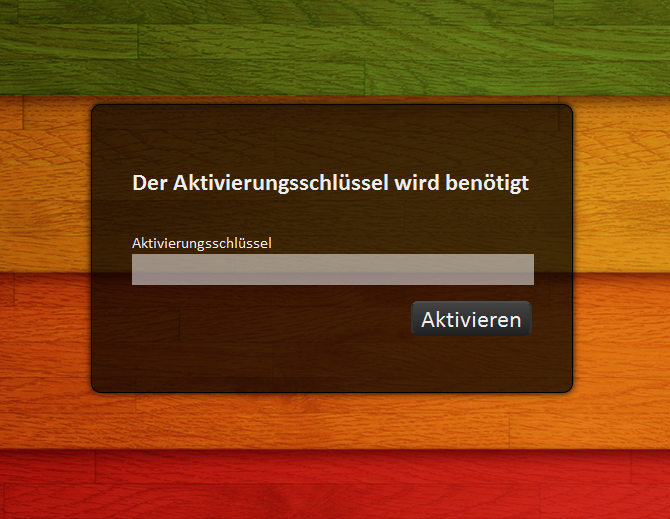
The whole process is way to hacky. I’m sure there are better ways to handle this.
Method 4
I made the activate page same as the rest of the site by adding this:
require_once($_SERVER['DOCUMENT_ROOT'].'/wp-load.php');
Method 5
I just wanted to modify some of the text so I was able to filter gettext using this code put into mu-plugins/my-functions.php. It will NOT work putting this into a regular plugin, but you can put it into functions.php of your base theme.
function rgbook_activate_page_action() {
    add_filter('ngettext', 'rgbook_activate_page_change_text' );
    add_filter('gettext', 'rgbook_activate_page_change_text' );
}
add_action( 'activate_header', 'rgbook_activate_page_action' );

function rgbook_activate_page_change_text( $text ) {
    $search = '<a href="%1$s" rel="nofollow noreferrer noopener" rel="nofollow noreferrer noopener">Log in</a> or go back to the <a href="%2$s" rel="nofollow noreferrer noopener">homepage</a>.';
    $replace = '<a href="%1$s" rel="nofollow noreferrer noopener" rel="nofollow noreferrer noopener">Click here to log in now</a>.';

    return str_ireplace($search, $replace, $text);
}
All methods was sourced from stackoverflow.com or stackexchange.com, is licensed under cc by-sa 2.5, cc by-sa 3.0 and cc by-sa 4.0