Below is the document ready function
Script type="text/javascript" charset="utf-8">
    $(document).ready(function () {
        $('#example').dataTable({
            "bProcessing": true,
            "bServerSide": true,
            "sAjaxSource": "GetUser.ashx",
            "sServerMethod": "POST",
            "sAjaxDataProp" : "",
            "aoColumnDefs": [ {
            "aTargets": [ 0 ],
            "mData": "download_link",
            "mRender": function ( data, type, full ) {
               return '<a href="/UserDetail.aspx?ID='+data+'" rel="nofollow noreferrer noopener" rel="nofollow noreferrer noopener">Detail</a>';
             }
           } ],
            "aoColumns": [
                { "mData": "LoginId" },
                { "mData": "Name" },
                { "mData": "CreatedDate" }
            ]
        });
Below is the respond from server (GetUser.ashx)
[
    {
        "UserId": "1",
        "LoginId": "white.smith",
        "Activated": "Y",
        "Name": "Test Account",
        "LastName": "Liu",
        "Email": "<a href="https://getridbug.com/cdn-cgi/l/email-protection" class="__cf_email__" data-cfemail="f3849b9a8796dd809e9a879bb39f9c949a90929fdd909c9e">[email protected]</a>",
        "CreatedDate": "1/21/2014 12:03:00 PM",
        "EntityState": "2",
        "EntityKey": "System.Data.EntityKey"
    },
More Data...
]
Below is the html table where the data should be put
<table cellpadding="0" cellspacing="0" border="0" class="display" id="example">
    <thead>
        <tr>
             <th width="15%">User Detail</th>
            <th width="15%">LoginID</th>
            <th width="15%">Name</th>
            <th width="15%">Created Date</th>
        </tr>
    </thead>
    <tbody>
        <tr>
            <td colspan="5" class="dataTables_empty">Loading data from server</td>
        </tr>
    </tbody>
    <tfoot>
        <tr>
             <th width="15%">User Detail</th>
            <th width="15%">LoginID</th>
            <th width="15%">Name</th>
            <th width="15%">Created Date</th>
        </tr>
    </tfoot>
</table>
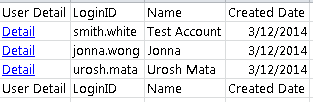
Expected result:
But I came across a problem:
While the page is loading, there was an uncaught exception from the browser:
Cannot read property 'length' of undefined
When I further check, it came from line 2037 of jquery.dataTables.js
var aData = _fnGetObjectDataFn( oSettings.sAjaxDataProp )( json );
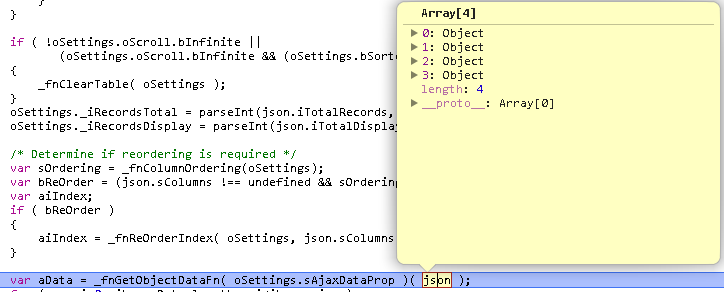
I checked that the json was valid, but the “aData” was null, why this happen?
Answers:
Thank you for visiting the Q&A section on Magenaut. Please note that all the answers may not help you solve the issue immediately. So please treat them as advisements. If you found the post helpful (or not), leave a comment & I’ll get back to you as soon as possible.
Method 1
Your "sAjaxDataProp" : "" is set to an empty string, which causes this error.
dataTables expects to have a string here to tell under which key your server returned data can be found.
This defaults to aaData, so your json should include this key amongst all others that might be returned or needed by pagination etc.
Normal serversided json:
{
"iTotalRecords":"6",
"iTotalDisplayRecords":"6",
"aaData": [
    [
        "1",
        "sameek",
        "sam",
        "sam",
        "<a href="https://getridbug.com/cdn-cgi/l/email-protection" class="__cf_email__" data-cfemail="f083919d95959bb084958384de939f9d">[email protected]</a>",
        "1",
        ""
    ],...
Since all values are in aaData you don’t need sAjaxDataProp at all.
Modified serverside json:
{
"iTotalRecords":"6",
"iTotalDisplayRecords":"6",
"myData": [
    [
        "1",
        "sameek",
        "sam",
        "sam",
        "<a href="https://getridbug.com/cdn-cgi/l/email-protection" class="__cf_email__" data-cfemail="c6b5a7aba3a3ad86b2a3b5b2e8a5a9ab">[email protected]</a>",
        "1",
        ""
    ],
Now the values are in myData. so you need to tell dataTables where to find the actual data by setting:
"sAjaxDataProp" : "myData"
Here is a Plunker
Method 2
As there are 4 columns, add the following in “aoColumns”:
"aoColumns": [
  { "mData": null },  // for User Detail
  { "mData": "LoginId" },
  { "mData": "Name" },
  { "mData": "CreatedDate" }
]
For undefined length, I have tried the following code and it’s working:
$('#example').dataTable({
 "aLengthMenu": [[100, 200, 300], [100, 200, 300]],
  "iDisplayLength": 100,
  "iDisplayStart" : 0,
  "bProcessing": true,
  "bServerSide": true,
  "sAjaxSource": "GetUser.ashx",
  "sServerMethod": "POST",
  "sAjaxDataProp" : "",
  "aoColumnDefs": [ {
    "aTargets": [ 0 ],
    "mData": "download_link",
    "mRender": function ( data, type, full ) {
      return '<a href="/UserDetail.aspx?ID='+data+'" rel="nofollow noreferrer noopener" rel="nofollow noreferrer noopener">Detail</a>';
    }
  } ],
  "aoColumns": [
    { "mData": null },
    { "mData": "LoginId" },
    { "mData": "Name" },
    { "mData": "CreatedDate" }
  ]
});
The reference site to know more about aLengthMenu is:
https://legacy.datatables.net/ref#aLengthMenu
Method 3
If you see this error, look at the json returned from the server, and then make sure that all of your datatable ‘mData’ values have matching entry. If you are also using a bean, check there as well.
And there is no need specify ‘tr’, ‘td’, etc for the table. It is much cleaner if you let jquery do that for you. Here is what my tables look like:
<table cellpadding="0" cellspacing="0" border="0" class="display" id="myTable" style="table-layout:fixed" ></table>
and then my datatable elements specify the width and column title:
{sTitle: "Column A", sWidth: "100px", mData: "idStringFromJson", bSortable: false},
Method 4
Use $('#example').DataTable({.. (capital D) instead of $('#example').dataTable({..
Method 5
When I ran into this problem, it was actually the result of an un-applied migration. I had restored a backup of the database, which hadn’t yet had one of my recent schema migrations run on it, and once I ran migrations, everything worked fine.
All methods was sourced from stackoverflow.com or stackexchange.com, is licensed under cc by-sa 2.5, cc by-sa 3.0 and cc by-sa 4.0