I am trying to build an asp.net web application and I am using SQL Server as my database. So right now I am in a position where I need to have a textbox(or etc.) on my screen, where the users must enter their date of birth… but one thing I require specifically is that this input(?) must return a DateTime value in the C# page. Because the code must see this date and check if this person is older than, say, 18.
First I came up with something like this:
<asp:TextBox CssClass="form-control" ID="TextBoxDOB" runat="server" TextMode="Date"/>
But as you can imagine; when I call this text box as: TextBoxDOB.Text it returns a string value and the program cannot say if this person is older than 18.
Next: I tried this <asp:Calendar> type of entry. But it looks too big on the web page. Perhaps I can change its appearance but I couldn’t figure out what type does ‘Calendar’ returns.
Also after having defined that this person is old enough, I need to insert this info to my SQL Data table. In that case, assuming the data type of the DOB column is “date”, will I be able to insert the user DOB to my SQL… What I actually mean; will DateTime value for this user input in C# be acceptable for SQL?
Thanks
Answers:
Thank you for visiting the Q&A section on Magenaut. Please note that all the answers may not help you solve the issue immediately. So please treat them as advisements. If you found the post helpful (or not), leave a comment & I’ll get back to you as soon as possible.
Method 1
If you set the text box as a date, then it will quite much produce a date value.
So, if you drop a text box on a form – set to date, then you get this:
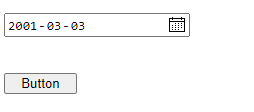
The values will be forced (no letters or chars).
So, now the code behind the above button can do this:
    Dim MyDate As Date
    MyDate = TextBox2.Text

    If DateDiff(DateInterval.Year, MyDate, Date.Today) >= 18 Then
        Debug.Print("is 18 or older")
    Else
        Debug.Print("is under 18")
    End If
So, .net will cast from sting to date for you. I could have skipped the above variable, and even done this:
    If DateDiff(DateInterval.Year, Textbox2.Text, Date.Today) >= 18 Then
        Debug.Print("is 18 or older")
    Else
        Debug.Print("is under 18")
    End If
And the same goes if you update a database.
eg:
cmdSQL.Parameters.Add("@MyDate", SqlDbType.DateTime).Value = TextBox2.Text
So you can most of the time simply allow .net to “cast” the value automatic, but to be safe, one can as first example shows shove the value into a variable of date (or datetime), and use that in your code.
I should also note that the act of setting the text box to date format, then you get a free built in date pick that shows as per above.
The markup for above was this (web form designer – drag and drop).
 <asp:TextBox ID="TextBox1" runat="server" Width="261px"></asp:TextBox>
 <br />
 <br />
 <asp:Button ID="Button2" runat="server" Text="Button" Width="73px" />
All methods was sourced from stackoverflow.com or stackexchange.com, is licensed under cc by-sa 2.5, cc by-sa 3.0 and cc by-sa 4.0