I have the code:
DateTime.Now.DayOfWeek.ToString()
That give’s me the english day of the week name, I want to have the german version, how to add CultureInfo here to get the german day of the week name?
Answers:
Thank you for visiting the Q&A section on Magenaut. Please note that all the answers may not help you solve the issue immediately. So please treat them as advisements. If you found the post helpful (or not), leave a comment & I’ll get back to you as soon as possible.
Method 1
var culture = new System.Globalization.CultureInfo("de-DE");
var day = culture.DateTimeFormat.GetDayName(DateTime.Today.DayOfWeek);
Method 2
You can use the DateTimeFormat.DayNames property of the german CultureInfo.
For example:
CultureInfo german = new CultureInfo("de-DE");
string sunday = german.DateTimeFormat.DayNames[(int)DayOfWeek.Sunday];
Method 3
This is the solution in Visual Basic
Dim GermanCultureInfo As Globalization.CultureInfo = New Globalization.CultureInfo("de-DE")

Return GermanCultureInfo.DateTimeFormat.GetDayName(DayOfWeek.Sunday)
The function of the solution is Obsolete by the way
DateTime.Now.ToString("dddd", new System.Globalization.CultureInfo("de-DE"))
Method 4
DayOfWeek is an enumeration, so the ToString method on it is not culture sensitive.
You will need to write a function to convert the Enum value to a corresponding string in German, if you insist on using DayOfWeek:
string DayOfWeekGerman(DayOfWeek dow)
{

    switch(dow)
    {
      case(DayOfWeek.Sunday)
         return "German Sunday";
      case(DayOfWeek.Monday)
         return "German Monday";
      ...
    }
}
A better approach is to use ToString from DateTime directly:
CultureInfo german = new CultureInfo("de-DE");
string dayName = DateTime.Now.ToString("dddd", german);
Method 5
I like this one:
public static class DateTimeExtension
{
    public static string GetDayOfWeek(this DateTime uiDateTime, CultureInfo culture = null)
    {
        if (culture == null)
        {
            culture = Thread.CurrentThread.CurrentUICulture;
        }

        return culture.DateTimeFormat.GetDayName(uiDateTime.DayOfWeek);
    }
}
And according to your question:
var culture = new System.Globalization.CultureInfo("de-DE");
var day = uiDateTime.GetDayOfWeek(culture);
Method 6
You can use this code to return your day name as same language
CultureInfo myCI = new CultureInfo("ar-EG");
MessageBox.Show(myCI.DateTimeFormat.GetDayName(DayOfWeek.Friday));
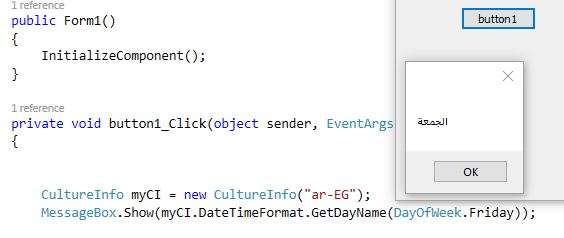
note: DateTime returns a DayOfWeek Enumeration so I use the code to return from
another Enumeration
All methods was sourced from stackoverflow.com or stackexchange.com, is licensed under cc by-sa 2.5, cc by-sa 3.0 and cc by-sa 4.0