I wrote this simple function:
def padded_hex(i, l):
    given_int = i
    given_len = l

    hex_result = hex(given_int)[2:] # remove '0x' from beginning of str
    num_hex_chars = len(hex_result)
    extra_zeros = '0' * (given_len - num_hex_chars) # may not get used..

    return ('0x' + hex_result if num_hex_chars == given_len else
            '?' * given_len if num_hex_chars > given_len else
            '0x' + extra_zeros + hex_result if num_hex_chars < given_len else
            None)
Examples:
padded_hex(42,4) # result '0x002a'
hex(15) # result '0xf'
padded_hex(15,1) # result '0xf'
Whilst this is clear enough for me and fits my use case (a simple test tool for a simple printer) I can’t help thinking there’s a lot of room for improvement and this could be squashed down to something very concise.
What other approaches are there to this problem?
Answers:
Thank you for visiting the Q&A section on Magenaut. Please note that all the answers may not help you solve the issue immediately. So please treat them as advisements. If you found the post helpful (or not), leave a comment & I’ll get back to you as soon as possible.
Method 1
Use the new .format() string method:
>>> "{0:#0{1}x}".format(42,6)
'0x002a'
Explanation:
{   # Format identifier
0:  # first parameter
#   # use "0x" prefix
0   # fill with zeroes
{1} # to a length of n characters (including 0x), defined by the second parameter
x   # hexadecimal number, using lowercase letters for a-f
}   # End of format identifier
If you want the letter hex digits uppercase but the prefix with a lowercase ‘x’, you’ll need a slight workaround:
>>> '0x{0:0{1}X}'.format(42,4)
'0x002A'
Starting with Python 3.6, you can also do this:
>>> value = 42
>>> padding = 6
>>> f"{value:#0{padding}x}"
'0x002a'
Method 2
How about this:
print '0x%04x' % 42
Method 3
"{:02x}".format(7)   # '07'
"{:02x}".format(27)  # '1b'
Where
:is the start of the formatting specification for the first argument{}to.format()02means “pad the input from the left with0s to length2“xmeans “format as hex with lowercase letters”
You can also do this with f-strings:
f"{7:02x}"   # '07'
f"{27:02x}"  # '1b'
Method 4
If just for leading zeros, you can try zfill function.
'0x' + hex(42)[2:].zfill(4) #'0x002a'
Method 5
Use * to pass width and X for uppercase
print '0x%0*X' % (4,42) # '0x002A'
As suggested by georg and Ashwini Chaudhary
Method 6
Suppose you want to have leading zeros for hexadecimal number, for example you want 7 digit where your hexadecimal number should be written on, you can do like that :
hexnum = 0xfff
str_hex =  hex(hexnum).rstrip("L").lstrip("0x") or "0"
'0'* (7 - len(str_hexnum)) + str_hexnum
This gives as a result :
'0000fff'
Method 7
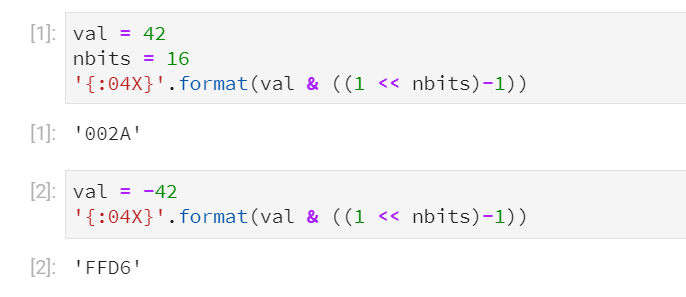
None of the answers are dealing well with negative numbers…
Try this:
val = 42
nbits = 16
'{:04X}'.format(val & ((1 << nbits)-1))
All methods was sourced from stackoverflow.com or stackexchange.com, is licensed under cc by-sa 2.5, cc by-sa 3.0 and cc by-sa 4.0