I’m trying to deploy my web app to Microsoft Azure and everything goes fine in visual studio. But when it launches it shows:
Hey, App Service developers!
Your app service is up and running.
Time to take the next step and deploy your code.
How can I show my web page instead of this page?
Here is the output I get in Visual Studio.
------ Publish started: Project: RCMania, Configuration: Debug Any CPU ------
Transformed Web.config using C:DDACAssignmentRCManiaRCManiaWeb.Debug.config into C:UsersAdminAppDataLocalTempWebSitePublishRCMania-1747672403objDebugTransformWebConfigtransformedWeb.config.
Auto ConnectionString Transformed C:UsersAdminAppDataLocalTempWebSitePublishRCMania-1747672403objDebugTransformWebConfigtransformedWeb.config into C:UsersAdminAppDataLocalTempWebSitePublishRCMania-1747672403objDebugCSAutoParameterizetransformedWeb.config.
Copying all files to temporary location below for package/publish:
C:UsersAdminAppDataLocalTempWebSitePublishRCMania-1747672403objDebugPackagePackageTmp.
Start Web Deploy Publish the Application/package to https://rcmania.scm.azurewebsites.net/msdeploy.axd?site=rcmania ...
Adding ACLs for path (rcmania)
Adding ACLs for path (rcmania)
Updating file (rcmaniaWeb.config).
Adding ACLs for path (rcmania)
Adding ACLs for path (rcmania)
Publish Succeeded.
Web App was published successfully http://rcmania.azurewebsites.net/
========== Build: 1 succeeded or up-to-date, 0 failed, 0 skipped ==========
========== Publish: 1 succeeded, 0 failed, 0 skipped ==========
Answers:
Thank you for visiting the Q&A section on Magenaut. Please note that all the answers may not help you solve the issue immediately. So please treat them as advisements. If you found the post helpful (or not), leave a comment & I’ll get back to you as soon as possible.
Method 1
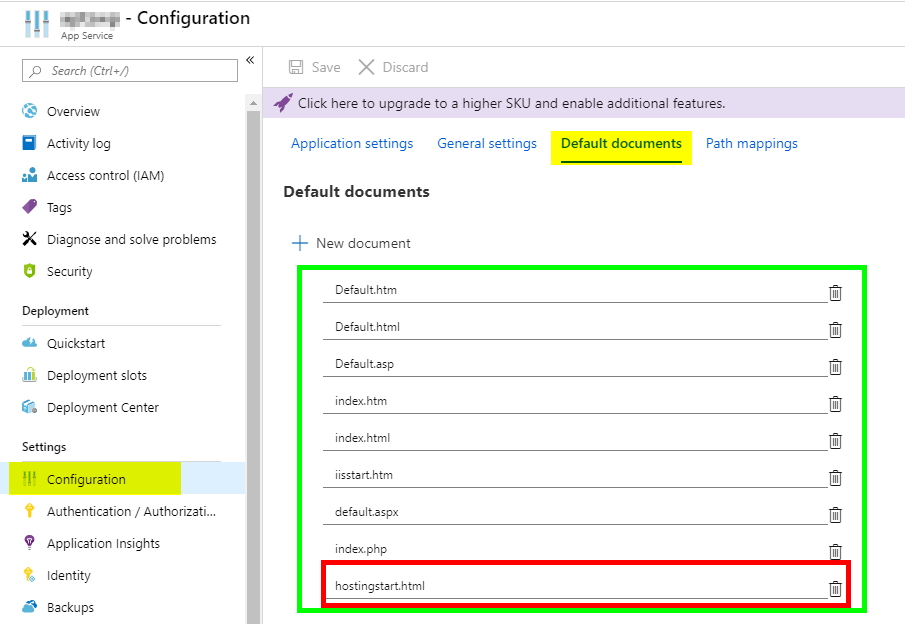
The last time i had an issue like this is was because of the Default Documents. Make sure you default page is listed in here and is above hostingstart.html
Method 2
In my case the app was failing to start up due to an unhandled exception thrown in my startup code.
However, the reason it was difficult to diagnose is it wasn’t shown in the logs in the “log stream” section of the Azure portal. (this is using linux with ASP.NET core 3.1)
When I used the SSH console, went into the /home/LogFiles directory I could see log messages saying what had gone wrong.
Method 3
I had this now with an MVC project, where the default path is “/Home”, or “/Home/Index” (either resolves, based on the routing rules). As a result, I didn’t have a default “page”, but I did have a default “path” of “Home”. Putting this in, and deleting the entry for hostingstart.html, worked for me.
Method 4
I solved this for my Java application by adding something to the azure-webapp-maven-
plugin configuration in my POM file.
<appSettings>
    <property>
        <name>JAVA_OPTS</name>
        <value>-Dserver.port=80 -Dsite.root=/usr/local/appservice/parkingpage/ROOT</value>
    </property>
</appSettings>
Note the ROOT at the end of ‘parkingpage’. I can’t image this is the way to go, but this is what I found in the applications logs in Kudu and it works.
Note: this was on a Linux OS. I tried something similar on a Windows OS without success. On Windows, the -Dsite.appbase command line argument is overridden by Azure.
All methods was sourced from stackoverflow.com or stackexchange.com, is licensed under cc by-sa 2.5, cc by-sa 3.0 and cc by-sa 4.0