I have a series of wordpress sites which live under one multisite:
–My multisite
- Website A
- Website B
- Website C
- Website D
I am going to be rebuilding the site and as part of the new build, we don’t need the multisite confiugration but I need all the content of one of the site as it’s rather large.
Essentially, what I want to do is have ‘Website C‘ as a single site on it’s own, websites ‘A‘,’B‘ and ‘D‘ can be deleted.
Any sort of multisite functionality needs to be removed and it needs to work as a single WP site.
The domains are as follows:
- Website A – www.website.com/de
- Website B – www.website.com/es
- Website C – www.website.com/
- Website D – www.website.com/ru
This should hopefully make any database changes easier as the new site will be:
www.website.com/
Answers:
Thank you for visiting the Q&A section on Magenaut. Please note that all the answers may not help you solve the issue immediately. So please treat them as advisements. If you found the post helpful (or not), leave a comment & I’ll get back to you as soon as possible.
Method 1
I’d just export all content from the site you want to keep. Then create a new WP instance, import that exported data, tweak as required.
Once the site is OK, make the new site active for the desired domain name (in your hosting, point the domain to the new site’s folder). No messing with databases required.
Added 31 July 2020
Another way: Use the Clone plugin from Automatic to export subsite. Install the plugin as superadmin. Then admin to the subsite and use the Clone plugin to back up everything.
Create a new WP instance (single-site), then install the Clone plugin there. Then import the backup you made of the subsite into the new site via the plugin. Make sure you remember the admin credentials, as everything on the new site will be replaced during the restore process.
Everything from subsite will now be on the new site including themes, plugins, settings and content.
Method 2
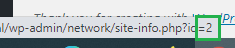
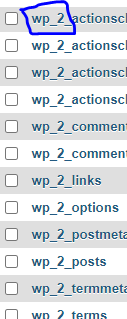
I think the requested changes might take more like a manual effect. Like separating db’s for each other site. Before that identify the which db belong to which site. When you access network site(Network admin->Sites) hover over site edit on respective site domain, on the bottom you can see the see site id’s1. So you can separately download these db’s uploads on it your respective new site db’s. Only concern would be the users tables(wp_usermeta, wp_users) because it sharing all users in these 2 tables. So uploads these on sites db and remove the unwanted users from the sites.
I believe this helps you.
All methods was sourced from stackoverflow.com or stackexchange.com, is licensed under cc by-sa 2.5, cc by-sa 3.0 and cc by-sa 4.0