When i signout i want it to show an are you sure dialogbox, and if the user click yes it will log out and clear cache- but it never appears, the website just keeps loading. Kan anyone tell me why?
   public void logout_click(object sender, EventArgs args)
    {


        var message = "Items in basket will be lost";
        var title = "Are you sure?";
        var result = MessageBox.Show(
            message,                  // the message to show
            title,                    // the title for the dialog box
            MessageBoxButtons.YesNo,  // show two buttons: Yes and No
            MessageBoxIcon.Question); // show a question mark icon


        if (result == DialogResult.Yes)
        {


            Session.Clear();
            Session.Abandon();
            Session.RemoveAll();
            FormsAuthentication.SignOut();
            Roles.DeleteCookie();


        }
    }
Answers:
Thank you for visiting the Q&A section on Magenaut. Please note that all the answers may not help you solve the issue immediately. So please treat them as advisements. If you found the post helpful (or not), leave a comment & I’ll get back to you as soon as possible.
Method 1
Looks like you are trying to use Windows.Forms MessageBox in ASP.NET. It won’t work. You have to implement the Confirmation in Javascript. Something like here: How to show MessageBox on asp.net?
Method 2
HTML MArkup
The HTML Markup consists of an ASP.Net Button btnConfirm. The Button has been assigned an OnClick and OnClientClick event handler.
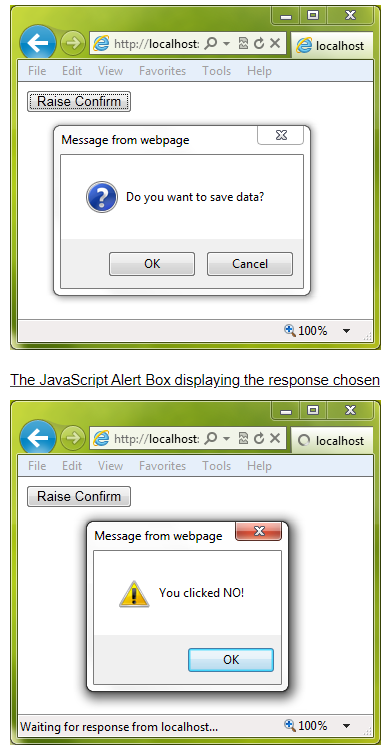
When the Button is clicked, the OnClientClick event will trigger the JavaScript Confirm method.
Inside the JavaScript Confirm method, the input provided by the user is stored in a dynamically created hidden field i.e. If OK is pressed value Yes is stored and if Cancel is pressed No is stored, so that we can pass the user inputs onto server side code.
Then the Button does normal PostBack and raise the OnClick event handler.
<html xmlns="http://www.w3.org/1999/xhtml">
<head>
    <title></title>
    <script type = "text/javascript">
        function Confirm() {
            var confirm_value = document.createElement("INPUT");
            confirm_value.type = "hidden";
            confirm_value.name = "confirm_value";
            if (confirm("Do you want to save data?")) {
                confirm_value.value = "Yes";
            } else {
                confirm_value.value = "No";
            }
            document.forms[0].appendChild(confirm_value);
        }
    </script>
</head>
<body>
    <form id="form1" runat="server">
      <asp:Button ID="btnConfirm" runat="server" OnClick="OnConfirm" Text="Raise Confirm" OnClientClick="Confirm()"/>
    </form>
</body>
</html>
Fetching the User input in server side
Inside the OnConfirm Click event handler, the user input is fetched that was stored in the dynamic hidden field from the Request.Form collection.
Then based on whether user has selected OK or Cancel different message is displayed using JavaScript Alert Message Box.
C#
public void OnConfirm(object sender, EventArgs e)
{
    string confirmValue = Request.Form["confirm_value"];
    if (confirmValue == "Yes")
    {
        this.Page.ClientScript.RegisterStartupScript(this.GetType(), "alert", "alert('You clicked YES!')", true);
    }
    else
    {
        this.Page.ClientScript.RegisterStartupScript(this.GetType(), "alert", "alert('You clicked NO!')", true);
    }
}
All methods was sourced from stackoverflow.com or stackexchange.com, is licensed under cc by-sa 2.5, cc by-sa 3.0 and cc by-sa 4.0