I’m having a problem when I deploy my web application in different servers. There seems to be an inconsistency in some DateTimeFormat patterns, like ShortDatePattern, using the same culture (pt-BR).
In my development machine (Windows 7, .NET 4 installed, application targeting .NET 3.5) and a Windows Server 2008 R2 (with the application targeting .NET 4) server the ShortDatePattern is "dd/MM/yyyy" – which is the correct, I guess.
In the production server (Windows Server 2003, using .NET 3.5) it is "d/M/yyyy". It is causing me tons of trouble.
I could solve the issue by setting the patterns by hand, but I’d really like to avoid doing this every time I need to output a date. Specially since this will be non-trivial in many places (like where I use MVC’s Html.TextBoxFor) and will require a good amount of rewriting.
If there’s a way of changing the patterns for the entire web application in one place it would be great. I’ve tried the following approach in the Global.asax.cs file, with no success:
CultureInfo info = new CultureInfo(System.Threading.Thread.CurrentThread.CurrentCulture.ToString());
info.DateTimeFormat.ShortDatePattern = "dd/MM/yyyy";
System.Threading.Thread.CurrentThread.CurrentCulture = info;
Any ideas?
Thank you.
Answers:
Thank you for visiting the Q&A section on Magenaut. Please note that all the answers may not help you solve the issue immediately. So please treat them as advisements. If you found the post helpful (or not), leave a comment & I’ll get back to you as soon as possible.
Method 1
Actually, I was trying to use the code above in the wrong place in the Global.asax file.
I managed to override the ShortDatePattern for the entire aplication by putting the code in the Application_BeginRequest method:
protected void Application_BeginRequest()
{
    CultureInfo info = new CultureInfo(System.Threading.Thread.CurrentThread.CurrentCulture.ToString());
    info.DateTimeFormat.ShortDatePattern = "dd/MM/yyyy";
    System.Threading.Thread.CurrentThread.CurrentCulture = info;
}
Method 2
The solution is to always create CultureInfo object using the constructor:
CultureInfo(string name, bool useUserOverride)
and passing false for useUserOverride parameter.
From MSDN:
useUserOverride: A Boolean that denotes whether to use the user-selected culture
settings (true) or the default culture settings (false).
Basically using false force the CultureInfo to use the default settings (separators, …) from the specified culture instead of using the one defined in the system.
Consider also that different operating system can produce different results in some (small) cases.
Running the code below (.NET 4.5):
CultureInfo ci = new CultureInfo("it-IT", false);

String date = DateTime.Now.ToString(ci);
Console.WriteLine(date);
Console.WriteLine("Time Separator: " + ci.DateTimeFormat.TimeSeparator);
Console.WriteLine("Date Separaotr: " + ci.DateTimeFormat.DateSeparator);
Console.ReadKey();
On Win 7 produce:
29/10/2013 14:12:33
Time Separator: :
Date Separaotr: /
while running it on Win 8 produce:
29/10/2013 15.08.43
Time Separator: .
Date Separaotr: /
Method 3
in control panel go to regional and language options,select portuges(brazil), in formats go to customize this format, check the date configuration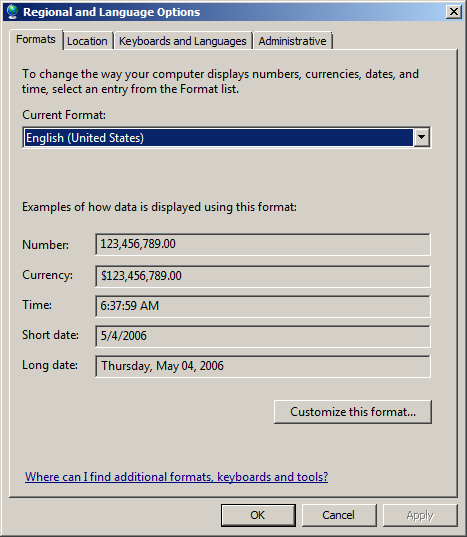 .
.
All methods was sourced from stackoverflow.com or stackexchange.com, is licensed under cc by-sa 2.5, cc by-sa 3.0 and cc by-sa 4.0