I have 2 models Task and TaskImage which is a collection of images belonging to Task object.
What I want is to be able to add multiple images to my Task object, but I can only do it using 2 models. Currently, when I add images, it doesn’t let me upload them and save new objects.
settings.py
MEDIA_ROOT = os.path.join(BASE_DIR, 'media')
MEDIA_URL = '/media/'
serializers.py
class TaskImageSerializer(serializers.ModelSerializer):
    class Meta:
        model = TaskImage
        fields = ('image',)


class TaskSerializer(serializers.HyperlinkedModelSerializer):
    user = serializers.ReadOnlyField(source='user.username')
    images = TaskImageSerializer(source='image_set', many=True, read_only=True)

    class Meta:
        model = Task
        fields = '__all__'

    def create(self, validated_data):
        images_data = validated_data.pop('images')
        task = Task.objects.create(**validated_data)
        for image_data in images_data:
            TaskImage.objects.create(task=task, **image_data)
        return task
models.py
class Task(models.Model):
    title = models.CharField(max_length=100, blank=False)
    user = models.ForeignKey(User)

    def save(self, *args, **kwargs):
        super(Task, self).save(*args, **kwargs)

class TaskImage(models.Model):
    task = models.ForeignKey(Task, on_delete=models.CASCADE)
    image = models.FileField(blank=True)
However, when I do a post request:
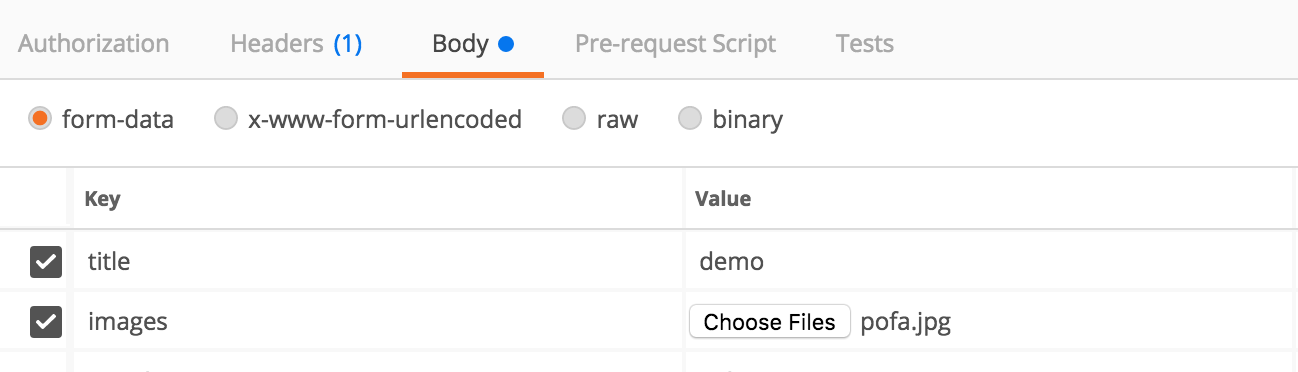
I get the following traceback:
File
“/Applications/Anaconda/anaconda/envs/godo/lib/python3.6/site-packages/django/core/handlers/exception.py”
in inner
41. response = get_response(request)File
“/Applications/Anaconda/anaconda/envs/godo/lib/python3.6/site-packages/django/core/handlers/base.py”
in _get_response
187. response = self.process_exception_by_middleware(e, request)File
“/Applications/Anaconda/anaconda/envs/godo/lib/python3.6/site-packages/django/core/handlers/base.py”
in _get_response
185. response = wrapped_callback(request, *callback_args, **callback_kwargs)File
“/Applications/Anaconda/anaconda/envs/godo/lib/python3.6/site-packages/django/views/decorators/csrf.py”
in wrapped_view
58. return view_func(*args, **kwargs)File
“/Applications/Anaconda/anaconda/envs/godo/lib/python3.6/site-packages/rest_framework/viewsets.py”
in view
95. return self.dispatch(request, *args, **kwargs)File
“/Applications/Anaconda/anaconda/envs/godo/lib/python3.6/site-packages/rest_framework/views.py”
in dispatch
494. response = self.handle_exception(exc)File
“/Applications/Anaconda/anaconda/envs/godo/lib/python3.6/site-packages/rest_framework/views.py”
in handle_exception
454. self.raise_uncaught_exception(exc)File
“/Applications/Anaconda/anaconda/envs/godo/lib/python3.6/site-packages/rest_framework/views.py”
in dispatch
491. response = handler(request, *args, **kwargs)File
“/Applications/Anaconda/anaconda/envs/godo/lib/python3.6/site-packages/rest_framework/mixins.py”
in create
21. self.perform_create(serializer)File “/Users/gr/Desktop/PycharmProjects/godo/api/views.py” in
perform_create
152. serializer.save(user=self.request.user)File
“/Applications/Anaconda/anaconda/envs/godo/lib/python3.6/site-packages/rest_framework/serializers.py”
in save
214. self.instance = self.create(validated_data)File “/Users/gr/Desktop/PycharmProjects/godo/api/serializers.py” in
create
67. images_data = validated_data.pop(‘images’)Exception Type: KeyError at /api/tasks/ Exception Value: ‘images’
Answers:
Thank you for visiting the Q&A section on Magenaut. Please note that all the answers may not help you solve the issue immediately. So please treat them as advisements. If you found the post helpful (or not), leave a comment & I’ll get back to you as soon as possible.
Method 1
Description for the issue
The origin of the exception was a KeyError, because of this statement
images_data = validated_data.pop('images')
This is because the validated data has no key images. This means the images input doesn’t validate the image inputs from postman.
Django post request store InMemmoryUpload in request.FILES, so we use it for fetching files. also, you want multiple image upload at once. So, you have to use different image_names while your image upload (in postman).
Change your serializer to like this:
class TaskSerializer(serializers.HyperlinkedModelSerializer):
    user = serializers.ReadOnlyField(source='user.username')
    images = TaskImageSerializer(source='taskimage_set', many=True, read_only=True)

    class Meta:
        model = Task
        fields = ('id', 'title', 'user', 'images')

    def create(self, validated_data):
        images_data = self.context.get('view').request.FILES
        task = Task.objects.create(title=validated_data.get('title', 'no-title'),
                                   user_id=1)
        for image_data in images_data.values():
            TaskImage.objects.create(task=task, image=image_data)
        return task
I don’t know about your view, but I’d like to use ModelViewSet preferrable view class
class Upload(ModelViewSet):
    serializer_class = TaskSerializer
    queryset = Task.objects.all()
Postman console:
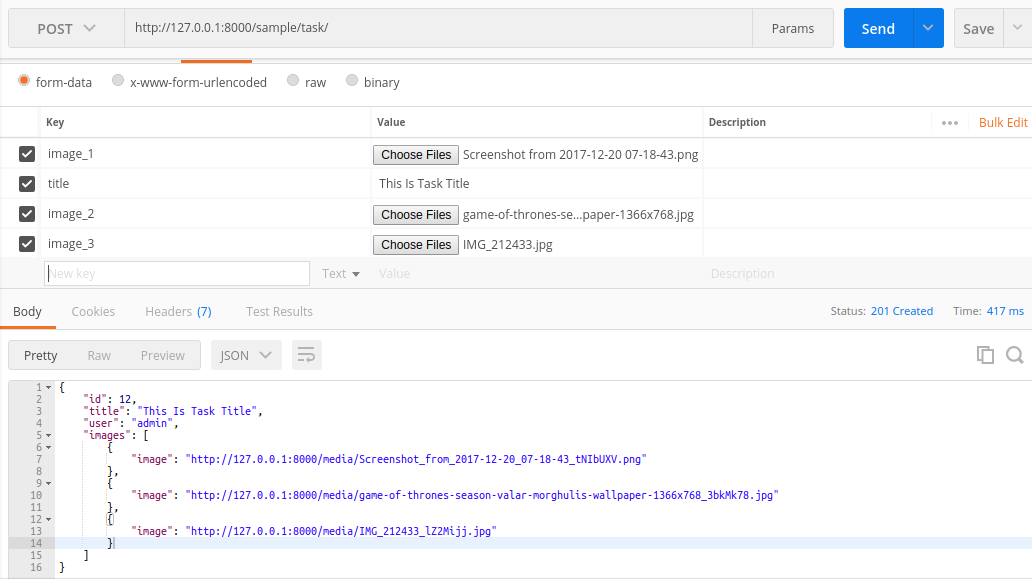
DRF result:
{
        "id": 12,
        "title": "This Is Task Title",
        "user": "admin",
        "images": [
            {
                "image": "http://127.0.0.1:8000/media/Screenshot_from_2017-12-20_07-18-43_tNIbUXV.png"
            },
            {
                "image": "http://127.0.0.1:8000/media/game-of-thrones-season-valar-morghulis-wallpaper-1366x768_3bkMk78.jpg"
            },
            {
                "image": "http://127.0.0.1:8000/media/IMG_212433_lZ2Mijj.jpg"
            }
        ]
    }
UPDATE
This is the answer for your comment.
In django reverse foreignKey are capturing using _set. see this official doc. Here, Task and TaskImage are in OneToMany relationship, so if you have one Task instance, you could get all related TaskImage instance by this reverse look-up feature.
Here is the example:
task_instance = Task.objects.get(id=1)
task_img_set_all = task_instance.taskimage_set.all()
Here this task_img_set_all will be equal to TaskImage.objects.filter(task_id=1)
Method 2
You have read_only set to true in TaskImageSerializer nested field. So there will be no validated_data there.
All methods was sourced from stackoverflow.com or stackexchange.com, is licensed under cc by-sa 2.5, cc by-sa 3.0 and cc by-sa 4.0