I am beginner to Django and currently, I can construct model like this.
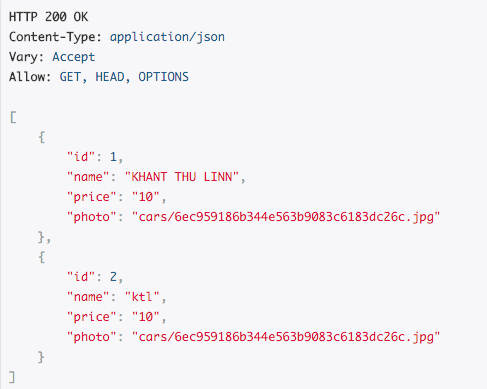
models.py
class Car(models.Model):
    name = models.CharField(max_length=255)
    price = models.DecimalField(max_digits=5, decimal_places=2)
    photo = models.ImageField(upload_to='cars')
serializers.py
class CarSerializer(serializers.ModelSerializer):
    class Meta:
        model = Car
        fields = ('id','name','price', 'photo')
views.py
class CarView(APIView):
    permission_classes = ()
    def get(self, request):
        car = Car.objects.all()
        serializer = CarSerializer(car)
        return Response(serializer.data)
For photo, it doesn’t show full URL. How can I show full URL?
Answers:
Thank you for visiting the Q&A section on Magenaut. Please note that all the answers may not help you solve the issue immediately. So please treat them as advisements. If you found the post helpful (or not), leave a comment & I’ll get back to you as soon as possible.
Method 1
Django is not providing an absolute URL to the image stored in a models.ImageField (at least if you don’t include the domain name in the MEDIA_URL; including the domain is not recommended, except of you are hosting your media files on a different server (e.g. aws)).
However, you can modify your serializer to return the absolute URL of your photo by using a custom serializers.SerializerMethodField. In this case, your serializer needs to be changed as follows:
class CarSerializer(serializers.ModelSerializer):
    photo_url = serializers.SerializerMethodField()

    class Meta:
        model = Car
        fields = ('id','name','price', 'photo_url')

    def get_photo_url(self, car):
        request = self.context.get('request')
        photo_url = car.photo.url
        return request.build_absolute_uri(photo_url)
Also make sure that you have set Django’s MEDIA_ROOTand MEDIA_URL parameters and that you can access a photo via your browser http://localhost:8000/path/to/your/image.jpg.
As piling pointed out, you need to add the request while initialising the serializer in your views.py:
def my_view(request):
    …
    car_serializer = CarSerializer(car, context={"request": request})
    car_serializer.data
Method 2
For future visitors, there is no need to add another field to the serializer if the view method already returns a serialized object. The only thing required is to add the context since it is needed to generate hyperlinks, as stated in the drf documentation
@list_route()
def my_view(self, request):
    qs = Object.objects.all()
    return Response(MySerializer(qs, many=True, context={'request': request}).data)
Method 3
Serializer class
class CarSerializer(serializers.ModelSerializer):

  photo_url = serializers.ImageField(max_length=None, use_url=True, allow_null=True, required=False)
  class Meta:
      model = Car
      fields = ('id','name','price', 'photo_url')
View
class CarView(APIView):

    def get(self, request, *args, **kwargs):

        queryset = Car.objects.all()

        serializer = CarSerializer(queryset, many=True, context={"request":request})

        return Response(serializer.data, status=status.HTTP_200_OK)
Method 4
It’s better to use this code, due to the above code doesn’t check the image is null able or not.
class CarSerializer(serializers.ModelSerializer):
      photo_url = serializers.SerializerMethodField()

      class Meta:
            model = Car
            fields = ('id','name','price', 'photo_url')

      def get_photo_url(self, car):
            request = self.context.get('request')
            if photo and hasattr(photo, 'url'):
               photo_url = car.photo.url
               return request.build_absolute_uri(photo_url)
            else:
               return None
Method 5
serializers.py
 class BannerSerializer(serializers.ModelSerializer):
        image = serializers.SerializerMethodField()
        def get_image(self, obj):
            return self.context['request'].build_absolute_uri( obj.image.url)
views.py
            banner = Banner.objects.all()
            banner_data = BannerSerializer(banner,many=True, context={'request': request})
            data = banner_data.data
            return Response({"data":data})
Method 6
I read the implement of the Serializer, and find the simplest way is to extends ImageField:
from django.db import models

class ImageField(models.ImageField):
    def value_to_string(self, obj): # obj is Model instance, in this case, obj is 'Class'
        return obj.fig.url # not return self.url

class Class(models.Model):
    name = models.CharField(max_length=50)
    intro = models.CharField(max_length=200)
    # fig = models.ImageField(upload_to="classes")
    fig = ImageField(upload_to="classes")

    def __str__(self):
        return repr(self,"name")
All methods was sourced from stackoverflow.com or stackexchange.com, is licensed under cc by-sa 2.5, cc by-sa 3.0 and cc by-sa 4.0