My local machine is running Python 2.5 and Nginx on Ubuntu 8.10, with Django builded from latest development trunk.
For every URL I request, it throws:
TemplateDoesNotExist at /appname/path appname/template_name.html
Django tried loading these templates, in this order:
* Using loader django.template.loaders.filesystem.function:
* Using loader django.template.loaders.app_directories.function:TEMPLATE_DIRS
(‘/usr/lib/python2.5/site-packages/projectname/templates’,)
Is it looking for /usr/lib/python2.5/site-packages/projectname/templates/appname/template_name.html in this case? The weird thing is this file does existed on disk. Why can’t Django locate it?
I run the same application on a remote server with Python 2.6 on Ubuntu 9.04 without such problem. Other settings are the same.
Is there anything misconfigured on my local machine, or what could possibly have caused such errors that I should look into?
In my settings.py, I have specified:
SETTINGS_PATH = os.path.normpath(os.path.dirname(__file__))
# Find templates in the same folder as settings.py.
TEMPLATE_DIRS = (
    os.path.join(SETTINGS_PATH, 'templates'),
)
It should be looking for the following files:
- /usr/lib/python2.5/site-packages/projectname/templates/appname1/template1.html
- /usr/lib/python2.5/site-packages/projectname/templates/appname1/template2.html
- /usr/lib/python2.5/site-packages/projectname/templates/appname2/template3.html
- …
All the above files exist on disk.
Solved
It works now after I tried:
chown -R www-data:www-data /usr/lib/python2.5/site-packages/projectname/*
It’s strange. I don’t need to do this on the remote server to make it work.
Answers:
Thank you for visiting the Q&A section on Magenaut. Please note that all the answers may not help you solve the issue immediately. So please treat them as advisements. If you found the post helpful (or not), leave a comment & I’ll get back to you as soon as possible.
Method 1
First solution:
These settings
TEMPLATE_DIRS = (
    os.path.join(SETTINGS_PATH, 'templates'),
)
mean that Django will look at the templates from templates/ directory under your project.
Assuming your Django project is located at /usr/lib/python2.5/site-packages/projectname/ then with your settings django will look for the templates under /usr/lib/python2.5/site-packages/projectname/templates/
So in that case we want to move our templates to be structured like this:
/usr/lib/python2.5/site-packages/projectname/templates/template1.html
/usr/lib/python2.5/site-packages/projectname/templates/template2.html
/usr/lib/python2.5/site-packages/projectname/templates/template3.html
Second solution:
If that still doesn’t work and assuming that you have the apps configured in settings.py like this:
INSTALLED_APPS = (
    'appname1',
    'appname2',
    'appname3',
)
By default Django will load the templates under templates/ directory under every installed apps. So with your directory structure, we want to move our templates to be like this:
/usr/lib/python2.5/site-packages/projectname/appname1/templates/template1.html
/usr/lib/python2.5/site-packages/projectname/appname2/templates/template2.html
/usr/lib/python2.5/site-packages/projectname/appname3/templates/template3.html
SETTINGS_PATH may not be defined by default. In which case, you will want to define it (in settings.py):
import os
SETTINGS_PATH = os.path.dirname(os.path.dirname(__file__))
Method 2
Find this tuple:
    import os
    SETTINGS_PATH = os.path.dirname(os.path.dirname(__file__))

    TEMPLATES = [
        {
            'BACKEND': 'django.template.backends.django.DjangoTemplates',
            'DIRS': [],
            'APP_DIRS': True,
            'OPTIONS': {
                'context_processors': [
                    'django.template.context_processors.debug',
                    'django.template.context_processors.request',
                    'django.contrib.auth.context_processors.auth',
                    'django.contrib.messages.context_processors.messages',
                ],
            },
        },
    ]
You need to add to ‘DIRS’ the string
os.path.join(SETTINGS_PATH, 'templates')
So altogether you need:
TEMPLATES = [
    {
        'BACKEND': 'django.template.backends.django.DjangoTemplates',
        'DIRS': [os.path.join(SETTINGS_PATH, 'templates')],
        'APP_DIRS': True,
        'OPTIONS': {
            'context_processors': [
                'django.template.context_processors.debug',
                'django.template.context_processors.request',
                'django.contrib.auth.context_processors.auth',
                'django.contrib.messages.context_processors.messages',
            ],
        },
    },
]
Method 3
If you encounter this problem when you add an app from scratch. It is probably because that you miss some settings. Three steps is needed when adding an app.
1、Create the directory and template file.
Suppose you have a project named mysite and you want to add an app named your_app_name. Put your template file under mysite/your_app_name/templates/your_app_name as following.
├── mysite
│   ├── settings.py
│   ├── urls.py
│   └── wsgi.py
├── your_app_name
│   ├── admin.py
│   ├── apps.py
│   ├── models.py
│   ├── templates
│   │   └── your_app_name
│   │       └── my_index.html
│   ├── urls.py
│   └── views.py
2、Add your app to INSTALLED_APPS.
Modify settings.py
INSTALLED_APPS = [
    ...
    'your_app_name',
    ...
]
3、Add your app directory to DIRS in TEMPLATES.
Modify settings.py.
TEMPLATES = [
    {
        ...
        'DIRS': [os.path.join(BASE_DIR, 'templates'),
                 os.path.join(BASE_DIR, 'your_app_name', 'templates', 'your_app_name'),
                ...
                ]
    }
]
Method 4
In setting .py remove TEMPLATE_LOADERS and TEMPLATE DIRS Then ADD
TEMPLATES = [
 {
    'BACKEND': 'django.template.backends.django.DjangoTemplates',
    'DIRS': ['/home/jay/apijay/templates',],
    'APP_DIRS': True,
    'OPTIONS': {
        'context_processors': [
            'django.template.context_processors.debug',
            'django.template.context_processors.request',
            'django.contrib.auth.context_processors.auth',
            'django.contrib.messages.context_processors.messages',
        ],
    },
 },
]
Method 5
I had an embarrassing problem…
I got this error because I was rushing and forgot to put the app in INSTALLED_APPS. You would think Django would raise a more descriptive error.
Method 6
As of Django version tested on version 3, You need to add your new app to installed app. No other code change is required for a django app
INSTALLED_APPS = [
    'django.contrib.admin',
    'django.contrib.auth',
    'django.contrib.contenttypes',
    'django.contrib.sessions',
    'django.contrib.messages',
    'django.contrib.staticfiles',
    'addyourappnamehere'
]
Method 7
For the django version 1.9,I added
'DIRS': [os.path.join(BASE_DIR, 'templates')],
line to the Templates block in settings.py
And it worked well
Method 8
Django TemplateDoesNotExist error means simply that the framework can’t find the template file.
To use the template-loading API, you’ll need to tell the framework where you store your templates. The place to do this is in your settings file (settings.py) by TEMPLATE_DIRS setting. By default it’s an empty tuple, so this setting tells Django’s template-loading mechanism where to look for templates.
Pick a directory where you’d like to store your templates and add it to TEMPLATE_DIRS e.g.:
TEMPLATE_DIRS = (
  '/home/django/myproject/templates',
)
Method 9
Just a hunch, but check out this article on Django template loading. In particular, make sure you have django.template.loaders.app_directories.Loader in your TEMPLATE_LOADERS list.
Method 10
Check permissions on templates and appname directories, either with ls -l or try doing an absolute path open() from django.
Method 11
It works now after I tried
chown -R www-data:www-data /usr/lib/python2.5/site-packages/projectname/*
It’s strange. I dont need to do this on the remote server to make it work.
Also, I have to run the following command on local machine to make all static files accessable but on remote server they are all “root:root”.
chown -R www-data:www-data /var/www/projectname/*
Local machine runs on Ubuntu 8.04 desktop edition. Remote server is on Ubuntu 9.04 server edition.
Anybody knows why?
Method 12
Make sure you’ve added your app to the project-name/app-namme/settings.py INSTALLED_APPS: .
INSTALLED_APPS = ['app-name.apps.AppNameConfig']
And on project-name/app-namme/settings.py TEMPLATES: .
'DIRS': [os.path.join(BASE_DIR, 'templates')],
Method 13
I must use templates for a internal APP and it works for me:
'DIRS': [os.path.join(BASE_DIR + '/THE_APP_NAME', 'templates')],
Method 14
See which folder django try to load template look at Template-loader postmortem in error page, for example, error will sothing like this:
Template-loader postmortem

Django tried loading these templates, in this order:

Using engine django:
django.template.loaders.filesystem.Loader: d:projectsvcsrcvcsrctemplatesbase.html (Source does not exist)
In my error vcsrcvcsrctemplatesbase.html not in path.
Then change TEMPLATES in setting.py file to your templates path
TEMPLATES = [
    {
        'BACKEND': 'django.template.backends.django.DjangoTemplates',
         # 'DIRS': [],
        'DIRS': [os.path.join(BASE_DIR, 'vcsrc/templates')],
        ...
Method 15
in your setting.py file replace DIRS in TEMPLATES array with this
'DIRS': []
to this
'DIRS': [os.path.join(BASE_DIR, 'templates')],
but 1 think u need to know is that
you have to make a folder with name templates and it should on the root path otherwise u have to change the DIRS value
Method 16
add rest_framework to the INSTALLED_APPS if django rest framework. For my case I had missed adding it to the installed apps.
INSTALLED_APPS = [
    '..........',,
    'rest_framework',
    '.........',
]
Method 17
In my case it was enough just to include my application in INSTALLED_APPS in the settings.py file:
INSTALLED_APPS = [
    "myapp",
    "django.contrib.admin",
    "django.contrib.auth",
    "django.contrib.contenttypes",
    "django.contrib.sessions",
    "django.contrib.messages",
    "django.contrib.staticfiles",
]
Also, remember that the template should be placed in your directory like so:
myapp/templates/myapp/template_name.html
but when you point at this template you do this like that:
template = loader.get_template("myapp/template_name.html")
Method 18
May, 2022 Update:
As long as you follow this tutorial(convention) properly, you don’t need to change and touch the default settings of “TEMPLATES” in “settings.py” as shown below:
# "core/settings.py"

TEMPLATES = [
    {
        "BACKEND": "django.template.backends.django.DjangoTemplates",
        "DIRS": [],
        "APP_DIRS": True,
        "OPTIONS": {
            "context_processors": [
                "django.template.context_processors.debug",
                "django.template.context_processors.request",
                "django.contrib.auth.context_processors.auth",
                "django.contrib.messages.context_processors.messages",
            ],
        },
    },
]
And again, as long as you follow this tutorial(convention) properly, “templates” are read properly whether or not “templates” folders are under application folders as shown below:
root
├── core
│   ├── settings.py
│   ├── urls.py
│   ...
├── myapp1
│   ├── templates
│   │   └── myapp1
│   │       └── myapp1.html
│   ├── urls.py
│   ├── views.py
│   ...
├── myapp2
│   ├── templates
│   │   └── myapp2
│   │       └── myapp2.html
│   ├── urls.py
│   ├── views.py
│   ...
And, whether or not a “templates” folder is under a root django project folder as shown below:
root
├── core
│   ├── settings.py
│   ├── urls.py
│   ...
├── myapp1
│   ├── urls.py
│   ├── views.py
│   ...
├── myapp2
│   ├── urls.py
│   ├── views.py
│   ...
├── templates
│   ├── myapp1
|   |   └── myapp1.html
|   └── myapp2
|       └── myapp2.html
So, the key things which you need to do are just don’t change and touch the default settings of “TEMPLATES” in “settings.py” as shown below:
# "core/settings.py"

TEMPLATES = [
    {
        "BACKEND": "django.template.backends.django.DjangoTemplates",
        "DIRS": [],
        "APP_DIRS": True,
        "OPTIONS": {
            "context_processors": [
                "django.template.context_processors.debug",
                "django.template.context_processors.request",
                "django.contrib.auth.context_processors.auth",
                "django.contrib.messages.context_processors.messages",
            ],
        },
    },
]
Then, set “myapp1” and “myapp2” applicatons to “INSTALLED_APPS” in “core/settings.py” as shown below:
# "core/settings.py"

INSTALLED_APPS = [
    ...
    "myapp1",
    "myapp2",
]
Then, write each “views.py” of “myapp1” and “myapp2” applications as shown below. Be careful, you need to write each “templates” path “myapp1/myapp1.html” and “myapp2/myapp2.html” instead of just writing each “templates” path “myapp1.html” and “myapp2.html” in “render()” as shown below:
# "myapp1/views.py"

from django.shortcuts import render

def myapp1(request):       # Don't write just "myapp1.html"
    return render(request, "myapp1/myapp1.html")
# "myapp2/views.py"

from django.shortcuts import render

def myapp2(request):       # Don't write just "myapp2.html"
    return render(request, "myapp2/myapp2.html")
Then, set each “views.py” path of “myapp1” and “myapp2” applications as shown below:
# "myapp1/views.py"

from django.urls import include, path

from . import views

urlpatterns = [
    path("", views.myapp1, name='myapp1'), # Here
]
# "myapp2/views.py"

from django.urls import include, path

from . import views

urlpatterns = [
    path("", views.myapp2, name='myapp2'), # Here
]
Then, set each path to “urls.py” of “myapp1” and “myapp2” applications in “core/urls.py” as shown below. Finally, The templates of “myapp1” and “myapp2” applications will be read without any errors:
# "core/urls.py"

from django.urls import include, path

urlpatterns = [
    ...
    path("myapp1/", include('myapp1.urls')), # Here
    path("myapp2/", include('myapp2.urls')), # Here
]
Method 19
Check that your templates.html are in /usr/lib/python2.5/site-packages/projectname/templates dir.
Method 20
Hi guys I found a new solution. Actually it is defined in another template so instead of defining TEMPLATE_DIRS yourself, put your directory path name at their:
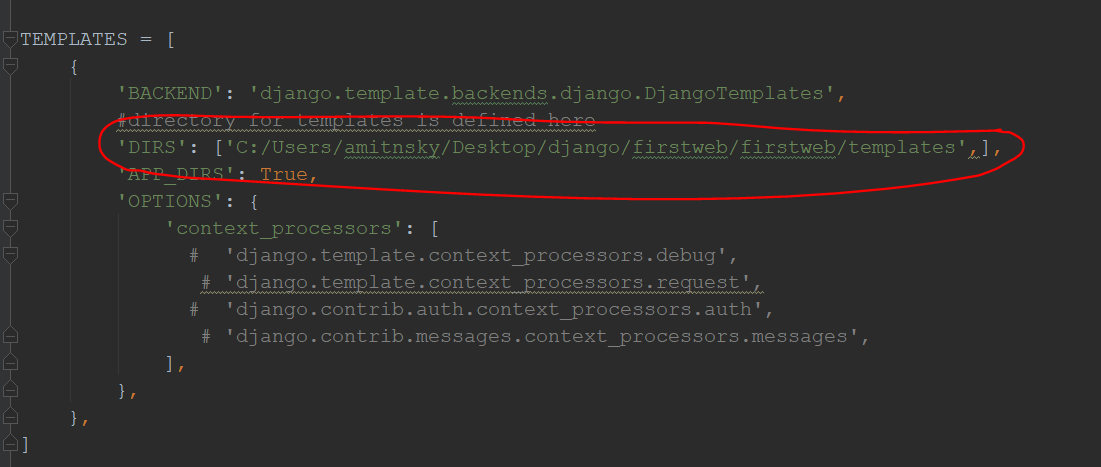
Method 21
I’m embarrassed to admit this, but the problem for me was that a template had been specified as ….hml instead of ….html. Watch out!
Method 22
I added this
TEMPLATE_DIRS = (
    os.path.join(SETTINGS_PATH, 'templates'),
)
and it still showed the error, then I realized that in another project the templates was showing without adding that code in settings.py file so I checked that project and I realized that I didn’t create a virtual environment in this project so I did
virtualenv env
and it worked, don’t know why
Method 23
I came up with this problem. Here is how I solved this:
Look at your settings.py, locate to TEMPLATES variable,
inside the TEMPLATES, add your templates path inside the DIRS list. For me, first I set my templates path as TEMPLATES_PATH = os.path.join(BASE_DIR,'templates'), then add TEMPLATES_PATH into DIRS list, 'DIRS':[TEMPLATES_PATH,].
Then restart the server, the TemplateDoesNotExist exception is gone.
That’s it.
Method 24
1.create a folder ‘templates’ in your ‘app'(let say you named such your app)
and you can put the html file here.
But it s strongly recommended to create a folder with same name(‘app’) in ‘templates’ folder and only then put htmls there. Into the ‘app/templates/app’ folder
2.now in ‘app’ ‘s urls.py put:
path('', views.index, name='index'), # in case of use default server index.html
3. in ‘app’ ‘s views.py put:
from django.shortcuts import render

def index(request): return
    render(request,"app/index.html")
    # name 'index' as you want
Method 25
Works on Django 3
I found I believe good way, I have the base.html in root folder, and all other html files in App folders, I
settings.py
import os

# This settings are to allow store templates,static and media files in root folder

BASE_DIR = os.path.dirname(os.path.dirname(os.path.abspath(__file__)))
TEMPLATE_DIR = os.path.join(BASE_DIR,'templates')
STATIC_DIR = os.path.join(BASE_DIR,'static')
MEDIA_DIR = os.path.join(BASE_DIR,'media')

# This is default path from Django, must be added
#AFTER our BASE_DIR otherwise DB will be broken.
BASE_DIR = Path(__file__).resolve().parent.parent

# add your apps to Installed apps
INSTALLED_APPS = [
    'main',
    'weblogin',
     ..........
]

# Now add TEMPLATE_DIR to  'DIRS' where in TEMPLATES like bellow
TEMPLATES = [
    {
        'BACKEND': 'django.template.backends.django.DjangoTemplates',
        'DIRS': [TEMPLATE_DIR, BASE_DIR,],
        'APP_DIRS': True,
        'OPTIONS': {
            'context_processors': [
                'django.template.context_processors.debug',
                'django.template.context_processors.request',
                'django.contrib.auth.context_processors.auth',
                'django.contrib.messages.context_processors.messages',
            ],
        },
    },
]
# On end of Settings.py put this refferences to Static and Media files
STATICFILES_DIRS = [STATIC_DIR,]
STATIC_URL = '/static/'

MEDIA_ROOT = [MEDIA_DIR,]
MEDIA_URL = '/media/'
If you have problem with Database, please check if you put the original BASE_DIR bellow the new BASE_DIR otherwise change
# Original
'NAME': BASE_DIR / 'db.sqlite3',
# to
'NAME': os.path.join(BASE_DIR,'db.sqlite3'),
Django now will be able to find the HTML and Static files both in the App folders and in Root folder without need of adding the name of App folder in front of the file.
Struture:
-DjangoProject
    -static(css,JS ...)
    -templates(base.html, ....)
    -other django files like (manage.py, ....)
    -App1
        -templates(index1.html, other html files can extend now base.html too)
        -other App1 files
    -App2
        -templates(index2.html, other html files can extend now base.html too)
        -other App2 files
Method 26
Simple solution
‘DIRS’: [BASE_DIR, ‘templates’],
Method 27
My problem was that I changed the name of my app. Not surprisingly, Visual Studio did not change the directory name containing the template. Manually correcting that solved the problem.
Method 28
Another cause of the “template does not exist” error seems to be forgetting to add the app name in settings.py. I forgot to add it and that was the reason for the error in my case.
INSTALLED_APPS = [
    'my_app',
    'django.contrib.admin',
    'django.contrib.auth',
    'django.contrib.contenttypes',
    'django.contrib.sessions',
    'django.contrib.messages',
    'django.contrib.staticfiles',
]
Method 29
in TEMPLATES :
TEMPLATES = [
{
    'BACKEND': 'django.template.backends.django.DjangoTemplates',
    'DIRS': [r'C:UsersislamDesktophtml_projectdjangotemplates'],
    'APP_DIRS': True,
    'OPTIONS': {
        'context_processors': [
            'django.template.context_processors.debug',
            'django.template.context_processors.request',
            'django.contrib.auth.context_processors.auth',
            'django.contrib.messages.context_processors.messages',
        ],
    },
},
]
put the full directory of your templates file, then in views :
def home(request):
return render(request, "homeindex.html")
start the path that after templates to the html file
in brief :
the full path is :
C:UsersislamDesktophtml_projectdjangotemplateshomeindex.html
-
C:UsersislamDesktophtml_projectdjangotemplates
the full path to your template file will be in TEMPLATES in'DIRS': [' '] -
homeindex.html the path that comes after template will be in
render( )
Method 30
You should type 'templates' to DIRS of TEMPLATES in your settings.py file.
TEMPLATES = [
    {
        'BACKEND': 'django.template.backends.django.DjangoTemplates',
        'DIRS': ['templates'], <--- type here!
        'APP_DIRS': True,
        'OPTIONS': {
            'context_processors': [
                'django.template.context_processors.debug',
                'django.template.context_processors.request',
                'django.contrib.auth.context_processors.auth',
                'django.contrib.messages.context_processors.messages',
            ],
        },
    },
]
All methods was sourced from stackoverflow.com or stackexchange.com, is licensed under cc by-sa 2.5, cc by-sa 3.0 and cc by-sa 4.0