Short version:
For IIS 7.5 web applications with Windows Authentication does the end
user need to have Read file access?
Long version:
I have an intranet ASP.NET web app that uses windows authentication. It’s installed at dozens of different companies and normally the authentication works fine: users navigate to the site e.g. http://appserver/MyApp, the app recognizes who they’re logged in as and displays pages accordingly. I just installed it at a new client and encountered a problem:
When connecting e.g. to http://appserver/MyApp I’m prompted for windows credentials but after entering them I’m repeatedly prompted. After several re-entering credentials I’m shown a 401 error page saying “401 – Unauthorized: Access is denied due to invalid credentials.”. So not only is it not passing through my identity but even when entering the username & password it’s still denying access.
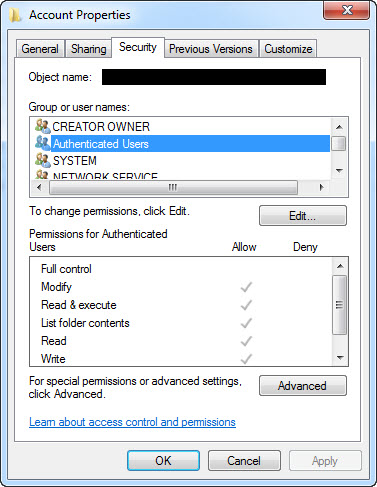
Giving Read & Execute permissions to the end users of the app solves this problem, but I don’t think this should be necessary at all.
In the windows Application Event Log there’s a message “File authorization failed for the request” along with Thread account name: NT AUTHORITYNETWORK SERVICE and User: [the correct workstation users’s domain account]. This suggests that the file access is being performed with the User’s identity, not the AppPool identity of Network Service. Sure enough if I grant the end user Read & Execute permission (I didn’t try Read only) to the application’s directory then everything works correctly: when the user browses to the site they’re authenticated automatically, not prompted, and the web site correctly recognizes their identity! Therefore my workaround solution is to give Read & Execute permission to Everybody on the application directory…but this is not an ideal solution.
This seems very strange. I’ve never needed to do this before in IIS 7.5, so far as I recall, and definitely never needed to in IIS 6 or IIS 7. Is this a new IIS7.5 thing? The documentation says that Impersonation is turned off by default. I added a element to the web.config to be sure, removed file permissions other than Network Service, but the problem remained.
Any thoughts? Is it normal for Windows Authenticated sites on IIS 7.5 for end users to need file permissions on the web server files?
Some relevant details:
- Network Service
has Full Control file permissions to the app folder. - When connecting from the server itself I was prompted for credentials
but after entering them i’m authenticated and the application works
correctly including displaying my windows login and connecting and
retrieving data from the db. I later determined that it was prompting
for credentials becausehttp://localhostwas in the trusted sites
and therefore not recognised as the Intranet Zone and thus not
passing identity through. I also determined that it was working as
this user identity because it’s an admin user who has file
permissions. - The web server is running Windows Server 2008 R2 / IIS
7.5. It didn’t have IIS on it until I installed it. I installed the default features as well as Windows Authentication, ASP.NET, and
possibly a couple of other items. A separate WCF app I installed that
uses IIS, anonymous authentication & .net 2.0 is working fine on
that web server. - The app install process is a manual copy of files,
creation of IIS App Pools & web apps, updating connection strings,
etc. - I checked the IE security settings. It was recognizing the
server as in the Intranet zone and had the option ‘Automatic logon
only in Intranet zone’ selected. Also on Advanced Settings the
‘Enable Integrated Windows Authentication’ option was checked. - After
installing IIS I ranaspnet_regiis -ifor .net 2.0 and
aspnet_regiis -irufor .net 4.0. - Anonymous authentication is
disabled for my app and Windows Authentication enabled. - The app is
running on ASP.NET v4 but there’s another app I installed
experiencing the same issue running ASP.NET v2. - The app is running
with Identity = Network Service and in 32-bit mode. - Database
connection string includesTrusted Connection=Trueand database
permissions are granted to the web server account[domain][server]$
e.g.DGMMyServer$. - In IIS > Authentication > Windows Authentication > Providers the list was Negotiate first then NTLM. I tried reordering so NTLM is first.
- In the Windows Security Event Log there
were a series of Microsoft Windows security auditing events: Logon
and Logoff. They indicated that the Logon was successful and was
displaying the User Id of the workstation user. This are from when
I’m connecting from another workstation and receive a 401
Unauthorized after several attempts.
I see someone has had this problem reported here but with no solution. Originally I posted in the ASP and then the IIS forums with no answers so far.
Update:
This msdn article says
When Windows authentication is enabled but impersonation is disabled, ASP.NET performs file access checks in the file authorization module using the credentials that are sent from the browser (my emphasis). Impersonation does not need to be enabled, because the FileAuthorizationModule module ensures that the requesting user is allowed read access or write access to the resource, depending on the request verb (for example, GET or POST) before executing the request. This behavior applies to any requests that enter managed code. In earlier versions of ASP.NET, accessing files based on URIs such as “Default.aspx” triggered the access check. In ASP.NET MVC applications, where access to resources is typically performed using extensionless URLs, this check typically does not apply, because there is not a physical file to check. In that case, the FileAuthorizationModule class falls back to checking access-control lists (ACLs) for the folder.
This does suggest that the end user needs permissions to the files (in the case of .aspx) or the folder (for MVC) … although still this seems slightly tucked away and non-definitive. This article about App Pools says they’re used as the identity for securing resources, which contradicts the idea of needing to grant privileges to end users. Unless the rules are different for App Pools and NETWORK SERVICE, which could be the case but would be surprising.
Answers:
Thank you for visiting the Q&A section on Magenaut. Please note that all the answers may not help you solve the issue immediately. So please treat them as advisements. If you found the post helpful (or not), leave a comment & I’ll get back to you as soon as possible.
Method 1
Are authenticated users allowed to the app folder?
Method 2
We were also fighting with this issue, and started setting up security groups so we could give our users file level permissions. Then one of our server admins stumbled across a couple of new properties that allow the app to authenticate to the file system under set credentials, and resolved the need for the users to have access. Here is what he came up with…
There are two IIS settings that control this:
Physical Path Credentials Physical Path Credentials Logon type
By default, Physical Path Credentials is set to Application User
(Pass-through authentication). This means that IIS doesn’t do any
impersonation when handling Windows Authentication requests. This can,
however, be set to a specific user (though not, unfortunately, the
application pool identity, which would be ideal). Physical Path
Credentials Logon Type is set by default to Clear-Text. For my testing
I set this to Interactive (though this may not be the correct value).
Possible values are Clear-Text, Batch, Interactive, and Network.To set this up I did the following:
- Created a local account (IIS-AccessUser)
- Granted IIS-AccessUser read and execute access to the /home directory of the site.
- Added IIS-AccessUser to IIS_IUSRS group (necessary for accessing .NET temporary files)
- Set IIS-AccessUser as the Physical Path Credentials
- Set Physical Path Credentials Logon Type to Interactive
Doing the above allowed me to log in to the application directly,
without having to allow Authenticated Users, or me having to be a
member of any of the groups in the /home folder. It also still
preserved .NET Authorization roles, so I still could not access parts
of the site that I was not allowed to.
Method 3
The short answer is NO. You are not required to grant file access permissions when using Windows Authentication in IIS 7.0 and IIS 7.5.
We were only able to discover this because our server admin smelled the security and management issues that arise from taking the route of granting file level access to users and groups.
For anyone dealing with this issue or if you are setting up a new IIS7/IIS7.5 server and/or moving from IIS 6, here is an article that gives you all of the Windows Authentication options and configurations that need to be modified to avoid granting file level access to individuals or groups.
Please read the two comments in at the end of the POST for some valid critiques of the methods used in this article.
In addition to the information in the article, please be aware that IIS 7.5 is not using the web configuration tags for system.web (at least not in my MVC 4 application).
It is looking in the system.webserver tags for authorization configuration (where you will need to list the windows domaingroups a user needs to be in to access your application).
— DSB
All methods was sourced from stackoverflow.com or stackexchange.com, is licensed under cc by-sa 2.5, cc by-sa 3.0 and cc by-sa 4.0