I am trying to automatically download some links through selenium’s click functionality and I am using a chrome webdriver and python as the programming language. How can I select the download directory through the python program so that it does not get downloaded in the default Downloads directory. I found a solution for firefox but there the download dialog keeps popping up every time it clicks on the link which does not happen in Chrome.
Answers:
Thank you for visiting the Q&A section on Magenaut. Please note that all the answers may not help you solve the issue immediately. So please treat them as advisements. If you found the post helpful (or not), leave a comment & I’ll get back to you as soon as possible.
Method 1
I found the accepted solution didn’t work, however this slight change did:
from selenium import webdriver

chrome_options = webdriver.ChromeOptions()
prefs = {'download.default_directory' : '/path/to/dir'}
chrome_options.add_experimental_option('prefs', prefs)
driver = webdriver.Chrome(chrome_options=chrome_options)
Method 2
Update 2018:
Its not valid Chrome command line switch, see the source code use hoju answer below to set the Preferences.
Original:
You can create a profile for chrome and define the download location for the tests. Here is an example:
from selenium import webdriver

options = webdriver.ChromeOptions()
options.add_argument("download.default_directory=C:/Downloads")

driver = webdriver.Chrome(chrome_options=options)
Method 3
the exact problem I also have faced while trying to do exactly same what you want to 🙂
For chrome:
from selenium import webdriver
options = webdriver.ChromeOptions()
options.add_argument("--start-maximized")
prefs = {"profile.default_content_settings.popups": 0,
             "download.default_directory":
                        r"C:Usersuser_dirDesktop\",#IMPORTANT - ENDING SLASH V IMPORTANT
             "directory_upgrade": True}
options.add_experimental_option("prefs", prefs)
browser=webdriver.Chrome(<chromdriver.exe path>, options=options)
For Firefox:
follow this blog for the answer:
https://srirajeshsahoo.wordpress.com/2018/07/26/how-to-bypass-pop-up-during-download-in-firefox-using-selenium-and-python/
The blog says all about the pop-up and downloads dir and how to do
Method 4
Using prefs solved my problem
path = os.path.dirname(os.path.abspath(__file__))
prefs = {"download.default_directory":path}
options = Options()
options.add_experimental_option("prefs", prefs)
driver = webdriver.Chrome('../harveston/chromedriver.exe',options = options)
Method 5
This worked for me on Chrome v81.0.4044.138
preferences = {
                "profile.default_content_settings.popups": 0,
                "download.default_directory": os.getcwd() + os.path.sep,
                "directory_upgrade": True
            }

chrome_options.add_experimental_option('prefs', preferences)
browser = webdriver.Chrome(executable_path="/usr/bin/chromedriver", options=chrome_options)
Method 6
To provide download directory and chrome’s diver executable path use the following code.
from selenium import webdriver
options = webdriver.ChromeOptions()
options.add_argument("download.default_directory=C:/Your_Directory")
driver = webdriver.Chrome(options=options ,executable_path='C:/chromedriver')
change the path in your code accordingly.
Method 7
If you are using linux distribution
Use this code
prefs = {'download.prompt_for_download': False,
         'download.directory_upgrade': True,
         'safebrowsing.enabled': False,
         'safebrowsing.disable_download_protection': True}

options.add_argument('--headless')
options.add_experimental_option('prefs', prefs)
driver = webdriver.Chrome('chromedriver.exe', chrome_options=options)
driver.command_executor._commands["send_command"] = ("POST", '/session/$sessionId/chromium/send_command')
driver.desired_capabilities['browserName'] = 'ur mum'
params = {'cmd': 'Page.setDownloadBehavior', 'params': {'behavior': 'allow', 'downloadPath': r'C:chickenbutt'}}
driver.execute("send_command", params)
Method 8
I see that many people have the same problem, just add the backslash at the end
op = webdriver.ChromeOptions()
prefs = {'download.default_directory' : 'C:\Users\SAJComputer\PycharmProjects\robot-test\'}
op.add_experimental_option('prefs', prefs)
driver = webdriver.Chrome(executable_path=driver_path , options=op)
Method 9
Below code snippet holds good for Windows/linux/MacOs distro:
    downloadDir = f"{os.getcwd()}//downloads//"
    # Make sure path exists.
    Path(downloadDir).mkdir(parents=True, exist_ok=True)

    # Set Preferences.
    preferences = {"download.default_directory": downloadDir,
                   "download.prompt_for_download": False,
                   "directory_upgrade": True,
                   "safebrowsing.enabled": True}

    chromeOptions = webdriver.ChromeOptions()
    chromeOptions.add_argument("--window-size=1480x560")
    chromeOptions.add_experimental_option("prefs", preferences)

    driver = webdriver.Chrome(DRIVER_PATH, options=chromeOptions)
    driver.get(url)
    time.sleep(10)
    driver.close()
Method 10
This is non code level solution with no chrome profiling/options settings.
If you are using script only on your local machine then use this solution
Click on Menu -> Setting -> Show advanced settings… -> Downloads
Now uncheck
Ask where to save each file before downloading
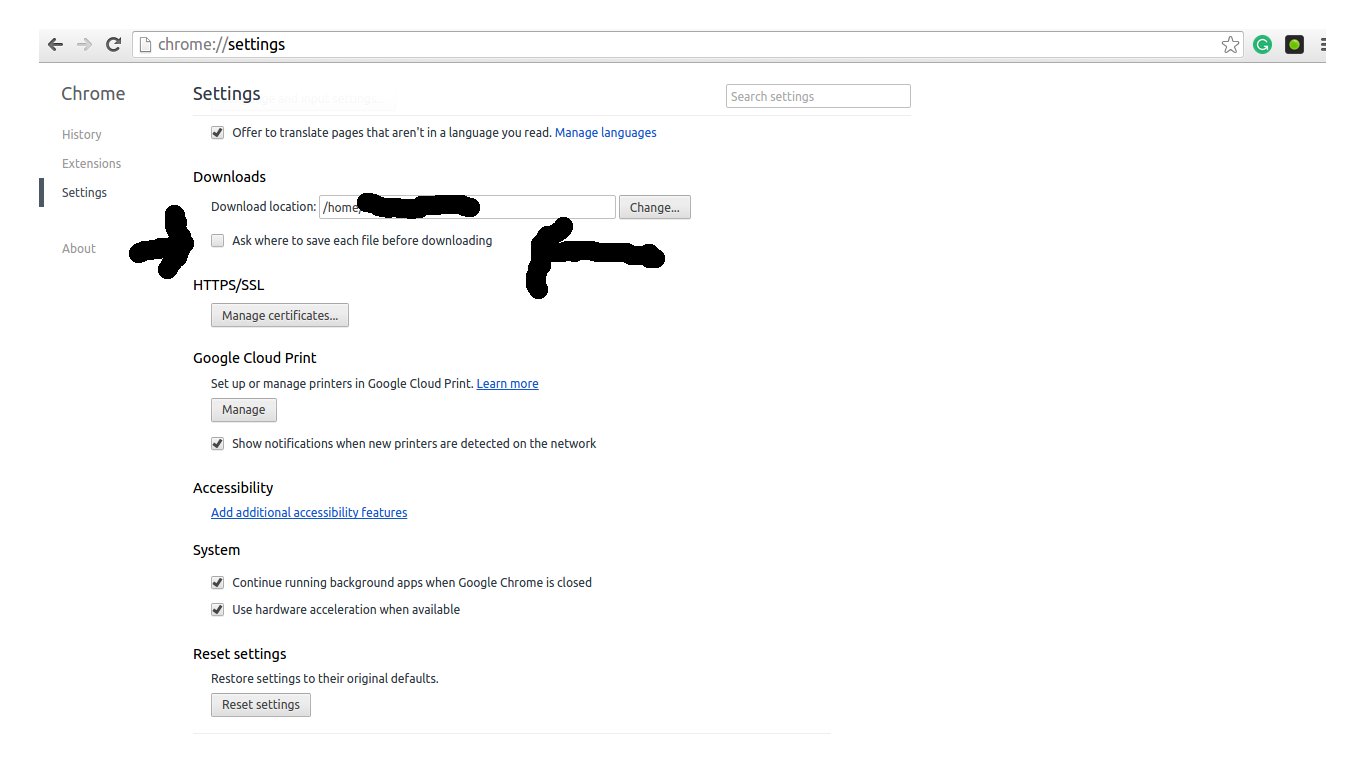
Hope it will help you 🙂
All methods was sourced from stackoverflow.com or stackexchange.com, is licensed under cc by-sa 2.5, cc by-sa 3.0 and cc by-sa 4.0