I need to draw some shapes on the screen using pyqtgraph.
I chose pyqtgraph over matplotlib because the former is way faster when a lot of shapes are present.
For lines polygons everything is ok, since I can simply plot multiple straight lines.
But how can I represent efficiently an arc?
I found out here link that the function pyqtgraph.QtGui.QGraphicsEllipseItem() allows me to draw a full ellipse.
But what if I just need an arc of that ellipse?
Answers:
Thank you for visiting the Q&A section on Magenaut. Please note that all the answers may not help you solve the issue immediately. So please treat them as advisements. If you found the post helpful (or not), leave a comment & I’ll get back to you as soon as possible.
Method 1
Here a solution where you can put two angles in degree and a direction for the arc (clockwise or counter clockwise). You can also put the radius. To translate the arc, you can just add two scalar for the x and y axis.
import pyqtgraph as pg
import numpy as np

from pyqtgraph.Qt import QtCore, QtGui

def Get_Points(r, a1, a2, nbPoints,clockwise=True):
    a1_rad = np.radians(a1)
    if a1_rad <0:
        a1_rad += 2 * np.pi
    a2_rad = np.radians(a2)
    if a2_rad <0:
        a2_rad += 2 * np.pi

    if a1_rad > a2_rad:
        if clockwise:
            t= np.linspace( a1_rad,a2_rad, nbPoints)
        else:
            t = np.linspace(a2_rad, a1_rad - 2 * np.pi,nbPoints)
    else:
        if clockwise:
            t= np.linspace(a2_rad, a1_rad,nbPoints)
        else:
            t = np.linspace(a1_rad, a2_rad - 2 * np.pi, nbPoints)
    x = r * np.cos(t)
    y = r * np.sin(t)
    return x, y

win = pg.GraphicsLayoutWidget(show=True, title="Plotting")
win.setFixedSize(500, 500)
p = win.addPlot(title='')
r = 10
a1 = 80
a2 = -200
x,y = Get_Points(r, a1, a2, 1000,clockwise=True)

c = pg.PlotCurveItem(x,y,cl=True)
p.setXRange(-1.5 * r, 1.5 * r, padding=0)
p.setYRange(-1.5 * r, 1.5 * r, padding=0)

p.addItem(c)

if __name__ == '__main__':
    import sys
    if (sys.flags.interactive != 1) or not hasattr(QtCore, 'PYQT_VERSION'):
        QtGui.QApplication.instance().exec_()
Method 2
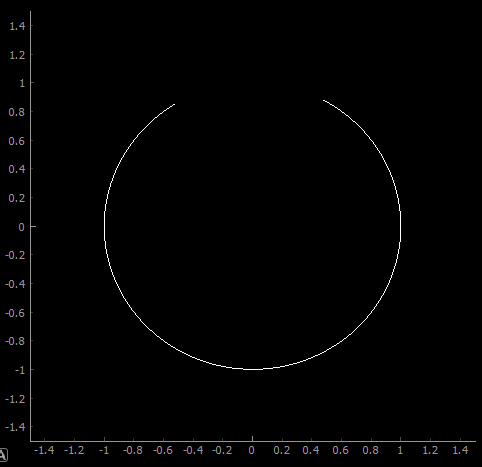
You could compute the position of some points on the arc and display them with a PlotCurveItem
import pyqtgraph as pg
import numpy as np

from pyqtgraph.Qt import QtCore, QtGui

t= np.arange(0,5*2*np.pi/6 ,0.01)
x = np.sin(t+0.5)
y = np.cos(t+0.5)
win = pg.GraphicsLayoutWidget(show=True, title="Plotting")
win.setFixedSize(500, 500)
p = win.addPlot(title='')
p.setXRange(-1.5, 1.5, padding=0)
p.setYRange(-1.5, 1.5, padding=0)


c = pg.PlotCurveItem(x,y)

p.addItem(c)

if __name__ == '__main__':
    import sys
    if (sys.flags.interactive != 1) or not hasattr(QtCore, 'PYQT_VERSION'):
        QtGui.QApplication.instance().exec_()
All methods was sourced from stackoverflow.com or stackexchange.com, is licensed under cc by-sa 2.5, cc by-sa 3.0 and cc by-sa 4.0