Would like to find out here if there is any way I can disable the “Update” button under “Account Management” and enable it until a Strong password is detected as shown in the screenshot?
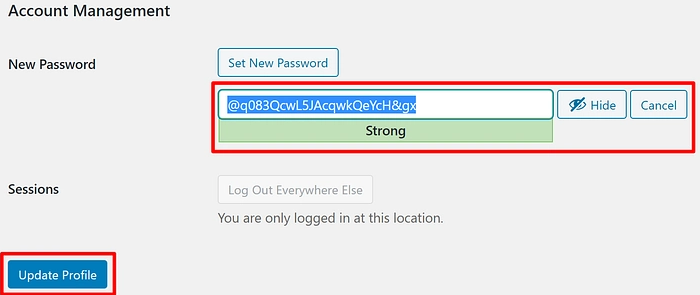
Currently, the “Update” button is enabled automatically when a “medium” strength password is being identified.
Thanks in advance!
Brian
Answers:
Thank you for visiting the Q&A section on Magenaut. Please note that all the answers may not help you solve the issue immediately. So please treat them as advisements. If you found the post helpful (or not), leave a comment & I’ll get back to you as soon as possible.
Method 1
I am using jquery for this,
please put this code inside the function.php of your theme.
add_action('admin_head','custom_handler_for_pass_js');
if ( ! function_exists( 'custom_handler_for_pass_js' ) ) {
function custom_handler_for_pass_js()
{
   ?>
    <script type="text/javascript">
    jQuery( document ).ready(function() {
        jQuery('.wp-generate-pw').click(function(){
            jQuery("#pass1").keyup(function(){
                if(jQuery( "#pass1" ).hasClass( "strong" )){
                    jQuery('#submit').prop('disabled', false);
                }else{
                    jQuery('#submit').prop('disabled', true);
                }
            });
        });
    });
    </script>
    <?php

  }}
This code is working, if it’s not working in your WP please check for a class name and make sure they are matching.
In case of any issue let me know.
All methods was sourced from stackoverflow.com or stackexchange.com, is licensed under cc by-sa 2.5, cc by-sa 3.0 and cc by-sa 4.0