When an exception occurs with any ASP.NET project (possibly any .net app) the stack trace will show the path on the developer’s machine, even when in production.
How to change it?
What’s going on under the hood?
Answers:
Thank you for visiting the Q&A section on Magenaut. Please note that all the answers may not help you solve the issue immediately. So please treat them as advisements. If you found the post helpful (or not), leave a comment & I’ll get back to you as soon as possible.
Method 1
This information is stored inside the .PDB files that were generated during the compilation of the source code. They contain the debugging information. But normally people don’t compile applications on their machines before shipping them into production. They use continuous integration and build servers that are dedicated for this purpose.
Now if you want to turn off debugging details you could configure the level of verbosity and debug info in the properties of your project.
Method 2
In order to remove it, go to Properties -> Package/Publish Web:
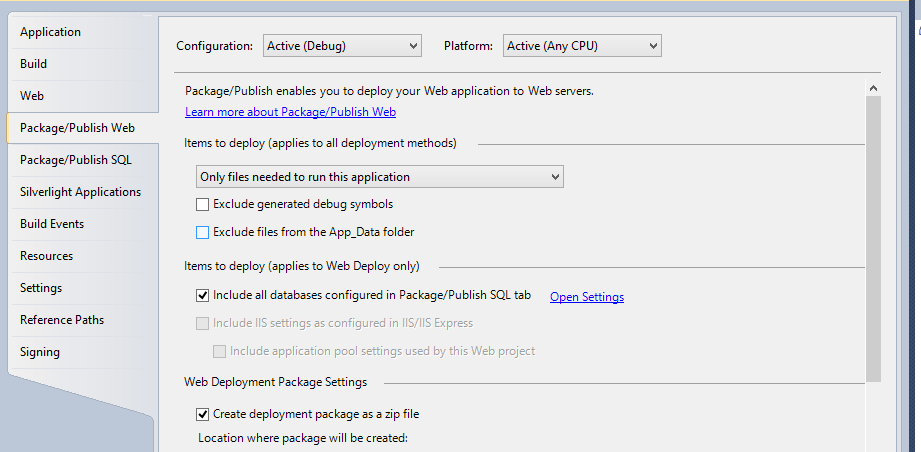
Make sure to click or check the “Exclude generated debug symbols“.
This will Publish your site without PDB files attached on the Bin folder. Make sure you are on Release mode before publishing your site for Live environment. One of the main difference of publishing your site without PDB files is that you cannot see the line number on the StackTrace when an error happens on your site.
All methods was sourced from stackoverflow.com or stackexchange.com, is licensed under cc by-sa 2.5, cc by-sa 3.0 and cc by-sa 4.0