I am dynamically generating a div which is like :
<div id='PrintDiv'>
        <table id="mainTable">
            <tr>
                <td>
                    Col1
                </td>
                <td>
                    Col2
                </td>
                <td>
                    Col3
                </td>
            </tr>
            <tr>
                <td>
                    Val1
                </td>
                <td>
                    Val2
                </td>
                <td>
                    Val3
                </td>
            </tr>
            <tr>
                <td>
                    Val11
                </td>
                <td>
                    Val22
                </td>
                <td>
                    Val33
                </td>
            </tr>
            <tr>
                <td>
                    Val111
                </td>
                <td>
                    Val222
                </td>
                <td>
                    Val333
                </td>
            </tr>
        </table>
    </div>
And there are lot more elements on the page as well.
Now, how can i get a csv file like this :
Col1,Col2,Col3
Val1,Val2,Val3
Val11,Val22,Val33
Val111,Val222,Val333
using jQuery ?
need a file save dailog box too,like this :
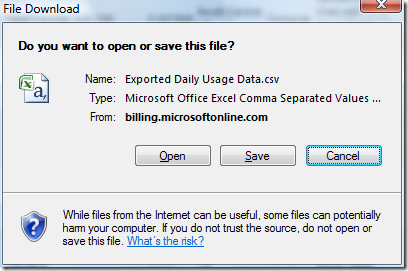
Thanks.
Answers:
Thank you for visiting the Q&A section on Magenaut. Please note that all the answers may not help you solve the issue immediately. So please treat them as advisements. If you found the post helpful (or not), leave a comment & I’ll get back to you as soon as possible.
Method 1
You can do that in the client side only, in browser that accept Data URIs:
data:application/csv;charset=utf-8,content_encoded_as_url
In your example the Data URI must be:
data:application/csv;charset=utf-8,Col1%2CCol2%2CCol3%0AVal1%2CVal2%2CVal3%0AVal11%2CVal22%2CVal33%0AVal111%2CVal222%2CVal333
You can call this URI by:
- using
window.open - or setting the
window.location - or by the
hrefof an anchor - by adding the
downloadattribute it will work in chrome, still have to test in IE.
To test, simply copy the URIs above and paste in your browser address bar. Or test the anchor below in a HTML page:
<a download="somedata.csv" href="data:application/csv;charset=utf-8,Col1%2CCol2%2CCol3%0AVal1%2CVal2%2CVal3%0AVal11%2CVal22%2CVal33%0AVal111%2CVal222%2CVal333">Example</a>
To create the content, getting the values from the table, you can use table2CSV and do:
var data = $table.table2CSV({delivery:'value'});

$('<a></a>')
    .attr('id','downloadFile')
    .attr('href','data:text/csv;charset=utf8,' + encodeURIComponent(data))
    .attr('download','filename.csv')
    .appendTo('body');

$('#downloadFile').ready(function() {
    $('#downloadFile').get(0).click();
});
Most, if not all, versions of IE don’t support navigation to a data link, so a hack must be implemented, often with an iframe. Using an iFrame combined with document.execCommand('SaveAs'..), you can get similar behavior on most currently used versions of IE.
Method 2
This is my implementation (based in: https://gist.github.com/3782074):
Usage:
HTML:
<table class="download">...</table>
<a href="" download=" rel="nofollow noreferrer noopener"name.csv">DOWNLOAD CSV</a>
JS:
$("a[download]").click(function(){
    $("table.download").toCSV(this);
});
Code:
jQuery.fn.toCSV = function(link) {
  var $link = $(link);
  var data = $(this).first(); //Only one table
  var csvData = [];
  var tmpArr = [];
  var tmpStr = '';
  data.find("tr").each(function() {
      if($(this).find("th").length) {
          $(this).find("th").each(function() {
            tmpStr = $(this).text().replace(/"/g, '""');
            tmpArr.push('"' + tmpStr + '"');
          });
          csvData.push(tmpArr);
      } else {
          tmpArr = [];
             $(this).find("td").each(function() {
                  if($(this).text().match(/^-{0,1}d*.{0,1}d+$/)) {
                      tmpArr.push(parseFloat($(this).text()));
                  } else {
                      tmpStr = $(this).text().replace(/"/g, '""');
                      tmpArr.push('"' + tmpStr + '"');
                  }
             });
          csvData.push(tmpArr.join(','));
      }
  });
  var output = csvData.join('n');
  var uri = 'data:application/csv;charset=UTF-8,' + encodeURIComponent(output);
  $link.attr("href", uri);
}
Notes:
- It uses “th” tags for headings. If they are not present, they are not
added. - This code detects numbers in the format: -####.## (You will need modify the code in order to accept other formats, e.g. using commas).
UPDATE:
My previous implementation worked fine but it didn’t set the csv filename. The code was modified to use a filename but it requires an < a > element. It seems that you can’t dynamically generate the < a > element and fire the “click” event (perhaps security reasons?).
DEMO
(Unfortunately jsfiddle fails to generate the file and instead it throws an error: ‘please use POST request’, don’t let that error stop you from testing this code in your application).
Method 3
I recently posted a free software library for this: “html5csv.js” — GitHub
It is intended to help streamline the creation of small simulator apps
in Javascript that might need to import or export csv files, manipulate, display, edit
the data, perform various mathematical procedures like fitting, etc.
After loading “html5csv.js” the problem of scanning a table and creating a CSV is a one-liner:
CSV.begin('#PrintDiv').download('MyData.csv').go();
Here is a JSFiddle demo of your example with this code.
Internally, for Firefox/Chrome this is a data URL oriented solution, similar to that proposed by @italo, @lepe, and @adeneo (on another question). For IE
The CSV.begin() call sets up the system to read the data into an internal array. That fetch then occurs. Then the .download() generates a data URL link internally and clicks it with a link-clicker. This pushes a file to the end user.
According to caniuse IE10 doesn’t support <a download=...>. So for IE my library calls navigator.msSaveBlob() internally, as suggested by @Manu Sharma
Method 4
Here are two WORKAROUNDS to the problem of triggering downloads from the client only. In later browsers you should look at “blob”
1. Drag and drop the table
Did you know you can simply DRAG your table into excel?
Here is how to select the table to either cut and past or drag
Select a complete table with Javascript (to be copied to clipboard)
2. create a popup page from your div
Although it will not produce a save dialog, if the resulting popup is saved with extension .csv, it will be treated correctly by Excel.
The string could be
w.document.write("row1.1trow1.2trow1.3nrow2.1trow2.2trow2.3");
e.g. tab-delimited with a linefeed for the lines.
There are plugins that will create the string for you – such as http://plugins.jquery.com/project/table2csv
var w = window.open('','csvWindow'); // popup, may be blocked though
// the following line does not actually do anything interesting with the
// parameter given in current browsers, but really should have.
// Maybe in some browser it will. It does not hurt anyway to give the mime type
w.document.open("text/csv");
w.document.write(csvstring); // the csv string from for example a jquery plugin
w.document.close();
DISCLAIMER: These are workarounds, and does not fully answer the question which currently has the answer for most browser: not possible on the client only
Method 5
By using just jQuery, you cannot avoid a server call.
However, to achieve this result, I’m using Downloadify, which lets me save files without having to make another server call. Doing this reduces server load and makes a good user experience.
To get a proper CSV you just have to take out all the unnecessary tags and put a ‘,’ between the data.
Method 6
You can’t avoid a server call here, JavaScript simply cannot (for security reasons) save a file to the user’s file system. You’ll have to submit your data to the server and have it send the .csv as a link or an attachment directly.
HTML5 has some ability to do this (though saving really isn’t specified – just a use case, you can read the file if you want), but there’s no cross-browser solution in place now.
Method 7
Hope the following demo can help you out.
$(function() {
  $("button").on('click', function() {
    var data = "";
    var tableData = [];
    var rows = $("table tr");
    rows.each(function(index, row) {
      var rowData = [];
      $(row).find("th, td").each(function(index, column) {
        rowData.push(column.innerText);
      });
      tableData.push(rowData.join(","));
    });
    data += tableData.join("n");
    $(document.body).append('<a id="download-link" download="data.csv" href=' + URL.createObjectURL(new Blob([data], {
      type: "text/csv"
    })) + '/>');


    $('#download-link')[0].click();
    $('#download-link').remove();
  });
});
table {
border-collapse: collapse;
}
td,
th {
border: 1px solid #aaa;
padding: 0.5rem;
text-align: left;
}
td {
font-size: 0.875rem;
}
.btn-group {
padding: 1rem 0;
}
button {
background-color: #fff;
border: 1px solid #000;
margin-top: 0.5rem;
border-radius: 3px;
padding: 0.5rem 1rem;
font-size: 1rem;
}
button:hover {
cursor: pointer;
background-color: #000;
color: #fff;
}<script src="https://cdnjs.cloudflare.com/ajax/libs/jquery/3.3.1/jquery.min.js"></script>
<div id='PrintDiv'>
<table id="mainTable">
<tr>
<td>Col1</td>
<td>Col2</td>
<td>Col3</td>
</tr>
<tr>
<td>Val1</td>
<td>Val2</td>
<td>Val3</td>
</tr>
<tr>
<td>Val11</td>
<td>Val22</td>
<td>Val33</td>
</tr>
<tr>
<td>Val111</td>
<td>Val222</td>
<td>Val333</td>
</tr>
</table>
</div>
<div class="btn-group">
<button>csv</button>
</div>Method 8
Just try the following coding…very simple to generate CSV with the values of HTML Tables. No browser issues will come
<!DOCTYPE html>
<html>
    <head>
        <script src="https://ajax.googleapis.com/ajax/libs/jquery/1.11.3/jquery.min.js"></script>
        <script src="https://www.csvscript.com/dev/html5csv.js"></script>
<script>
$(document).ready(function() {

 $('table').each(function() {
    var $table = $(this);

    var $button = $("<button type='button'>");
    $button.text("Export to CSV");
    $button.insertAfter($table);

    $button.click(function() {
         CSV.begin('table').download('Export.csv').go();
    });
  });
})

</script>
    </head>
<body>
<div id='PrintDiv'>
<table style="width:100%">
  <tr>
    <td>Jill</td>
    <td>Smith</td>
    <td>50</td>
  </tr>
  <tr>
    <td>Eve</td>
    <td>Jackson</td>
    <td>94</td>
  </tr>
  <tr>
    <td>John</td>
    <td>Doe</td>
    <td>80</td>
  </tr>
</table>
</div>
</body>
</html>
All methods was sourced from stackoverflow.com or stackexchange.com, is licensed under cc by-sa 2.5, cc by-sa 3.0 and cc by-sa 4.0