I have a web application on godaddy shared hosting. Its a asp.net application. Everything working fine but when I upload some file it gives an error “Access to the path ‘PATH’ is denied.”
I tried several ways like giving full permission to the folder in which I am uploading the file from godaddy control panel.
I also saw this post and tried to follow he said : http://forums.asp.net/t/1052417.aspx/1
But no help.
Can anyone suggest me whats wrong there. Its under IIS 7.
Answers:
Thank you for visiting the Q&A section on Magenaut. Please note that all the answers may not help you solve the issue immediately. So please treat them as advisements. If you found the post helpful (or not), leave a comment & I’ll get back to you as soon as possible.
Method 1
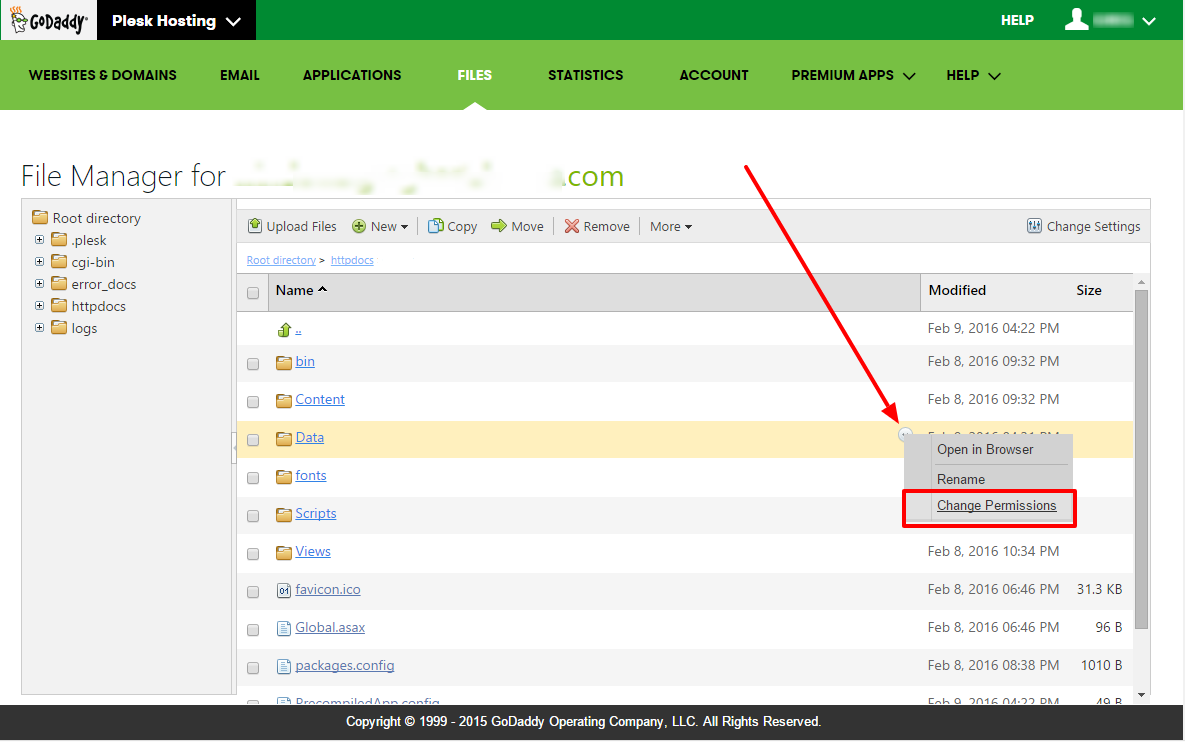
- Open “File Manager”
- Navigate to folder and hover over it
- Click little “down” arrow towards right edge of “Name” column (see image)
- Click “Change Permissions”
- Select user (you’ll most likely want to use “Plesk IIS Worker Process Identity Account” if you’re doing file uploads through your site) and set permissions as needed
Method 2
“Setting Directory Permissions with Windows Hosting Accounts”
http://support.godaddy.com/help/article/6481
You should ask your hosting provider for access permissions if it doesn’t solve your problem.
Ref:
Removing Web Access to Directories on a Windows Hosting Account
Removing the “Anonymous Access” IIS Setting for that directory. The
result of removing this permission is that you can only access that
directory from with your hosting account or via FTP. You will not be
able to access the directory through any Web browser, regardless of
whether you are knowledgeable of the hosting account user name and
password.
Method 3
using System;
using System.Collections.Generic;
using System.Linq;
using System.Web;
using System.Web.UI;
using System.Web.UI.WebControls;
using System.Collections.Generic;
using System.IO;
public partial class _Default : System.Web.UI.Page
{
    protected void Page_Load(object sender, EventArgs e)
    {
        if (!IsPostBack)
        {
            BindGrid();
        }
    }
    protected void BindGrid()
    {
        string[] filePaths = Directory.GetFiles(Server.MapPath("~/images/"));
        List<ListItem> files = new List<ListItem>();
        foreach (string filePath in filePaths)
        {
            files.Add(new ListItem(Path.GetFileName(filePath), filePath));
        }
        GridView1.DataSource = files;
        GridView1.DataBind();
    }
    protected void btnUpload_Click(object sender, EventArgs e)
    {
        if (FileUpload1.HasFile)
        {
            FileUpload1.SaveAs(Server.MapPath("~/images/") + FileUpload1.FileName);
            BindGrid();
        }
        else //enter code here
        {
            Response.Write("Please select file to upload");
        }
    }
    protected void DownloadFile(object sender, EventArgs e)
    {
        string filePath = (sender as LinkButton).CommandArgument;
        Response.ContentType = ContentType;
        Response.AppendHeader("Content-Disposition", "attachment; filename=" + Path.GetFileName(filePath));
        Response.WriteFile(filePath);
        Response.End();
    }
    protected void DeleteFile(object sender, EventArgs e)
    {
        string filePath = (sender as LinkButton).CommandArgument;
        File.Delete(filePath);
        BindGrid();
    }
}
All methods was sourced from stackoverflow.com or stackexchange.com, is licensed under cc by-sa 2.5, cc by-sa 3.0 and cc by-sa 4.0