I have a table in database with numbers of tenants, each tenant lists a record of their sales per date. There are instance where in a tenant has NO SALES in particular date/s, therefore the date with no sales has NO RECORD in the table breaking a proper date sequence. Please see the sample table for illustration below:
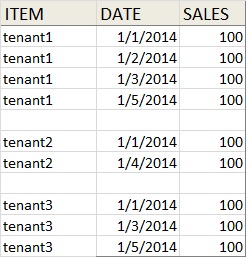
I used this select query in SQL to display the output above
select tenant, date, sales
from tblSales
where date between '01/01/2015' and '01/05/2014'
What I need as a correct output: display complete date based on the selected date range on the where clause, when tenant has no record in a particular date, the query should add a record of date in that particular tenant and just add null value in the sales column like in this image:
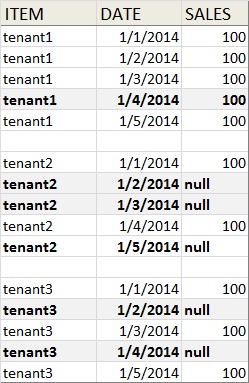
- as my initial solution, I thought of creating a temp table inserting a sequence of date based on the date range selected and use that to left join with the actual table.
Here’s what I have started:
@dateFrom datetime  = '02/01/2015',
@dateTo date = '02/05/2015'

declare @MaxNumDays int
declare @Counter int

set @Counter = 0
set @MaxNumDays = DATEDIFF(day, @dateFrom  , @dateto) + 1

create table #DSRTdate (
    Date datetime
)

WHILE @Counter < @MaxNumDays
BEGIN
    insert into #DSRTdate (Date) values (DATEADD(day,@Counter,@dateFrom ))
    SET @Counter += 1
END
I used the above codes to get and insert in a temporary table the sequence data from the use selection, in the above case, it inserts 02/01/2015, 02/02/2015, 02/03/2015, 02/04/2015, AND 02/05/2015
select tenantcode, date, sales
into #DSRT2
from DAILYMOD
where (date between @dateFrom and @dateTo)

select *
from #dsrtdate a
left join #DSRT2 b on a.date = b.date
order by b.tenantcode, a.date
Then I used left join to display the missing dates but this results only to ONE TENANT only and it makes also the tenantname null. Like this:
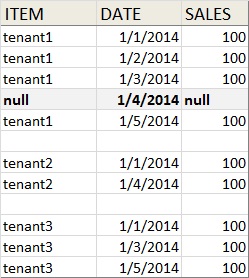
Any suggestions would be highly appreciated.
Answers:
Thank you for visiting the Q&A section on Magenaut. Please note that all the answers may not help you solve the issue immediately. So please treat them as advisements. If you found the post helpful (or not), leave a comment & I’ll get back to you as soon as possible.
Method 1
You could do this using a Tally Table.
Basically, you use the Tally Table to generate sequence of dates from @startDate to @endDate and CROSS JOIN it to DISTINCT Item to generate all Date–Item combination. Then, the result will be LEFT-JOINed to tblSales to achieve the desired output.
DECLARE
    @startDate  DATE = '20140101',
    @endDate    DATE = '20140105';

WITH E1(N) AS(
    SELECT 1 UNION ALL SELECT 1 UNION ALL SELECT 1 UNION ALL SELECT 1 UNION ALL SELECT 1 UNION ALL
    SELECT 1 UNION ALL SELECT 1 UNION ALL SELECT 1 UNION ALL SELECT 1 UNION ALL SELECT 1
)
,E2(N) AS(SELECT 1 FROM E1 a, E1 b)
,E4(N) AS(SELECT 1 FROM E2 a, E2 b)
,Tally(N) AS(
    SELECT TOP (DATEDIFF(DAY, @startDate, @endDate) + 1)
        ROW_NUMBER() OVER(ORDER BY(SELECT NULL))
    FROM E4
)
,CteAllDates(Item, dt) AS(
    SELECT x.Item, DATEADD(DAY, N - 1, @startDate)
    FROM Tally
    CROSS JOIN(
        SELECT DISTINCT Item
        FROM tblSales
        WHERE [Date] BETWEEN @startDate AND @endDate
    ) AS x
)
SELECT d.*, ts.Sales
FROM CteAllDates d
LEFT JOIN tblSales ts
    ON ts.Item = d.Item
    AND ts.Date = d.dt
WHERE
    ts.[Date] BETWEEN @startDate AND @endDate
ORDER BY d.Item, d.dt
Here is an alternative. Instead of the cascading CTEs, use sys.columns to generate the Tally Table.:
DECLARE
    @startDate  DATE = '20140101',
    @endDate    DATE = '20140105';

WITH Tally(N) AS(
    SELECT TOP (DATEDIFF(DAY, @startDate, @endDate) + 1)
        ROW_NUMBER() OVER(ORDER BY(SELECT NULL))
    FROM sys.columns a, sys.columns b
)
,CteAllDates(Item, dt) AS(
    SELECT x.Item, DATEADD(DAY, N - 1, @startDate)
    FROM Tally
    CROSS JOIN(
        SELECT DISTINCT Item
        FROM tblSales
        WHERE [Date] BETWEEN @startDate AND @endDate
    ) AS x
)
SELECT d.*, ts.Sales
FROM CteAllDates d
LEFT JOIN tblSales ts
    ON ts.Item = d.Item
    AND ts.Date = d.dt
WHERE
    ts.[Date] BETWEEN @startDate AND @endDate
ORDER BY d.Item, d.dt
Result
|    Item |         dt |  Sales |
|---------|------------|--------|
| tenant1 | 2014-01-01 |    100 |
| tenant1 | 2014-01-02 |    100 |
| tenant1 | 2014-01-03 |    100 |
| tenant1 | 2014-01-04 |   NULL |
| tenant1 | 2014-01-05 |    100 |
| tenant2 | 2014-01-01 |    100 |
| tenant2 | 2014-01-02 |   NULL |
| tenant2 | 2014-01-03 |   NULL |
| tenant2 | 2014-01-04 |    100 |
| tenant2 | 2014-01-05 |   NULL |
| tenant3 | 2014-01-01 |    100 |
| tenant3 | 2014-01-02 |   NULL |
| tenant3 | 2014-01-03 |    100 |
| tenant3 | 2014-01-04 |   NULL |
| tenant3 | 2014-01-05 |    100 |
Method 2
I love wewesthemenace answer! Up-voted and have saved it for future reference. Here is another suggestion. Use this code in SQL command from Crystal. Left outer join to your table sales. Its long. Its tedious. But its easier to understand if you aren’t an SQL expert which describes me pretty well 🙂 If you figured out his answer and it works then disregard this solution.
Note: the from clause isn’t serving any function except to satisfy the requirement of having a from clause in an SQL statement like this. If tblSales is a large table consider using one from your database which has less data and still left outer join to tblSales.
    select distinct
cast(concat(DATEPART(YYYY, GETDATE()),'-',DATEPART(MM,GETDATE()),'-','01') as DATE) as salesdate
from tblSales
UNION
select distinct
cast(concat(DATEPART(YYYY, GETDATE()),'-',DATEPART(MM,GETDATE()),'-','02') as DATE) as salesdate
from tblSales
UNION
select distinct
cast(concat(DATEPART(YYYY, GETDATE()),'-',DATEPART(MM,GETDATE()),'-','03') as DATE) as salesdate
from tblSales
UNION
select distinct
cast(concat(DATEPART(YYYY, GETDATE()),'-',DATEPART(MM,GETDATE()),'-','04') as DATE) as salesdate
from tblSales
UNION
select distinct
cast(concat(DATEPART(YYYY, GETDATE()),'-',DATEPART(MM,GETDATE()),'-','05') as DATE) as salesdate
from tblSales
UNION
select distinct
cast(concat(DATEPART(YYYY, GETDATE()),'-',DATEPART(MM,GETDATE()),'-','06') as DATE) as salesdate
from tblSales
UNION
select distinct
cast(concat(DATEPART(YYYY, GETDATE()),'-',DATEPART(MM,GETDATE()),'-','07') as DATE) as salesdate
from tblSales
UNION
select distinct
cast(concat(DATEPART(YYYY, GETDATE()),'-',DATEPART(MM,GETDATE()),'-','08') as DATE) as salesdate
from tblSales
UNION
select distinct
cast(concat(DATEPART(YYYY, GETDATE()),'-',DATEPART(MM,GETDATE()),'-','09') as DATE) as salesdate
from tblSales
UNION
select distinct
cast(concat(DATEPART(YYYY, GETDATE()),'-',DATEPART(MM,GETDATE()),'-','10') as DATE) as salesdate
from tblSales
UNION
select distinct
cast(concat(DATEPART(YYYY, GETDATE()),'-',DATEPART(MM,GETDATE()),'-','11') as DATE) as salesdate
from tblSales
UNION
select distinct
cast(concat(DATEPART(YYYY, GETDATE()),'-',DATEPART(MM,GETDATE()),'-','12') as DATE) as salesdate
from tblSales
UNION
select distinct
cast(concat(DATEPART(YYYY, GETDATE()),'-',DATEPART(MM,GETDATE()),'-','13') as DATE) as salesdate
from tblSales
UNION
select distinct
cast(concat(DATEPART(YYYY, GETDATE()),'-',DATEPART(MM,GETDATE()),'-','14') as DATE) as salesdate
from tblSales
UNION
select distinct
cast(concat(DATEPART(YYYY, GETDATE()),'-',DATEPART(MM,GETDATE()),'-','15') as DATE) as salesdate
from tblSales
UNION
select distinct
cast(concat(DATEPART(YYYY, GETDATE()),'-',DATEPART(MM,GETDATE()),'-','16') as DATE) as salesdate
from tblSales
UNION
select distinct
cast(concat(DATEPART(YYYY, GETDATE()),'-',DATEPART(MM,GETDATE()),'-','17') as DATE) as salesdate
from tblSales
UNION
select distinct
cast(concat(DATEPART(YYYY, GETDATE()),'-',DATEPART(MM,GETDATE()),'-','18') as DATE) as salesdate
from tblSales
UNION
select distinct
cast(concat(DATEPART(YYYY, GETDATE()),'-',DATEPART(MM,GETDATE()),'-','19') as DATE) as salesdate
from tblSales
UNION
select distinct
cast(concat(DATEPART(YYYY, GETDATE()),'-',DATEPART(MM,GETDATE()),'-','20') as DATE) as salesdate
from tblSales
UNION
select distinct
cast(concat(DATEPART(YYYY, GETDATE()),'-',DATEPART(MM,GETDATE()),'-','21') as DATE) as salesdate
from tblSales
UNION
select distinct
cast(concat(DATEPART(YYYY, GETDATE()),'-',DATEPART(MM,GETDATE()),'-','22') as DATE) as salesdate
from tblSales
UNION
select distinct
cast(concat(DATEPART(YYYY, GETDATE()),'-',DATEPART(MM,GETDATE()),'-','23') as DATE) as salesdate
from tblSales
UNION
select distinct
cast(concat(DATEPART(YYYY, GETDATE()),'-',DATEPART(MM,GETDATE()),'-','24') as DATE) as salesdate
from tblSales
UNION
select distinct
cast(concat(DATEPART(YYYY, GETDATE()),'-',DATEPART(MM,GETDATE()),'-','25') as DATE) as salesdate
from tblSales
UNION
select distinct
cast(concat(DATEPART(YYYY, GETDATE()),'-',DATEPART(MM,GETDATE()),'-','26') as DATE) as salesdate
from tblSales
UNION
select distinct
cast(concat(DATEPART(YYYY, GETDATE()),'-',DATEPART(MM,GETDATE()),'-','27') as DATE) as salesdate
from tblSales
UNION
select distinct
cast(concat(DATEPART(YYYY, GETDATE()),'-',DATEPART(MM,GETDATE()),'-','28') as DATE) as salesdate
from tblSales
UNION
select distinct
cast(concat(DATEPART(YYYY, GETDATE()),'-',DATEPART(MM,GETDATE()),'-','29') as DATE) as salesdate
from tblSales
UNION
select distinct
cast(concat(DATEPART(YYYY, GETDATE()),'-',DATEPART(MM,GETDATE()),'-','30') as DATE) as salesdate
from tblSales
UNION
select distinct
cast(concat(DATEPART(YYYY, GETDATE()),'-',DATEPART(MM,GETDATE()),'-','31') as DATE) as salesdate
from tblSales
All methods was sourced from stackoverflow.com or stackexchange.com, is licensed under cc by-sa 2.5, cc by-sa 3.0 and cc by-sa 4.0