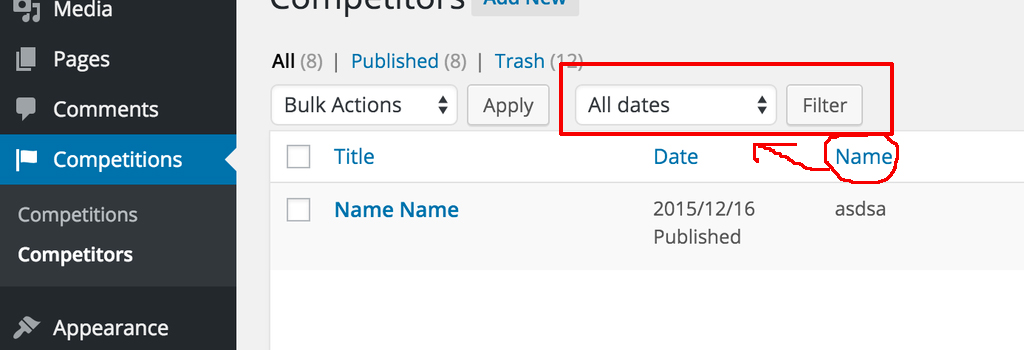
I’ve used Advanced Custom Fields to create custom fields for Competition name, answers etc. I’ve made a custom post type for competitions as shown on the image and I used WordPress functions.php to create the columns from my custom fields values.
I’m trying to get a “Filter by”-dropdown box with the competitions different names/labels like shown below, but I can only find solutions using taxonomies, which I rather not use if possible because I’ve only used custom fields for everything else.
Is it possible to make a custom “Filter by” dropdown using only custom fields?
Answers:
Thank you for visiting the Q&A section on Magenaut. Please note that all the answers may not help you solve the issue immediately. So please treat them as advisements. If you found the post helpful (or not), leave a comment & I’ll get back to you as soon as possible.
Method 1
And for displaying result for Filter then try this code
add_filter( 'parse_query', 'prefix_parse_filter' );
function  prefix_parse_filter($query) {
   global $pagenow;
   $current_page = isset( $_GET['post_type'] ) ? $_GET['post_type'] : '';

   if ( is_admin() &&
     'competition' == $current_page &&
     'edit.php' == $pagenow &&
      isset( $_GET['competition-name'] ) &&
      $_GET['competition-name'] != '' ) {

    $competition_name                  = $_GET['competition-name'];
    $query->query_vars['meta_key']     = 'competition_name';
    $query->query_vars['meta_value']   = $competition_name;
    $query->query_vars['meta_compare'] = '=';
  }
}
Change the meta key and meta value as required.
I have taken “competition name as meta_key and “competition-name” as select drop down name.
Method 2
The restrict_manage_posts action triggers the add_extra_tablenav() function, which is how you add additional dropdowns to your desired List Table.
In the example below, we first ensure that the Post Type is correct, and then we grab all DB values stored against the competition_name key in the postmeta table (you must change the key name as required). The query is fairly basic and only checks to see if the Competition is published, takes only unique values (you don’t want duplication in the dropdown) and then orders them alphabetically.
Next we check for results (no point outputting the dropdown for nothing), and then construct the options (including a defualt to show all). Finally the dropdown is output.
As stated in my comment, this isn’t the end of the story though; you’ll need some logic to tell the List Table to only show your desired results when the filter is active, but I’ll leave you to have a look at that and then start another question if you require further assistance. Hint – check out the file /wp-admin/includes/class-wp-posts-list-table.php, and it’s parent .../wp-class-list-table.php
/**
 * Add extra dropdowns to the List Tables
 *
 * @param required string $post_type    The Post Type that is being displayed
 */
add_action('restrict_manage_posts', 'add_extra_tablenav');
function add_extra_tablenav($post_type){

    global $wpdb;

    /** Ensure this is the correct Post Type*/
    if($post_type !== 'competition')
        return;

    /** Grab the results from the DB */
    $query = $wpdb->prepare('
        SELECT DISTINCT pm.meta_value FROM %1$s pm
        LEFT JOIN %2$s p ON p.ID = pm.post_id
        WHERE pm.meta_key = "%3$s"
        AND p.post_status = "%4$s"
        AND p.post_type = "%5$s"
        ORDER BY "%6$s"',
        $wpdb->postmeta,
        $wpdb->posts,
        'competition_name', // Your meta key - change as required
        'publish',          // Post status - change as required
        $post_type,
        'competition_name'
    );
    $results = $wpdb->get_col($query);

    /** Ensure there are options to show */
    if(empty($results))
        return;

    // get selected option if there is one selected
    if (isset( $_GET['competition-name'] ) && $_GET['competition-name'] != '') {
        $selectedName = $_GET['competition-name'];
    } else {
        $selectedName = -1;
    }

    /** Grab all of the options that should be shown */
    $options[] = sprintf('<option value="-1">%1$s</option>', __('All Competitions', 'your-text-domain'));
    foreach($results as $result) :
        if ($result == $selectedName) {
            $options[] = sprintf('<option value="%1$s" selected>%2$s</option>', esc_attr($result), $result);
        } else {
            $options[] = sprintf('<option value="%1$s">%2$s</option>', esc_attr($result), $result);
        }
    endforeach;

    /** Output the dropdown menu */
    echo '<select class="" id="competition-name" name="competition-name">';
    echo join("n", $options);
    echo '</select>';

}
Method 3
If this isn’t working for anyone, my solution was needing to add the Column I was trying to filter by to the list of Sortable columns for my custom post type.
// Make Custom Post Type Custom Columns Sortable
function cpt_custom_columns_sortable( $columns ) {

    // Add our columns to $columns array
    $columns['item_number'] = 'item_number';
    $columns['coat_school'] = 'coat_school';

    return $columns;
} add_filter( 'manage_edit-your-custom-post-type-slug_sortable_columns', 'cpt_custom_columns_sortable' );
Method 4
Replace the query below to correct the wpdb:prepare error:
$query = $wpdb->prepare('
        SELECT DISTINCT pm.meta_value FROM %1$s pm
        LEFT JOIN %2$s p ON p.ID = pm.post_id
        WHERE pm.meta_key = "%3$s"
        AND p.post_status = "%4$s"
        AND p.post_type = "%5$s"
        ORDER BY "%3$s"',
        $wpdb->postmeta,
        $wpdb->posts,
        'competition_name', // Your meta key - change as required
        'publish',          // Post status - change as required
        $post_type,
        'competition_name' //this is needed a second time to define "%3$s" in ORDER BY
  );
Method 5
I ave faced the same issue when I was trying to filter custom-post-type with custom-field
but I have resolved this issue in the following steps.
Converted custom-field name from writer to _writer
and then I have updated following code inside callback function of parse_query hook that I can add custom-field meta_query like
$query->set( 'meta_query', array(
    array(
          'key'     => '_writer',
           'compare' => '=',
           'value'   => $_GET['_writer'],
           'type'    => 'numeric',
      )
) );
This Above Solution Worked for me.
Documentation https://developer.wordpress.org/reference/hooks/pre_get_posts/
Helpful Links https://developer.wordpress.org/reference/hooks/pre_get_posts/#comment-2571
https://stackoverflow.com/questions/47869905/how-can-i-filter-records-in-custom-post-type-list-in-admin-based-on-user-id-that
All methods was sourced from stackoverflow.com or stackexchange.com, is licensed under cc by-sa 2.5, cc by-sa 3.0 and cc by-sa 4.0