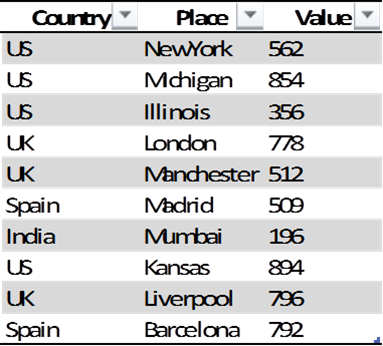
Using Python Pandas I am trying to find the Country & Place with the maximum value.
This returns the maximum value:
data.groupby(['Country','Place'])['Value'].max()
But how do I get the corresponding Country and Place name?
Answers:
Thank you for visiting the Q&A section on Magenaut. Please note that all the answers may not help you solve the issue immediately. So please treat them as advisements. If you found the post helpful (or not), leave a comment & I’ll get back to you as soon as possible.
Method 1
Assuming df has a unique index, this gives the row with the maximum value:
In [34]: df.loc[df['Value'].idxmax()]
Out[34]:
Country        US
Place      Kansas
Value         894
Name: 7
Note that idxmax returns index labels. So if the DataFrame has duplicates in the index, the label may not uniquely identify the row, so df.loc may return more than one row.
Therefore, if df does not have a unique index, you must make the index unique before proceeding as above. Depending on the DataFrame, sometimes you can use stack or set_index to make the index unique. Or, you can simply reset the index (so the rows become renumbered, starting at 0):
df = df.reset_index()
Method 2
df[df['Value']==df['Value'].max()]
This will return the entire row with max value
Method 3
I think the easiest way to return a row with the maximum value is by getting its index. argmax() can be used to return the index of the row with the largest value.
index = df.Value.argmax()
Now the index could be used to get the features for that particular row:
df.iloc[df.Value.argmax(), 0:2]
Method 4
The country and place is the index of the series, if you don’t need the index, you can set as_index=False:
df.groupby(['country','place'], as_index=False)['value'].max()
Edit:
It seems that you want the place with max value for every country, following code will do what you want:
df.groupby("country").apply(lambda df:df.irow(df.value.argmax()))
Method 5
Use the index attribute of DataFrame. Note that I don’t type all the rows in the example.
In [14]: df = data.groupby(['Country','Place'])['Value'].max()

In [15]: df.index
Out[15]:
MultiIndex
[Spain  Manchester, UK     London    , US     Mchigan   ,        NewYork   ]

In [16]: df.index[0]
Out[16]: ('Spain', 'Manchester')

In [17]: df.index[1]
Out[17]: ('UK', 'London')
You can also get the value by that index:
In [21]: for index in df.index:
    print index, df[index]
   ....:
('Spain', 'Manchester') 512
('UK', 'London') 778
('US', 'Mchigan') 854
('US', 'NewYork') 562
Edit
Sorry for misunderstanding what you want, try followings:
In [52]: s=data.max()

In [53]: print '%s, %s, %s' % (s['Country'], s['Place'], s['Value'])
US, NewYork, 854
Method 6
In order to print the Country and Place with maximum value, use the following line of code.
print(df[['Country', 'Place']][df.Value == df.Value.max()])
Method 7
You can use:
print(df[df['Value']==df['Value'].max()])
Method 8
My solution for finding maximum values in columns:
df.ix[df.idxmax()]
, also minimum:
df.ix[df.idxmin()]
Method 9
I’d recommend using nlargest for better performance and shorter code. import pandas
df[col_name].value_counts().nlargest(n=1)
Method 10
import pandas
df is the data frame you create.
Use the command:
df1=df[['Country','Place']][df.Value == df['Value'].max()]
This will display the country and place whose value is maximum.
Method 11
Using DataFrame.nlargest.
The dedicated method for this is nlargest which uses algorithm.SelectNFrame on the background, which is a performant way of doing: sort_values().head(n)
   x  y  a  b
0  1  2  a  x
1  2  4  b  x
2  3  6  c  y
3  4  1  a  z
4  5  2  b  z
5  6  3  c  z
df.nlargest(1, 'y')

   x  y  a  b
2  3  6  c  y
Method 12
I encountered a similar error while trying to import data using pandas, The first column on my dataset had spaces before the start of the words. I removed the spaces and it worked like a charm!!
All methods was sourced from stackoverflow.com or stackexchange.com, is licensed under cc by-sa 2.5, cc by-sa 3.0 and cc by-sa 4.0