I need some help.
There is URL: https://www.inipec.gov.it/cerca-pec/-/pecs/companies.
I need to click checkbox Captcha:
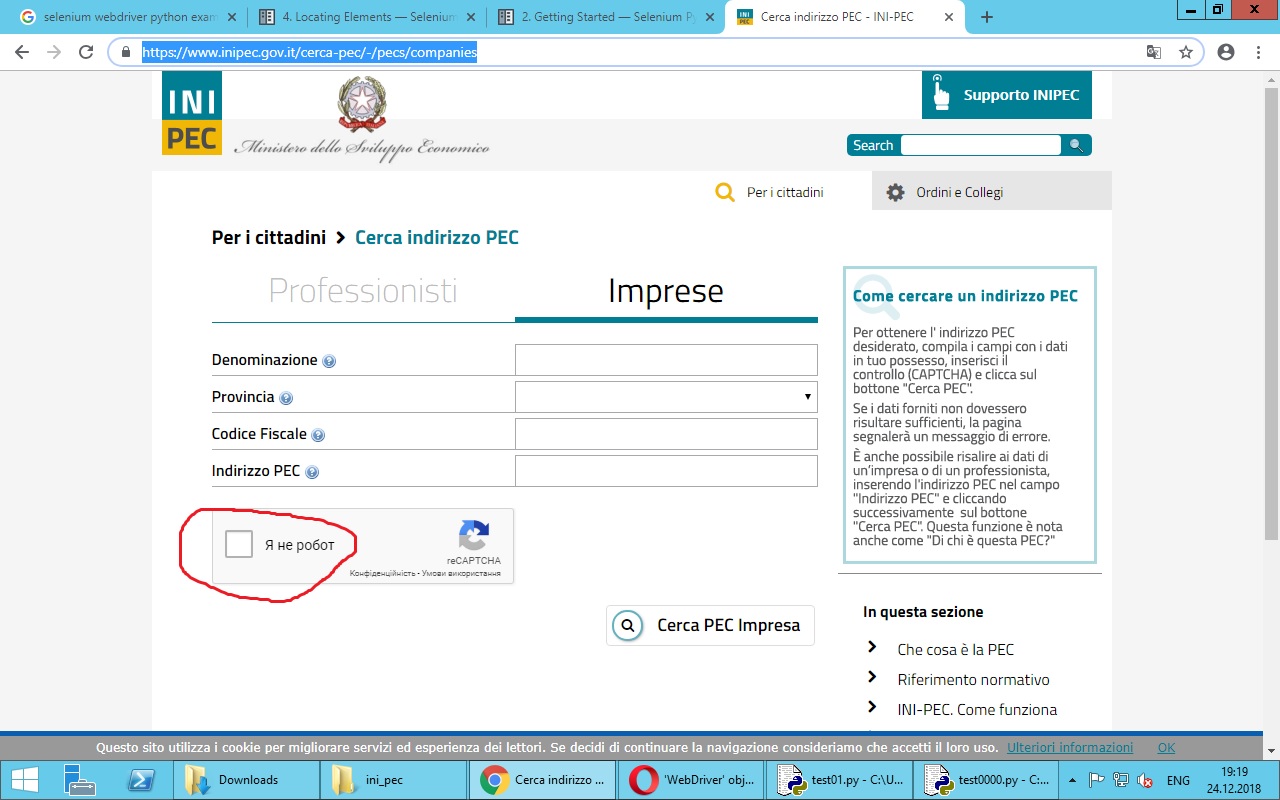
My code is look like:
import os, urllib.request, requests, datetime, time, random, ssl, json, codecs, csv, urllib
from urllib.request import Request, urlopen
from urllib.request import urlretrieve
from datetime import datetime
from selenium import webdriver
from selenium.webdriver.common.keys import Keys
from selenium.common.exceptions import NoSuchElementException
from selenium.webdriver.common.by import By
from selenium.webdriver.support.ui import WebDriverWait
from selenium.webdriver.support import expected_conditions as EC
from selenium.common.exceptions import NoAlertPresentException
from selenium.webdriver.chrome.options import Options

chromedriver = "chromedriver"
os.environ["webdriver.chrome.driver"] = chromedriver
chrome_options = webdriver.ChromeOptions()
driver = webdriver.Chrome(executable_path=chromedriver, chrome_options=chrome_options)
driver.get("https://www.inipec.gov.it/cerca-pec/-/pecs/companies")
driver.switch_to_default_content()
element = driver.find_elements_by_css_selector('iframe')[1]
driver.switch_to_frame(element)

driver.find_elements_by_xpath('//*[@id="recaptcha-anchor"]/div[1]').click()
During the execution, there is an error:
driver.find_elements_by_xpath(‘//*[@id=”recaptcha-anchor”]/div1‘).click()
AttributeError: ‘list’ object has no attribute ‘click’
Please, help to fix it.
Answers:
Thank you for visiting the Q&A section on Magenaut. Please note that all the answers may not help you solve the issue immediately. So please treat them as advisements. If you found the post helpful (or not), leave a comment & I’ll get back to you as soon as possible.
Method 1
Solution update (11-Feb-2020)
Using the following set of binaries:
- Selenium v3.141.0
- ChromeDriver v80.0
- Chrome Version 80.0
You can use the following updated block of code as a solution:
from selenium import webdriver
from selenium.webdriver.support.ui import WebDriverWait
from selenium.webdriver.common.by import By
from selenium.webdriver.support import expected_conditions as EC

options = webdriver.ChromeOptions()
options.add_argument("start-maximized")
options.add_experimental_option("excludeSwitches", ["enable-automation"])
options.add_experimental_option('useAutomationExtension', False)
driver = webdriver.Chrome(options=options, executable_path=r'C:WebDriverschromedriver.exe')
driver.get("https://www.inipec.gov.it/cerca-pec/-/pecs/companies")
WebDriverWait(driver, 10).until(EC.frame_to_be_available_and_switch_to_it((By.CSS_SELECTOR,"iframe[name^='a-'][src^='https://www.google.com/recaptcha/api2/anchor?']")))
WebDriverWait(driver, 10).until(EC.element_to_be_clickable((By.XPATH, "//span[@id='recaptcha-anchor']"))).click()
Original solution
Within the URL https://www.inipec.gov.it/cerca-pec/-/pecs/companies to invoke click() on the reCAPTCHA checkbox you need to:
- Induce WebDriverWait for the desired frame to be available and switch to it.
- Induce WebDriverWait for the desired element to be clickable.
-
You can use the following solution:
from selenium import webdriver
from selenium.webdriver.common.by import By
from selenium.webdriver.support.ui import WebDriverWait
from selenium.webdriver.support import expected_conditions as EC
from selenium.webdriver.chrome.options import Options

options = webdriver.ChromeOptions()
options.add_argument("start-maximized")
options.add_argument('disable-infobars')
driver = webdriver.Chrome(executable_path=r'C:WebDriverschromedriver.exe', chrome_options=options)
driver.get("https://www.inipec.gov.it/cerca-pec/-/pecs/companies")
WebDriverWait(driver, 10).until(EC.frame_to_be_available_and_switch_to_it((By.CSS_SELECTOR,"iframe[name^='a-'][src^='https://www.google.com/recaptcha/api2/anchor?']")))
WebDriverWait(driver, 10).until(EC.element_to_be_clickable((By.XPATH, "//span[@class='recaptcha-checkbox goog-inline-block recaptcha-checkbox-unchecked rc-anchor-checkbox']/div[@class='recaptcha-checkbox-checkmark']"))).click()
Method 2
I resolved this, you can try this with your landing website url.
from selenium import webdriver
from selenium.webdriver.support.select import Select
from selenium.common.exceptions import SessionNotCreatedException

options = webdriver.ChromeOptions()
prefs = {"download.default_directory": download_dir}
options.add_experimental_option("prefs", prefs)
options.add_argument("--no-sandbox")

driver = webdriver.Chrome("/usr/bin/chromedriver", chrome_options = options)
driver.get("https://www.google.com/recaptcha/api2/demo")

driver.maximize_window()
price = driver.find_element_by_xpath("//div[@class='g-recaptcha']")
price_content = price.get_attribute('innerHTML')
start = str(price_content).find(";k=")+len(";k=")
end = str(price_content).find("&co")
driver.implicitly_wait(20)
driver.execute_script("document.getElementById('g-recaptcha-response').style.display = '';")
recaptcha_text_area = driver.find_element_by_id("g-recaptcha-response")

recaptcha_text_area.clear()
recaptcha_text_area.send_keys(price_content[start:end])
    #.....................................................................................

button = driver.find_element_by_id("recaptcha-demo-submit")
All methods was sourced from stackoverflow.com or stackexchange.com, is licensed under cc by-sa 2.5, cc by-sa 3.0 and cc by-sa 4.0