Let me start by telling that what I get may not be what I expect and perhaps you can help me here. I have the following data:
>>> x
array([ 3.08,  3.1 ,  3.12,  3.14,  3.16,  3.18,  3.2 ,  3.22,  3.24,
    3.26,  3.28,  3.3 ,  3.32,  3.34,  3.36,  3.38,  3.4 ,  3.42,
    3.44,  3.46,  3.48,  3.5 ,  3.52,  3.54,  3.56,  3.58,  3.6 ,
    3.62,  3.64,  3.66,  3.68])

>>> y
array([ 0.000857,  0.001182,  0.001619,  0.002113,  0.002702,  0.003351,
    0.004062,  0.004754,  0.00546 ,  0.006183,  0.006816,  0.007362,
    0.007844,  0.008207,  0.008474,  0.008541,  0.008539,  0.008445,
    0.008251,  0.007974,  0.007608,  0.007193,  0.006752,  0.006269,
    0.005799,  0.005302,  0.004822,  0.004339,  0.00391 ,  0.003481,
    0.003095])
Now, I want to fit these data with, say, a 4 degree polynomial. So I do:
>>> coefs = np.polynomial.polynomial.polyfit(x, y, 4)
>>> ffit = np.poly1d(coefs)
Now I create a new grid for x values to evaluate the fitting function ffit:
>>> x_new = np.linspace(x[0], x[-1], num=len(x)*10)
When I do all the plotting (data set and fitting curve) with the command:
>>> fig1 = plt.figure()
>>> ax1 = fig1.add_subplot(111)
>>> ax1.scatter(x, y, facecolors='None')
>>> ax1.plot(x_new, ffit(x_new))
>>> plt.show()
I get the following:
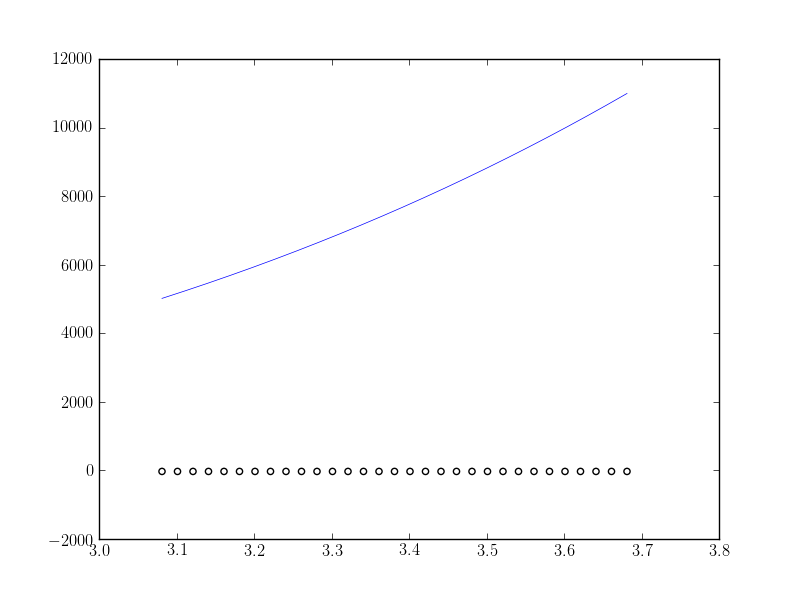
What I expect is the fitting function to fit correctly (at least near the maximum value of the data). What am I doing wrong?
Thanks in advance.
Answers:
Thank you for visiting the Q&A section on Magenaut. Please note that all the answers may not help you solve the issue immediately. So please treat them as advisements. If you found the post helpful (or not), leave a comment & I’ll get back to you as soon as possible.
Method 1
Unfortunately, np.polynomial.polynomial.polyfit returns the coefficients in the opposite order of that for np.polyfit and np.polyval (or, as you used np.poly1d). To illustrate:
In [40]: np.polynomial.polynomial.polyfit(x, y, 4)
Out[40]:
array([  84.29340848, -100.53595376,   44.83281408,   -8.85931101,
          0.65459882])

In [41]: np.polyfit(x, y, 4)
Out[41]:
array([   0.65459882,   -8.859311  ,   44.83281407, -100.53595375,
         84.29340846])
In general: np.polynomial.polynomial.polyfit returns coefficients [A, B, C] to A + Bx + Cx^2 + ..., while np.polyfit returns: ... + Ax^2 + Bx + C.
So if you want to use this combination of functions, you must reverse the order of coefficients, as in:
ffit = np.polyval(coefs[::-1], x_new)
However, the documentation states clearly to avoid np.polyfit, np.polyval, and np.poly1d, and instead to use only the new(er) package.
You’re safest to use only the polynomial package:
import numpy.polynomial.polynomial as poly

coefs = poly.polyfit(x, y, 4)
ffit = poly.polyval(x_new, coefs)
plt.plot(x_new, ffit)
Or, to create the polynomial function:
ffit = poly.Polynomial(coefs)    # instead of np.poly1d
plt.plot(x_new, ffit(x_new))
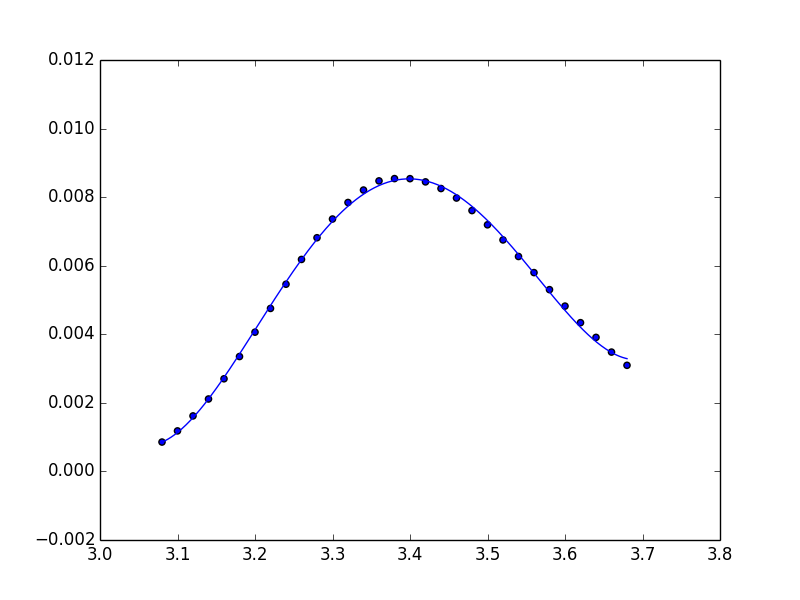
Method 2
Note that you can use the Polynomial class directly to do the fitting and return a Polynomial instance.
from numpy.polynomial import Polynomial

p = Polynomial.fit(x, y, 4)
plt.plot(*p.linspace())
p uses scaled and shifted x values for numerical stability. If you need the usual form of the coefficients, you will need to follow with
pnormal = p.convert(domain=(-1, 1))
All methods was sourced from stackoverflow.com or stackexchange.com, is licensed under cc by-sa 2.5, cc by-sa 3.0 and cc by-sa 4.0