Hi I am exporting database to excel with below method as
        Response.ClearContent();
        Response.Buffer = true;
        Response.AddHeader("content-disposition", "attachment; filename=" + FileName);
        Response.ContentType = "application/vnd.ms-excel";
        EnableViewState = false;
        Response.Write("<style> TABLE { border:dotted 1px #999; } TH { border:dotted 1px #D5D5D5; text-align:center } TD { border:dotted 1px #D5D5D5; } </style>");
        Response.Write("<table>");
        Response.Write("<tr>");
        Response.Write("<th>Actual Estimated Price</th>");
        Response.Write("<th>Aprroved Estimated Price </th>");
        Response.Write("<th>Actual Price</th>");
        Response.Write("<th>Aprroved Actual Price </th>");
        Response.Write("<th>TransactionID </th>");
        Response.Write("<th>Created On</th>");
        Response.Write("</tr>");
        foreach (DataRow dr in dt.Rows)
        {
            Response.Write("<tr>");
            Response.Write("<td>");
            Response.Write(String.Format("{0:0.0#}", dr["EstimatedPriceTotal"].ToString()));
            Response.Write("</td>");
            Response.Write("<td>");
            Response.Write(String.Format("{0:0.0#}", dr["ApprovedEstimatedPriceTotal"].ToString()));
            Response.Write("</td>");
            Response.Write("<td>");
            Response.Write(String.Format("{0:0.0#}", dr["ActualPriceTotal"].ToString()));
            Response.Write("</td>");
            Response.Write("<td>");
            Response.Write(String.Format("{0:0.0#}", dr["ApprovedActualPriceTotal"].ToString()));
            Response.Write("</td>");
            Response.Write("<td>");
            Response.Write(dr["TransactionID"].ToString());
            Response.Write("</td>");
            Response.Write("<td>");
            Response.Write(Convert.ToDateTime(dr["CreatedOn"].ToString()));
            Response.Write("</td>");
            Response.Write("</tr>");
        }
        Response.Write("</table>");
        Response.End();
but I am not able to export Actual Estimated Price, Aprroved Estimated Price in excel as decimal format
The value is coming as 5 instead of showing 5.00
How can I format some column of excel to decimal format from c# side
Update
How can I merge column header merge in EPPPlus
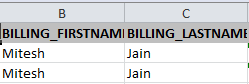
I want both header name as
CustomerName
Mitesh Jain
Answers:
Thank you for visiting the Q&A section on Magenaut. Please note that all the answers may not help you solve the issue immediately. So please treat them as advisements. If you found the post helpful (or not), leave a comment & I’ll get back to you as soon as possible.
Method 1
Here you go, one complete method. Just send a DataTable and a file name and this does the rest. This snippet will also make the header row gray with bold text and will auto fit the columns.
using OfficeOpenXml;
using OfficeOpenXml.Style;

public void ExportToExcel(DataTable dt, string FileName)
{
    //create a new byte array
    byte[] bin;

    //create a new excel document
    using (ExcelPackage excelPackage = new ExcelPackage())
    {
        //create a new worksheet
        ExcelWorksheet ws = excelPackage.Workbook.Worksheets.Add(FileName);

        //add the contents of the datatable to the excel file
        ws.Cells["A1"].LoadFromDataTable(dt, true);

        //auto fix the columns
        ws.Cells[ws.Dimension.Address].AutoFitColumns();

        //loop all the columns
        for (int col = 1; col <= ws.Dimension.End.Column; col++)
        {
            //make all columns just a bit wider, it would sometimes not fit
            ws.Column(col).Width = ws.Column(col).Width + 1;

            var cell = ws.Cells[1, col];

            //make the text bold
            cell.Style.Font.Bold = true;

            //make the background of the cell gray
            var fill = cell.Style.Fill;
            fill.PatternType = ExcelFillStyle.Solid;
            fill.BackgroundColor.SetColor(ColorTranslator.FromHtml("#BFBFBF"));

            //make the header text upper case
            cell.Value = ((string)cell.Value).ToUpper();
        }

        //convert the excel package to a byte array
        bin = excelPackage.GetAsByteArray();
    }

    //clear the buffer stream
    Response.ClearHeaders();
    Response.Clear();
    Response.Buffer = true;

    //set the correct contenttype
    Response.ContentType = "application/vnd.openxmlformats-officedocument.spreadsheetml.sheet";

    //set the correct length of the data being send
    Response.AddHeader("content-length", bin.Length.ToString());

    //set the filename for the excel package
    Response.AddHeader("content-disposition", "attachment; filename="" + FileName + ".xlsx"");

    //send the byte array to the browser
    Response.OutputStream.Write(bin, 0, bin.Length);

    //cleanup
    Response.Flush();
    HttpContext.Current.ApplicationInstance.CompleteRequest();
}
All methods was sourced from stackoverflow.com or stackexchange.com, is licensed under cc by-sa 2.5, cc by-sa 3.0 and cc by-sa 4.0