Is there a way to generate random letters in Python (like random.randint but for letters)? The range functionality of random.randint would be nice but having a generator that just outputs a random letter would be better than nothing.
Answers:
Thank you for visiting the Q&A section on Magenaut. Please note that all the answers may not help you solve the issue immediately. So please treat them as advisements. If you found the post helpful (or not), leave a comment & I’ll get back to you as soon as possible.
Method 1
Simple:
>>> import string
>>> string.ascii_letters
'abcdefghijklmnopqrstuvwxyzABCDEFGHIJKLMNOPQRSTUVWXYZ'
>>> import random
>>> random.choice(string.ascii_letters)
'j'
string.ascii_letters returns a string containing the lower case and upper case letters according to the current locale.
random.choice returns a single, random element from a sequence.
Method 2
>>> import random
>>> import string
>>> random.choice(string.ascii_letters)
'g'
Method 3
>>>def random_char(y):
       return ''.join(random.choice(string.ascii_letters) for x in range(y))

>>>print (random_char(5))
>>>fxkea
to generate y number of random characters
Method 4
>>> import random
>>> import string
>>> random.choice(string.ascii_lowercase)
'b'
Method 5
You can use this to get one or more random letter(s)
import random
import string
random.seed(10)
letters = string.ascii_lowercase
rand_letters = random.choices(letters,k=5) # where k is the number of required rand_letters

print(rand_letters)

['o', 'l', 'p', 'f', 'v']
Method 6
Another way, for completeness:
>>> chr(random.randrange(97, 97 + 26))
Use the fact that ascii ‘a’ is 97, and there are 26 letters in the alphabet.
When determining the upper and lower bound of the random.randrange() function call, remember that random.randrange() is exclusive on its upper bound, meaning it will only ever generate an integer up to 1 unit less that the provided value.
Method 7
You can just make a list:
import random
list1=['a', 'b', 'c', 'd', 'e', 'f', 'g', 'h']
b=random.randint(0,7)
print(list1[b])
Method 8
def randchar(a, b):
    return chr(random.randint(ord(a), ord(b)))
Method 9
import random
def guess_letter():
    return random.choice('abcdefghijklmnopqrstuvwxyz')
Method 10
This doesn’t use any fancy modules but works fine:
''.join(chr(random.randrange(65,90)) for i in range(10))
Method 11
import random
def Random_Alpha():
    l = ['A','B','C','D','E','F','G','H','I','J','K','L','M','N','O','P','Q','R','S','T','U','V','W','X','Y','Z']
    return l[random.randint(0,25)]

print(Random_Alpha())
Method 12
You can use
map(lambda a : chr(a), np.random.randint(low=65, high=90, size=4))
Method 13
#*A handy python password generator*
 import random
    letters = ['a', 'b', 'c', 'd', 'e', 'f', 'g', 'h', 'i', 'j', 'k', 'l', 'm', 'n', 'o', 'p', 'q', 'r', 's', 't', 'u', 'v', 'w', 'x', 'y', 'z', 'A', 'B', 'C', 'D', 'E', 'F', 'G', 'H', 'I', 'J', 'K', 'L', 'M', 'N', 'O', 'P', 'Q', 'R', 'S', 'T', 'U', 'V', 'W', 'X', 'Y', 'Z']
    numbers = ['0', '1', '2', '3', '4', '5', '6', '7', '8', '9']
    symbols = ['!', '#', '$', '%', '&', '(', ')', '*', '+']

    print("Welcome to the Python Password Generator!")
    l= int(input("How many letters would you like in your password?n"))
    s = int(input(f"How many symbols would you like?n"))
    n = int(input(f"How many numbers would you like?n"))

    sequence = random.sample(letters,l)
    num      = random.sample(numbers,n)
    sym      = random.sample(symbols,s)
    sequence.extend(num)
    sequence.extend(sym)

    random.shuffle(sequence)
    password = ''.join([str(elem) for elem in sequence])#listToStr
    print(password)
Method 14
import string
import random

KEY_LEN = 20

def base_str():
    return (string.letters+string.digits)
def key_gen():
    keylist = [random.choice(base_str()) for i in range(KEY_LEN)]
    return ("".join(keylist))
You can get random strings like this:
g9CtUljUWD9wtk1z07iF
ndPbI1DDn6UvHSQoDMtd
klMFY3pTYNVWsNJ6cs34
Qgr7OEalfhXllcFDGh2l
Method 15
def create_key(key_len):
    key = ''
    valid_characters_list = string.letters + string.digits
    for i in range(key_len):
        character = choice(valid_characters_list)
        key = key + character
    return key

def create_key_list(key_num):
    keys = []
    for i in range(key_num):
        key = create_key(key_len)
        if key not in keys:
            keys.append(key)
    return keys
Method 16
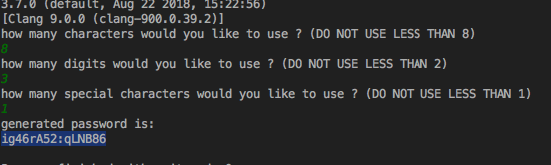
All previous answers are correct, if you are looking for random characters of various types (i.e. alphanumeric and special characters) then here is an script that I created to demonstrate various types of creating random functions, it has three functions one for numbers, alpha- characters and special characters. The script simply generates passwords and is just an example to demonstrate various ways of generating random characters.
import string
import random
import sys

#make sure it's 3.7 or above
print(sys.version)

def create_str(str_length):
    return random.sample(string.ascii_letters, str_length)

def create_num(num_length):
    digits = []
    for i in range(num_length):
        digits.append(str(random.randint(1, 100)))

    return digits

def create_special_chars(special_length):
    stringSpecial = []
    for i in range(special_length):
        stringSpecial.append(random.choice('!$%&()*+,-.:;<=><a href="https://getridbug.com/cdn-cgi/l/email-protection" class="__cf_email__" data-cfemail="eed1ae">[email protected]</a>[]^_`{|}~'))

    return stringSpecial

print("how many characters would you like to use ? (DO NOT USE LESS THAN 8)")
str_cnt = input()
print("how many digits would you like to use ? (DO NOT USE LESS THAN 2)")
num_cnt = input()
print("how many special characters would you like to use ? (DO NOT USE LESS THAN 1)")
s_chars_cnt = input()
password_values = create_str(int(str_cnt)) +create_num(int(num_cnt)) + create_special_chars(int(s_chars_cnt))

#shuffle/mix the values
random.shuffle(password_values)

print("generated password is: ")
print(''.join(password_values))
Result:
Method 17
A summary and improvement of some of the answers.
import numpy as np
n = 5
[chr(i) for i in np.random.randint(ord('a'), ord('z') + 1, n)]
# ['b', 'f', 'r', 'w', 't']
Method 18
well, this is my answer! It works well. Just put the number of random letters you want in ‘number’… (Python 3)
import random

def key_gen():
    keylist = random.choice('abcdefghijklmnopqrstuvwxyz')
    return keylist

number = 0
list_item = ''
while number < 20:
    number = number + 1
    list_item = list_item + key_gen()

print(list_item)
Method 19
import string
import random

def random_char(y):
    return ''.join(random.choice(string.ascii_letters+string.digits+li) for x in range(y))
no=int(input("Enter the number of character for your password=  "))
li = random.choice('<a href="https://getridbug.com/cdn-cgi/l/email-protection" class="__cf_email__" data-cfemail="260766">[email protected]</a>#$%^*&( )_+}{')
print(random_char(no)+li)
Method 20
My overly complicated piece of code:
import random

letter = (random.randint(1,26))
if letter == 1:
   print ('a')
elif letter == 2:
    print ('b')
elif letter == 3:
    print ('c')
elif letter == 4:
    print ('d')
elif letter == 5:
    print ('e')
elif letter == 6:
    print ('f')
elif letter == 7:
    print ('g')
elif letter == 8:
    print ('h')
elif letter == 9:
    print ('i')
elif letter == 10:
    print ('j')
elif letter == 11:
    print ('k')
elif letter == 12:
    print ('l')
elif letter == 13:
    print ('m')
elif letter == 14:
    print ('n')
elif letter == 15:
    print ('o')
elif letter == 16:
    print ('p')
elif letter == 17:
    print ('q')
elif letter == 18:
    print ('r')
elif letter == 19:
    print ('s')
elif letter == 20:
    print ('t')
elif letter == 21:
    print ('u')
elif letter == 22:
    print ('v')
elif letter == 23:
    print ('w')
elif letter == 24:
    print ('x')
elif letter == 25:
    print ('y')
elif letter == 26:
    print ('z')
It basically generates a random number out of 26 and then converts into its corresponding letter. This could defiantly be improved but I am only a beginner and I am proud of this piece of code.
Method 21
Maybe this can help you:
import random
for a in range(64,90):
    h = random.randint(64, a)
    e += chr(h)
print e
Method 22
Place a python on the keyboard and let him roll over the letters until you find your preferd random combo Just kidding!
import string #This was a design above but failed to print. I remodled it.
import random
irandom = random.choice(string.ascii_letters)
print irandom
All methods was sourced from stackoverflow.com or stackexchange.com, is licensed under cc by-sa 2.5, cc by-sa 3.0 and cc by-sa 4.0