This is a self-answered post. A common problem is to randomly generate dates between a given start and end date.
There are two cases to consider:
- random dates with a time component, and
- random dates without time
For example, given some start date 2015-01-01 and an end date 2018-01-01, how can I sample N random dates between this range using pandas?
Answers:
Thank you for visiting the Q&A section on Magenaut. Please note that all the answers may not help you solve the issue immediately. So please treat them as advisements. If you found the post helpful (or not), leave a comment & I’ll get back to you as soon as possible.
Method 1
Is converting to the unix timestamp acceptable?
def random_dates(start, end, n=10):

    start_u = start.value//10**9
    end_u = end.value//10**9

    return pd.to_datetime(np.random.randint(start_u, end_u, n), unit='s')
Sample run:
start = pd.to_datetime('2015-01-01')
end = pd.to_datetime('2018-01-01')
random_dates(start, end)

DatetimeIndex(['2016-10-08 07:34:13', '2015-11-15 06:12:48',
               '2015-01-24 10:11:04', '2015-03-26 16:23:53',
               '2017-04-01 00:38:21', '2015-05-15 03:47:54',
               '2015-06-24 07:32:32', '2015-11-10 20:39:36',
               '2016-07-25 05:48:09', '2015-03-19 16:05:19'],
              dtype='datetime64[ns]', freq=None)
EDIT:
As per the comment by @smci, I wrote a function to accommodate both 1 and 2 with a little explanation inside the function itself.
def random_datetimes_or_dates(start, end, out_format='datetime', n=10):

    '''
    unix timestamp is in ns by default.
    I divide the unix time value by 10**9 to make it seconds (or 24*60*60*10**9 to make it days).
    The corresponding unit variable is passed to the pd.to_datetime function.
    Values for the (divide_by, unit) pair to select is defined by the out_format parameter.
    for 1 -> out_format='datetime'
    for 2 -> out_format=anything else
    '''
    (divide_by, unit) = (10**9, 's') if out_format=='datetime' else (24*60*60*10**9, 'D')

    start_u = start.value//divide_by
    end_u = end.value//divide_by

    return pd.to_datetime(np.random.randint(start_u, end_u, n), unit=unit)
Sample run:
random_datetimes_or_dates(start, end, out_format='datetime')

DatetimeIndex(['2017-01-30 05:14:27', '2016-10-18 21:17:16',
               '2016-10-20 08:38:02', '2015-09-02 00:03:08',
               '2015-06-04 02:38:12', '2016-02-19 05:22:01',


                  '2015-11-06 10:37:10', '2017-12-17 03:26:02',
                   '2017-11-20 06:51:32', '2016-01-02 02:48:03'],
                  dtype='datetime64[ns]', freq=None)

random_datetimes_or_dates(start, end, out_format='not datetime')

DatetimeIndex(['2017-05-10', '2017-12-31', '2017-11-10', '2015-05-02',
               '2016-04-11', '2015-11-27', '2015-03-29', '2017-05-21',
               '2015-05-11', '2017-02-08'],
              dtype='datetime64[ns]', freq=None)
Method 2
np.random.randn + to_timedelta
This addresses Case (1). You can do this by generating a random array of timedelta objects and adding them to your start date.
def random_dates(start, end, n, unit='D', seed=None):
    if not seed:  # from piR's answer
        np.random.seed(0)

    ndays = (end - start).days + 1
    return pd.to_timedelta(np.random.rand(n) * ndays, unit=unit) + start
>>> np.random.seed(0)
>>> start = pd.to_datetime('2015-01-01')
>>> end = pd.to_datetime('2018-01-01')
>>> random_dates(start, end, 10)
DatetimeIndex([   '2016-08-25 01:09:42.969600',
                  '2017-02-23 13:30:20.304000',
                  '2016-10-23 05:33:15.033600',
               '2016-08-20 17:41:04.012799999',
               '2016-04-09 17:59:00.815999999',
                  '2016-12-09 13:06:00.748800',
                  '2016-04-25 00:47:45.974400',
                  '2017-09-05 06:35:58.444800',
                  '2017-11-23 03:18:47.347200',
                  '2016-02-25 15:14:53.894400'],
              dtype='datetime64[ns]', freq=None)
This will generate dates with a time component as well.
Sadly, rand does not support a replace=False, so if you want unique dates, you’ll need a two-step process of 1) generate the non-unique days component, and 2) generate the unique seconds/milliseconds component, then add the two together.
np.random.randint + to_timedelta
This addresses Case (2). You can modify random_dates above to generate random integers instead of random floats:
def random_dates2(start, end, n, unit='D', seed=None):
    if not seed:  # from piR's answer
        np.random.seed(0)

    ndays = (end - start).days + 1
    return start + pd.to_timedelta(
        np.random.randint(0, ndays, n), unit=unit
    )
>>> random_dates2(start, end, 10)
DatetimeIndex(['2016-11-15', '2016-07-13', '2017-04-15', '2017-02-02',
               '2017-10-30', '2015-10-05', '2016-08-22', '2017-12-30',
               '2016-08-23', '2015-11-11'],
              dtype='datetime64[ns]', freq=None)
To generate dates with other frequencies, the functions above can be called with a different value for unit. Additionally, you can add a parameter freq and tweak your function call as needed.
If you want unique random dates, you can use np.random.choice with replace=False:
def random_dates2_unique(start, end, n, unit='D', seed=None):
    if not seed:  # from piR's answer
        np.random.seed(0)

    ndays = (end - start).days + 1
    return start + pd.to_timedelta(
        np.random.choice(ndays, n, replace=False), unit=unit
    )
Performance
Going to benchmark just the methods that address Case (1), since Case (2) is really a special case which any method can get to using dt.floor.
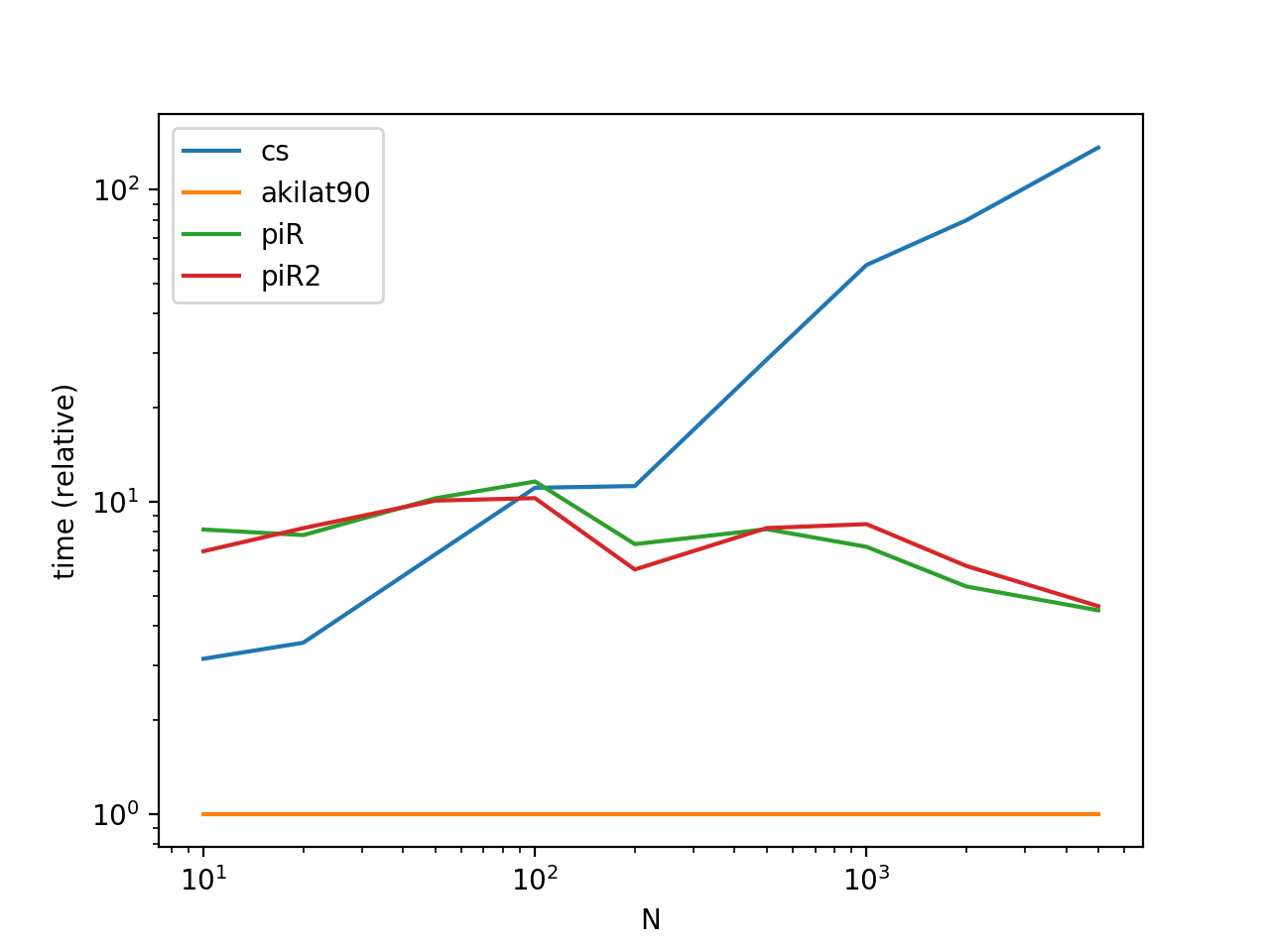
Functions
def cs(start, end, n):
    ndays = (end - start).days + 1
    return pd.to_timedelta(np.random.rand(n) * ndays, unit='D') + start

def akilat90(start, end, n):
    start_u = start.value//10**9
    end_u = end.value//10**9

    return pd.to_datetime(np.random.randint(start_u, end_u, n), unit='s')

def piR(start, end, n):
    dr = pd.date_range(start, end, freq='H') # can't get better than this :-(
    return pd.to_datetime(np.sort(np.random.choice(dr, n, replace=False)))

def piR2(start, end, n):
    dr = pd.date_range(start, end, freq='H')
    a = np.arange(len(dr))
    b = np.sort(np.random.permutation(a)[:n])
    return dr[b]
Benchmarking Code
from timeit import timeit

import pandas as pd
import matplotlib.pyplot as plt

res = pd.DataFrame(
       index=['cs', 'akilat90', 'piR', 'piR2'],
       columns=[10, 20, 50, 100, 200, 500, 1000, 2000, 5000],
       dtype=float
)

for f in res.index:
    for c in res.columns:
        np.random.seed(0)

        start = pd.to_datetime('2015-01-01')
        end = pd.to_datetime('2018-01-01')

        stmt = '{}(start, end, c)'.format(f)
        setp = 'from __main__ import start, end, c, {}'.format(f)
        res.at[f, c] = timeit(stmt, setp, number=30)

ax = res.div(res.min()).T.plot(loglog=True)
ax.set_xlabel("N");
ax.set_ylabel("time (relative)");

plt.show()
Method 3
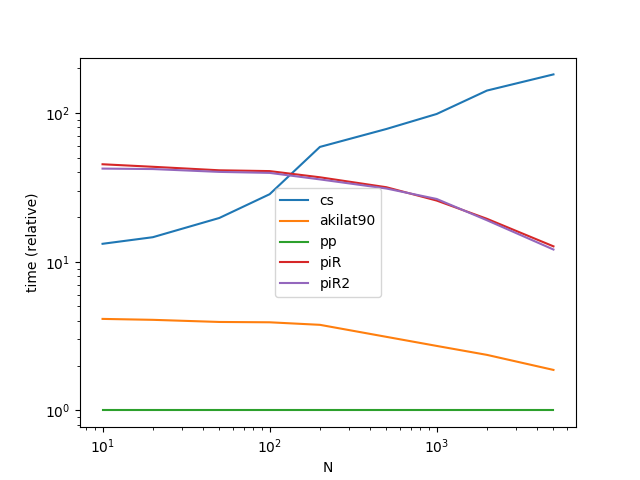
We can speed up @akilat90’s approach about twofold (in @coldspeed’s benchmark) by using the fact that datetime64 is just a rebranded int64 hence we can view-cast:
def pp(start, end, n):
    start_u = start.value//10**9
    end_u = end.value//10**9

    return pd.DatetimeIndex((10**9*np.random.randint(start_u, end_u, n, dtype=np.int64)).view('M8[ns]'))
Method 4
numpy.random.choice
You can leverage Numpy’s random choice. choice may be problematic over large data_ranges. For example, too large will result in a MemoryError. It requires storing the entire thing in order to select random bits.
random_dates('2015-01-01', '2018-01-01', 10, 'ns', seed=[3, 1415])

MemoryError
Also, this requires a sort.
def random_dates(start, end, n, freq, seed=None):
    if seed is not None:
        np.random.seed(seed)

    dr = pd.date_range(start, end, freq=freq)
    return pd.to_datetime(np.sort(np.random.choice(dr, n, replace=False)))

random_dates('2015-01-01', '2018-01-01', 10, 'H', seed=[3, 1415])

DatetimeIndex(['2015-04-24 02:00:00', '2015-11-26 23:00:00',
               '2016-01-18 00:00:00', '2016-06-27 22:00:00',
               '2016-08-12 17:00:00', '2016-10-21 11:00:00',
               '2016-11-07 11:00:00', '2016-12-09 23:00:00',
               '2017-02-20 01:00:00', '2017-06-17 18:00:00'],
              dtype='datetime64[ns]', freq=None)
numpy.random.permutation
Similar to other answer. However, I like this answer as it slices the datetimeindex produced by date_range and automatically returns another datetimeindex.
def random_dates_2(start, end, n, freq, seed=None):
    if seed is not None:
        np.random.seed(seed)

    dr = pd.date_range(start, end, freq=freq)
    a = np.arange(len(dr))
    b = np.sort(np.random.permutation(a)[:n])
    return dr[b]
Method 5
Just my two cents, using date_range and sample:
def random_dates(start, end, n, seed=1, replace=False):
    dates = pd.date_range(start, end).to_series()
    return dates.sample(n, replace=replace, random_state=seed)

random_dates("20170101","20171223", 10, seed=1)
Out[29]:
2017-10-01   2017-10-01
2017-08-23   2017-08-23
2017-11-30   2017-11-30
2017-06-15   2017-06-15
2017-11-18   2017-11-18
2017-10-31   2017-10-31
2017-07-31   2017-07-31
2017-03-07   2017-03-07
2017-09-09   2017-09-09
2017-10-15   2017-10-15
dtype: datetime64[ns]
Method 6
I found A new base library generated the range of the date, seems like on my side a bit faster than pandas.data_range , credit from this answer
from dateutil.rrule import rrule, DAILY
import datetime, random
def pick(start,end,n):
    return (random.sample(list(rrule(DAILY, dtstart=start,until=end)),n))


pick(datetime.datetime(2010, 2, 1, 0, 0),datetime.datetime(2010, 2, 5, 0, 0),2)
[datetime.datetime(2010, 2, 3, 0, 0), datetime.datetime(2010, 2, 2, 0, 0)]
Method 7
Thats some alternative way 😀 Maybe someone will need it.
from datetime import datetime
import random
import numpy as np
import pandas as pd

N = 10 #N-samples
dates = np.zeros([N,3])

for i in range(0,N):
    year = random.randint(1970, 2010)
    month = random.randint(1, 12)
    day = random.randint(1, 28)
    #if you need to change it use variables :3
    birth_date = datetime(year, month, day)
    dates[i] = [year,month,day]

df = pd.DataFrame(dates.astype(int))
df.columns = ['year', 'month', 'day']
pd.to_datetime(df)
Result:
0   1999-08-22
1   1989-04-27
2   1978-10-01
3   1998-12-09
4   1979-04-19
5   1988-03-22
6   1992-03-02
7   1993-04-28
8   1978-10-04
9   1972-01-13
dtype: datetime64[ns]
Method 8
I think this is an easier solution for just creating a date field in a pandas DateFrame
list1 = []
for x in range(0,365):
    list1.append(x)
date = pd.DataFrame(pd.to_datetime(list1, unit='D',origin=pd.Timestamp('2018-01-01')))
All methods was sourced from stackoverflow.com or stackexchange.com, is licensed under cc by-sa 2.5, cc by-sa 3.0 and cc by-sa 4.0