I’m working on a RadGrid, and I want to access its rows but it seems it does not have a .Rows property.
Here’s what I have tried until now:
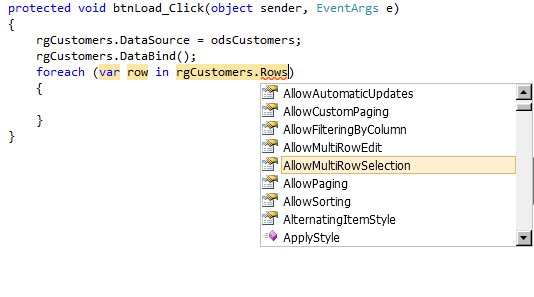
How can I access rgCustomers‘s Rows collection? I want to add a button to each row.
Answers:
Thank you for visiting the Q&A section on Magenaut. Please note that all the answers may not help you solve the issue immediately. So please treat them as advisements. If you found the post helpful (or not), leave a comment & I’ll get back to you as soon as possible.
Method 1
According to Telerik’s documentation,
“Each dynamic row in the grid represents a record from the specified data source. Dynamic rows are represented by the GridDataItem class (a descendent of GridItem).
Each GridTableView has a set of rows (the Items collection) of type GridDataItem.”
So you want to use the Items collection of the grid, which is a collection of GridDataItems.
protected void btnLoad_Click(object sender, EventArgs e)
{
  rgCustomers.DataSource = odsCustomers;
  rgCustomers.DataBind();
  foreach (GridDataItem row in rgCustomers.Items)
  {
  }
}
Method 2
I’m assuming it’s WPF/Silverlight RadGrid?
If You want to access row control in databound grid (not row data) – You’ll have to use ItemContainerGenerator property of RadGrid. For example:
rgCustomers.ItemContainerGenerator.ContainerFromIndex(0);
or
rgCustomers.ItemContainerGenerator.ContainerFromItem(odsCustomers[0]);
will return first row control (of type RadGridViewRow if I remember correctly)
Method 3
GridTemplateColumn or GridButtonColumn will do the trick.
– If you want to access the current row:
-
Use the OnClick event handler of the button.
<telerik:RadButton ID="BTN_DEMO" runat="server" HeaderText="N°1 DEMO BTN"
Text='<%#"Click Me iM N°"+((IhateEvalDataSource) Container.DataItem).Stuff_ID %>'
OnClick="BTN_DEMO_Click"></telerik:RadButton>
-
Get a reference to the GridDataItem using (sender as RadButton).NamingContainer.
protected void BTN_BL_Click(object sender, EventArgs e) { GridDataItem G = ((RadButton)sender).NamingContainer as GridDataItem; } -
Use GetDataKeyValue() method to extract the record ID:
DEMO_INT = (int)G.GetDataKeyValue("mySweetInt");
DEMO_STRING = (string)G.GetDataKeyValue("MyString");
All methods was sourced from stackoverflow.com or stackexchange.com, is licensed under cc by-sa 2.5, cc by-sa 3.0 and cc by-sa 4.0