How do I get the 'state' of a Tkinter Checkbutton? By 'state' I mean get whether or not it has a check mark in it or not.
Answers:
Thank you for visiting the Q&A section on Magenaut. Please note that all the answers may not help you solve the issue immediately. So please treat them as advisements. If you found the post helpful (or not), leave a comment & I’ll get back to you as soon as possible.
Method 1
When you’re creating it, it takes a variable keyword argument. Pass it an IntVar from Tkinter. Checking or unchecking the box will set that value contained by var to the corresponding boolean state. This can be accessed as var.get():
checked => var.get()
not checked => not var.get()
>>> root = Tkinter.Tk()
>>> var = Tkinter.IntVar()
>>> chk = Tkinter.Checkbutton(root, text='foo', variable=var)
>>> chk.pack(side=Tkinter.LEFT)
>>> var.get()  #unchecked
0
>>> var.get()  #checked
1
Method 2
If you use the new* ttk module from tkinter, you can read and write checkbutton states without assigning variables.
import tkinter
from tkinter import ttk
tkwindow = tkinter.Tk()
chk = ttk.Checkbutton(tkwindow, text="foo")
chk.grid(column=0, row=0)
Notice that the new checkbox defaults to the “alternate”, sometimes called “half-checked”, state:
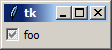
You can read the current state usinge the .state() method:
>>> print(chk.state())  # half-checked
('alternate',)
>>> print(chk.state())  # checked
('selected',)
>>> print(chk.state())  # not checked
()
To set the state in code:
chk.state(['selected'])  # check the checkbox
chk.state(['!selected']) # clear the checkbox
chk.state(['disabled'])  # disable the checkbox
chk.state(['!disabled','selected']) # enable the checkbox and put a check in it!
And here is a convenient way to check for a specific state:
chk.instate(['selected']) # returns True if the box is checked
There are two tricky things I’ve found:
-
The initial state is “alternate”, and this state flag doesn’t get cleared when adding a “selected” state flag. So, if you want to toggle your checkbutton in code, you’ll first need to clear the “alternate” flag:
chk.state(['!alternate'])
-
If you disable/enable the checkbutton using
chk.state(['disabled'])
chk.state(['!disabled'])
then everything works fine. But, if you use these common, alternate methods:
chk.config(state=tk.DISABLED)
chk.config(state=tk.NORMAL)
then it reasserts the ‘alternate’ flag.
This behavior doesn’t happen if you assign a variable to the checkbutton, but then, if you wanted to assign a variable then this answer probably won’t help you 🙂
* ttk became available in Python 2.7 (Tk 8.5). This question talks about the differences between the old standard widgets and the newer, “themed” ones.
Method 3
bitsmack answer doesn’t exactly agree with what I am seeing.
chk.state() returns a tuple which has two elements when selected: (‘focus’,’selected’)
import tkinter as tk
from tkinter import ttk
def p(event):
    st = ck.state()
    print (f'is tuple {type(st) is tuple}  {len(st)}-----------------------------------------')
    if 'selected' in st:
        print ('got selected')
    for i,pst in enumerate(st) :
        print(f'{i}, {pst}')


root = tk.Tk()
root.geometry('200x200+300+200')
root.grid_rowconfigure(0, weight = 1)

ck = ttk.Checkbutton(root,text = 'tryme')
ck.grid()
root.bind('<Return>',p)
root.mainloop()
yields this result:
is tuple True 1—————————————-
0, alternate
is tuple True 2—————————————–
got selected
0, focus
1, selected
is tuple True 1—————————————–
0, focus
So, to determine if the checkbox is selected:
if 'selected' in chk.state()
for alternate:
if 'alternate' in chk.state()
for not selected:
if not ('selected' in chk.state or 'alternate' in chk.state)
All methods was sourced from stackoverflow.com or stackexchange.com, is licensed under cc by-sa 2.5, cc by-sa 3.0 and cc by-sa 4.0