I tried implementing this formula: http://andrew.hedges.name/experiments/haversine/
The aplet does good for the two points I am testing:
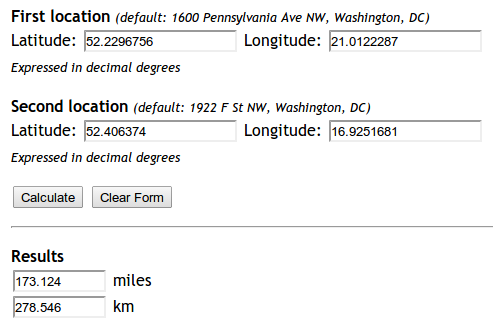
Yet my code is not working.
from math import sin, cos, sqrt, atan2

R = 6373.0

lat1 = 52.2296756
lon1 = 21.0122287
lat2 = 52.406374
lon2 = 16.9251681

dlon = lon2 - lon1
dlat = lat2 - lat1
a = (sin(dlat/2))**2 + cos(lat1) * cos(lat2) * (sin(dlon/2))**2
c = 2 * atan2(sqrt(a), sqrt(1-a))
distance = R * c

print "Result", distance
print "Should be", 278.546
The distance it returns is 5447.05546147. Why?
Answers:
Thank you for visiting the Q&A section on Magenaut. Please note that all the answers may not help you solve the issue immediately. So please treat them as advisements. If you found the post helpful (or not), leave a comment & I’ll get back to you as soon as possible.
Method 1
Update: 04/2018: Vincenty distance is deprecated since GeoPy version 1.13 – you should use geopy.distance.distance() instead!
The answers above are based on the Haversine formula, which assumes the earth is a sphere, which results in errors of up to about 0.5% (according to help(geopy.distance)). Vincenty distance uses more accurate ellipsoidal models such as WGS-84, and is implemented in geopy. For example,
import geopy.distance

coords_1 = (52.2296756, 21.0122287)
coords_2 = (52.406374, 16.9251681)

print geopy.distance.geodesic(coords_1, coords_2).km
will print the distance of 279.352901604 kilometers using the default ellipsoid WGS-84. (You can also choose .miles or one of several other distance units).
Method 2
Edit: Just as a note, if you just need a quick and easy way of finding the distance between two points, I strongly recommend using the approach described in Kurt’s answer below instead of re-implementing Haversine — see his post for rationale.
This answer focuses just on answering the specific bug OP ran into.
It’s because in Python, all the trig functions use radians, not degrees.
You can either convert the numbers manually to radians, or use the radians function from the math module:
from math import sin, cos, sqrt, atan2, radians

# approximate radius of earth in km
R = 6373.0

lat1 = radians(52.2296756)
lon1 = radians(21.0122287)
lat2 = radians(52.406374)
lon2 = radians(16.9251681)

dlon = lon2 - lon1
dlat = lat2 - lat1

a = sin(dlat / 2)**2 + cos(lat1) * cos(lat2) * sin(dlon / 2)**2
c = 2 * atan2(sqrt(a), sqrt(1 - a))

distance = R * c

print("Result:", distance)
print("Should be:", 278.546, "km")
The distance is now returning the correct value of 278.545589351 km.
Method 3
For people (like me) coming here via search engine and just looking for a solution which works out of the box, I recommend installing mpu. Install it via pip install mpu --user and use it like this to get the haversine distance:
import mpu

# Point one
lat1 = 52.2296756
lon1 = 21.0122287

# Point two
lat2 = 52.406374
lon2 = 16.9251681

# What you were looking for
dist = mpu.haversine_distance((lat1, lon1), (lat2, lon2))
print(dist)  # gives 278.45817507541943.
An alternative package is gpxpy.
If you don’t want dependencies, you can use:
import math


def distance(origin, destination):
    """
    Calculate the Haversine distance.

    Parameters
    ----------
    origin : tuple of float
        (lat, long)
    destination : tuple of float
        (lat, long)

    Returns
    -------
    distance_in_km : float

    Examples
    --------
    >>> origin = (48.1372, 11.5756)  # Munich
    >>> destination = (52.5186, 13.4083)  # Berlin
    >>> round(distance(origin, destination), 1)
    504.2
    """
    lat1, lon1 = origin
    lat2, lon2 = destination
    radius = 6371  # km

    dlat = math.radians(lat2 - lat1)
    dlon = math.radians(lon2 - lon1)
    a = (math.sin(dlat / 2) * math.sin(dlat / 2) +
         math.cos(math.radians(lat1)) * math.cos(math.radians(lat2)) *
         math.sin(dlon / 2) * math.sin(dlon / 2))
    c = 2 * math.atan2(math.sqrt(a), math.sqrt(1 - a))
    d = radius * c

    return d


if __name__ == '__main__':
    import doctest
    doctest.testmod()
The other alternative package is haversine
from haversine import haversine, Unit

lyon = (45.7597, 4.8422) # (lat, lon)
paris = (48.8567, 2.3508)

haversine(lyon, paris)
>> 392.2172595594006  # in kilometers

haversine(lyon, paris, unit=Unit.MILES)
>> 243.71201856934454  # in miles

# you can also use the string abbreviation for units:
haversine(lyon, paris, unit='mi')
>> 243.71201856934454  # in miles

haversine(lyon, paris, unit=Unit.NAUTICAL_MILES)
>> 211.78037755311516  # in nautical miles
They claim to have performance optimization for distances between all points in two vectors
from haversine import haversine_vector, Unit

lyon = (45.7597, 4.8422) # (lat, lon)
paris = (48.8567, 2.3508)
new_york = (40.7033962, -74.2351462)

haversine_vector([lyon, lyon], [paris, new_york], Unit.KILOMETERS)

>> array([ 392.21725956, 6163.43638211])
Method 4
I arrived at a much simpler and robust solution which is using geodesic from geopy package since you’ll be highly likely using it in your project anyways so no extra package installation needed.
Here is my solution:
from geopy.distance import geodesic


origin = (30.172705, 31.526725)  # (latitude, longitude) don't confuse
dist = (30.288281, 31.732326)

print(geodesic(origin, dist).meters)  # 23576.805481751613
print(geodesic(origin, dist).kilometers)  # 23.576805481751613
print(geodesic(origin, dist).miles)  # 14.64994773134371
Method 5
There are multiple ways to calculate the distance based on the coordinates i.e latitude and longitude
Install and import
from geopy import distance
from math import sin, cos, sqrt, atan2, radians
from sklearn.neighbors import DistanceMetric
import osrm
import numpy as np
Define coordinates
lat1, lon1, lat2, lon2, R = 20.9467,72.9520, 21.1702, 72.8311, 6373.0
coordinates_from = [lat1, lon1]
coordinates_to = [lat2, lon2]
Using haversine
dlon = radians(lon2) - radians(lon1)
dlat = radians(lat2) - radians(lat1)

a = sin(dlat / 2)**2 + cos(lat1) * cos(lat2) * sin(dlon / 2)**2
c = 2 * atan2(sqrt(a), sqrt(1 - a))

distance_haversine_formula = R * c
print('distance using haversine formula: ', distance_haversine_formula)
Using haversine with sklearn
dist = DistanceMetric.get_metric('haversine')

X = [[radians(lat1), radians(lon1)], [radians(lat2), radians(lon2)]]
distance_sklearn = R * dist.pairwise(X)
print('distance using sklearn: ', np.array(distance_sklearn).item(1))
Using OSRM
osrm_client = osrm.Client(host='http://router.project-osrm.org')
coordinates_osrm = [[lon1, lat1], [lon2, lat2]] # note that order is lon, lat

osrm_response = osrm_client.route(coordinates=coordinates_osrm, overview=osrm.overview.full)
dist_osrm = osrm_response.get('routes')[0].get('distance')/1000 # in km
print('distance using OSRM: ', dist_osrm)
Using geopy
distance_geopy = distance.distance(coordinates_from, coordinates_to).km
print('distance using geopy: ', distance_geopy)

distance_geopy_great_circle = distance.great_circle(coordinates_from, coordinates_to).km
print('distance using geopy great circle: ', distance_geopy_great_circle)
Output
distance using haversine formula:  26.07547017310917
distance using sklearn:  27.847882224769783
distance using OSRM:  33.091699999999996
distance using geopy:  27.7528030550408
distance using geopy great circle:  27.839182219511834
Method 6
import numpy as np


def Haversine(lat1,lon1,lat2,lon2, **kwarg):
    """
    This uses the ‘haversine’ formula to calculate the great-circle distance between two points – that is,
    the shortest distance over the earth’s surface – giving an ‘as-the-crow-flies’ distance between the points
    (ignoring any hills they fly over, of course!).
    Haversine
    formula:    a = sin²(Δφ/2) + cos φ1 ⋅ cos φ2 ⋅ sin²(Δλ/2)
    c = 2 ⋅ atan2( √a, √(1−a) )
    d = R ⋅ c
    where   φ is latitude, λ is longitude, R is earth’s radius (mean radius = 6,371km);
    note that angles need to be in radians to pass to trig functions!
    """
    R = 6371.0088
    lat1,lon1,lat2,lon2 = map(np.radians, [lat1,lon1,lat2,lon2])

    dlat = lat2 - lat1
    dlon = lon2 - lon1
    a = np.sin(dlat/2)**2 + np.cos(lat1) * np.cos(lat2) * np.sin(dlon/2) **2
    c = 2 * np.arctan2(a**0.5, (1-a)**0.5)
    d = R * c
    return round(d,4)
Method 7
You can use Uber’s H3,point_dist() function to compute the spherical distance between two (lat, lng) points. We can set return unit (‘km’, ‘m’, or ‘rads’). The default unit is Km.
Example :
import h3

coords_1 = (52.2296756, 21.0122287)
coords_2 = (52.406374, 16.9251681)
distance = h3.point_dist(coords_1, coords_2, unit='m') # to get distance in meters
Hope this will usefull!
Method 8
In the year 2022, one can post live javascript code that solves this problem using more recent javascript library. The general benefit is that the users can run and see the result on the web page that runs on modern devices.
// Using WGS84 ellipsoid model for computation
var geod84 = geodesic.Geodesic.WGS84;
// Input data
lat1 = 52.2296756;
lon1 = 21.0122287;
lat2 = 52.406374;
lon2 = 16.9251681;
// Do the classic `geodetic inversion` computatioin
geod84inv = geod84.Inverse(lat1, lon1, lat2, lon2);
// Present the solution (only the geodetic distance)
console.log("The distance is " + (geod84inv.s12/1000).toFixed(5) + " km.");
<script type="text/javascript" src="https://cdn.jsdelivr.net/npm/[email protected]/geographiclib-geodesic.min.js">
</script>Method 9
In the year 2022, one can post mixed javascript+python code that solves this problem using more recent python library, namely, geographiclib. The general benefit is that the users can run and see the result on the web page that runs on modern devices.
async function main(){
  let pyodide = await loadPyodide();
  await pyodide.loadPackage(["micropip"]);

  console.log(pyodide.runPythonAsync(`
    import micropip
    await micropip.install('geographiclib')
    from geographiclib.geodesic import Geodesic
    lat1 = 52.2296756;
    lon1 = 21.0122287;
    lat2 = 52.406374;
    lon2 = 16.9251681;
    ans = Geodesic.WGS84.Inverse(lat1, lon1, lat2, lon2)
    dkm = ans["s12"] / 1000
    print("Geodesic solution", ans)
    print(f"Distance = {dkm:.4f} km.")
  `));

}

main();
<script src="https://cdn.jsdelivr.net/pyodide/v0.20.0/full/pyodide.js"></script>Method 10
The most simple way is with haversine package.
import haversine as hs


coord_1 = (lat, lon)
coord_2 = (lat, lon)
x = hs.haversine(coord_1,coord_2)
print(f'The distance is {x} km')
Method 11
Another intereting use of mixed javascript+python through pyodide and webassembly implementation to obtain the solution using Python’s libraries pandas+geographiclib is also feasible.
I made extra effort using pandas to prep the input data and when output is available, append them to the solution column. Pandas provides many useful features for input/output for common needs. Its method toHtml is handy to present the final solution on the web page
EDIT
I found that the execution of the code in this answer is not successful on some iphone and ipad devices. But on newer midrange Android devices will run fine. I will find a way to correct this issue and update this soon.
My sidenote, I am aware that my answers are not direct answer to the OP question like some other answers. But lately the outside world said that many answers in StackOvereflow are outdated and tried to steer people away from here.
async function main(){
let pyodide = await loadPyodide();
await pyodide.loadPackage(["pandas", "micropip"]);
console.log(pyodide.runPythonAsync(`
import micropip
import pandas as pd
import js
print("Pandas version: " + pd.__version__)
await micropip.install('geographiclib')
from geographiclib.geodesic import Geodesic
import geographiclib as gl
print("Geographiclib version: " + gl.__version__)
data = {'Description': ['Answer to the question', 'Bangkok to Tokyo'],
      'From_long': [21.0122287, 100.6],
      'From_lat': [52.2296756, 13.8],
      'To_long': [16.9251681, 139.76],
      'To_lat': [52.406374, 35.69],
      'Distance_km': [0, 0]}
df1 = pd.DataFrame(data)
collist = ['Description','From_long','From_lat','To_long','To_lat']
div2 = js.document.createElement("div")
div2content = df1.to_html(buf=None, columns=collist, col_space=None, header=True, index=True)
div2.innerHTML = div2content
js.document.body.append(div2)
arr="<i>by Swatchai</i>"

def dkm(frLat,frLon,toLat,toLon):
    print("frLon,frLat,toLon,toLat:", frLon, "|", frLat, "|", toLon, "|", toLat)
    dist = Geodesic.WGS84.Inverse(frLat, frLon, toLat, toLon)
    return dist["s12"] / 1000

collist = ['Description','From_long','From_lat','To_long','To_lat','Distance_km']
dist = []
for ea in zip(df1['From_lat'].values, df1['From_long'].values, df1['To_lat'].values, df1['To_long'].values):
  ans = dkm(*ea)
  print("ans=", ans)
  dist.append(ans)

df1['Distance_km'] = dist
# Update content
div2content = df1.to_html(buf=None, columns=collist, col_space=None, header=True, index=False)
div2.innerHTML = div2content
js.document.body.append(div2)

# Using Haversine Formula
from math import sin, cos, sqrt, atan2, radians, asin
# approximate radius of earth in km from wikipedia
R = 6371
lat1 = radians(52.2296756)
lon1 = radians(21.0122287)
lat2 = radians(52.406374)
lon2 = radians(16.9251681)
# https://en.wikipedia.org/wiki/Haversine_formula
def hav(angrad):
    return (1-cos(angrad))/2
h = hav(lat2-lat1)+cos(lat2)*cos(lat1)*hav(lon2-lon1)
dist2 = 2*R*asin(sqrt(h))
print(f"Distance by haversine formula = {dist2:8.6f} km.")
`));


}
main();
<script src="https://cdn.jsdelivr.net/pyodide/v0.20.0/full/pyodide.js"></script>
Pyodide implementation<br>All methods was sourced from stackoverflow.com or stackexchange.com, is licensed under cc by-sa 2.5, cc by-sa 3.0 and cc by-sa 4.0