This should be such an easy thing but it’s giving me so much headache.
I created a content template called content-sticky.php.
Added all the code there
<article id="post-<?php the_ID(); ?>" <?php post_class('pinned-post teal'); ?>>
    <div class="pinned-post-image">
        <?php my_webpage_post_thumbnail(); ?>
    </div>

    <header class="entry-header pinned-post-content">
        <?php
        if ( is_singular() ) :
            the_title( '<h1 class="entry-title">', '</h1>' );
        else :
            the_title( '<h2 class="entry-title"><a href="' . esc_url( get_permalink() ) . '" rel="bookmark">', '</a></h2>' );
        endif;

        if ( 'post' === get_post_type() ) :
            ?>
            <p>
            <?php
            my_webpage_posted_on();
            my_webpage_posted_by();
            ?>
            </p>

            <?php
            the_excerpt();
            ?>
        <?php endif; ?>
    </header><!-- .entry-header -->

    <a class="pinned-post-read-more rust" href="<?php
    global $post;
    esc_url( get_permalink(($post->ID) ) );
    ?>">Read More</a>

</article><!-- #post-<?php the_ID(); ?> -->
Yes I know, I should not have the_excerpt in the header, that’s a change for another day.
What I can’t get to work is getting the permalink for the post, it returns empty! (tried solutions from here)
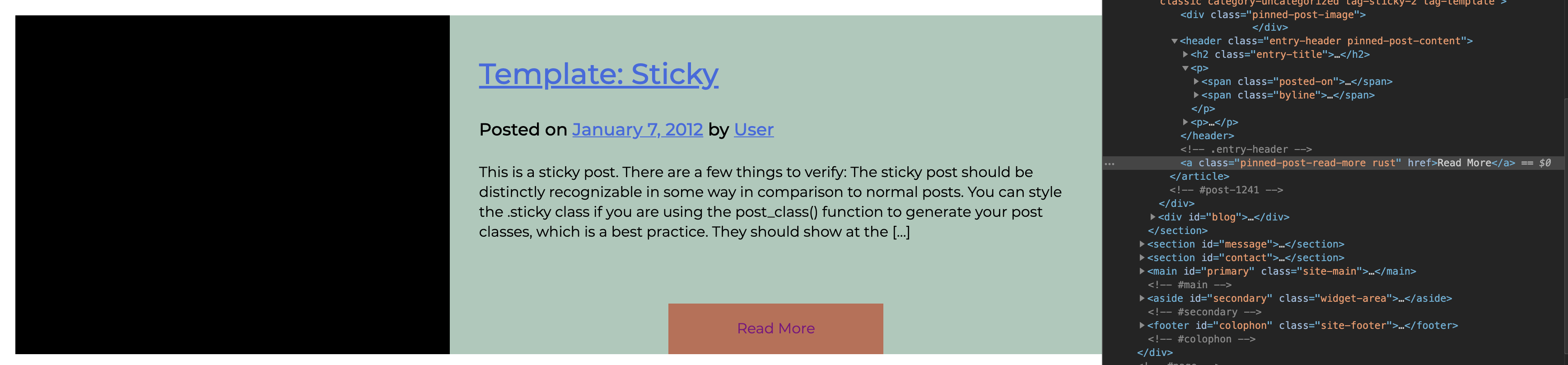
I tried the following example after reading the api:
<a class="pinned-post-read-more rust" href="<?php esc_url( get_permalink(the_ID()) )?>">Read More</a>
It returned href="1234" which is the correct ID but not the permalink, so how was the correct ID passed and not the return a URL?
I thought because it was a string? so I casted with an int (int) the_ID(), same result…
I’m lost.
I haven’t really studyied php either so that might be a reason, just going on with my modest knowledge from C, Python, Java, and Javascript
BTW, this is how I’m implementing this template
    $sticky = get_option( 'sticky_posts' ); // Get all sticky posts

    $args = array(
            'posts_per_page' => 1,
            'post__in'  => $sticky,
            'ignore_sticky_posts' => 1
    );
    $query = new WP_Query( $args );

    if ( $query->have_posts() ) : ?>

        <div id="pinned-posts">
            <div class="tab-header" id="pinned-posts-tab-header">Pinned Posts</div> <?php

            if ( is_home() && ! is_front_page() ) :
                ?>
                <header>
                    <h1 class="page-title screen-reader-text"><?php single_post_title(); ?></h1>
                </header>
                <?php
            endif;

            /* Start the Loop */
            while ( $query->have_posts() ) :
                $query->the_post();

                /*
                * Include the Post-Type-specific template for the content.
                * If you want to override this in a child theme, then include a file
                * called content-___.php (where ___ is the Post Type name) and that will be used instead.
                */
                get_template_part( 'template-parts/content-sticky', get_post_type() );

            endwhile;

        else:

            get_template_part( 'template-parts/content', 'none' );

        ?> </div> <?php
        wp_reset_query();
        endif;
Answers:
Thank you for visiting the Q&A section on Magenaut. Please note that all the answers may not help you solve the issue immediately. So please treat them as advisements. If you found the post helpful (or not), leave a comment & I’ll get back to you as soon as possible.
Method 1
You need to switch get_permalink to the_permalink or echo esc_url(get_permalink).
All methods was sourced from stackoverflow.com or stackexchange.com, is licensed under cc by-sa 2.5, cc by-sa 3.0 and cc by-sa 4.0