How do I get the IP address of the server that calls my ASP.NET page? I have seen stuff about a Response object, but am very new at c#. Thanks a ton.
Answers:
Thank you for visiting the Q&A section on Magenaut. Please note that all the answers may not help you solve the issue immediately. So please treat them as advisements. If you found the post helpful (or not), leave a comment & I’ll get back to you as soon as possible.
Method 1
This should work:
 //this gets the ip address of the server pc

  public string GetIPAddress()
  {
     IPHostEntry ipHostInfo = Dns.GetHostEntry(Dns.GetHostName()); // `Dns.Resolve()` method is deprecated.
     IPAddress ipAddress = ipHostInfo.AddressList[0];

     return ipAddress.ToString();
  }
http://wec-library.blogspot.com/2008/03/gets-ip-address-of-server-pc-using-c.html
OR
 //while this gets the ip address of the visitor making the call
  HttpContext.Current.Request.UserHostAddress;
http://www.geekpedia.com/KB32_How-do-I-get-the-visitors-IP-address.html
Method 2
Request.ServerVariables["LOCAL_ADDR"];
This gives the IP the request came in on for multi-homed servers
Method 3
The above is slow as it requires a DNS call (and will obviously not work if one is not available). You can use the code below to get a map of the current pc’s local IPV4 addresses with their corresponding subnet mask:
public static Dictionary<IPAddress, IPAddress> GetAllNetworkInterfaceIpv4Addresses()
{
    var map = new Dictionary<IPAddress, IPAddress>();

    foreach (var ni in NetworkInterface.GetAllNetworkInterfaces())
    {
        foreach (var uipi in ni.GetIPProperties().UnicastAddresses)
        {
            if (uipi.Address.AddressFamily != AddressFamily.InterNetwork) continue;

            if (uipi.IPv4Mask == null) continue; //ignore 127.0.0.1
            map[uipi.Address] = uipi.IPv4Mask;
        }
    }
    return map;
}
warning: this is not implemented in Mono yet
Method 4
  //this gets the ip address of the server pc
  public string GetIPAddress()
  {
     string strHostName = System.Net.Dns.GetHostName();
     //IPHostEntry ipHostInfo = Dns.Resolve(Dns.GetHostName()); <-- Obsolete
     IPHostEntry ipHostInfo = Dns.GetHostEntry(strHostName);
     IPAddress ipAddress = ipHostInfo.AddressList[0];

     return ipAddress.ToString();
  }
Method 5
This will work for IPv4:
public static string GetServerIP()
{
    IPHostEntry ipHostInfo = Dns.GetHostEntry(Dns.GetHostName());

    foreach (IPAddress address in ipHostInfo.AddressList)
    {
        if (address.AddressFamily == AddressFamily.InterNetwork)
            return address.ToString();
    }

    return string.Empty;
}
Method 6
The below snap is taken from Mkyong to show the networks tab inside developers console in google chrome.Inside “Request Headers” tab you could see a list of all server variables as shown below:
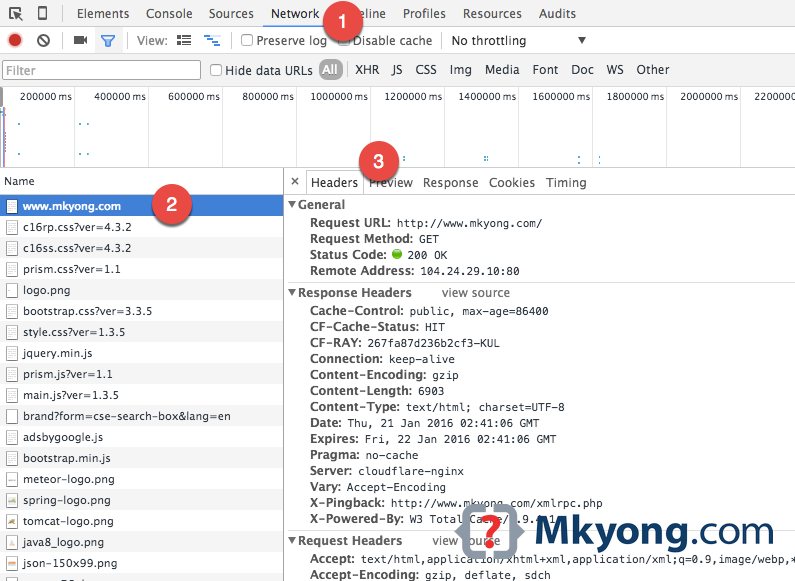
Below are few lines of code which gets the ipaddress of the client which hits your application
//gets the ipaddress of the machine hitting your production server
string ipAddress = HttpContext.Current.Request.ServerVariables["HTTP_X_FORWARDED_FOR"];

if (ipAddress == "" || ipAddress == null)
{
  //gets the ipaddress of your local server(localhost) during development phase
  ipAddress = HttpContext.Current.Request.ServerVariables["REMOTE_ADDR"];
}

//Output:
For production server - 122.169.106.247 (random)
For localhost         - ::1
All methods was sourced from stackoverflow.com or stackexchange.com, is licensed under cc by-sa 2.5, cc by-sa 3.0 and cc by-sa 4.0