I’m getting this error while running my ASP.NET app on IIS7. I’ve tried doing what it says to do but it doesn’t help.
The WebResource.axd handler must be
registered in the configuration to
process this request.
> <!-- Web.Config Configuration File -->
>
> <configuration>
>     <system.web>
>        <httpHandlers>
>            <add path="WebResource.axd" verb="GET" type="System.Web.Handlers.AssemblyResourceLoader" validate="True" />
>        </httpHandlers>
>     </system.web>
> </configuration>
I’m using a little bit of AJAX which is what I think is causing the issue. Has anyone encountered this before?
Answers:
Thank you for visiting the Q&A section on Magenaut. Please note that all the answers may not help you solve the issue immediately. So please treat them as advisements. If you found the post helpful (or not), leave a comment & I’ll get back to you as soon as possible.
Method 1
I figured it out so I’m posting it here for search reasons. It is a bug in ASP.NET and it has to do with having ColdFusion installed. Microsoft hasn’t yet released a fix.
There are two ways to fix this.
- Change the AppPool in IIS7 to “Classic .NET AppPool”. I’m not sure of any implications with this setting.
- Remove all the references to ColdFusion from your applicationHost.config file in system32inetsrvconfig.
Method 2
ColdFusion installs a global wildcard handler mapping which apparently overrides many of the standard .NET handlers. The solutions mentioned work just fine, but if you can’t switch to Classic Mode and don’t want to screw with your ColdFusion installation, you can remove the inherited handler mapping at the individual site level.
To do this, go to the site in question in IIS, double-click on “Handler Mappings” under the “IIS” section, and find the handler named something like “AboMapperCustom-XXXXXX” with “*” for the Path. Select the entry and click “Remove” in the sidebar. This will only remove the mapping for your application, so it won’t break any existing CF sites on the server.
Method 3
In IIS7 you need to add the <httpHandler> section to <system.webServer> instead of <system.web>. Here is an example.
Method 4
I got this error after carelessly copying my app’s web.config between a pair of clustered servers, which overwrote the tag:
<system.webServer>
    <handlers>
        <remove name="AboMapperCustom-XXXXXXXX" />
    </handlers>
</system.webServer>
with
<system.webServer>
    <handlers>
        <remove name="AboMapperCustom-YYYYYYYY" />
    </handlers>
</system.webServer>
Locating the proper ID as per Josh’s response and correcting the tag fixed it, but more importantly, will presumably keep that handler mapping from sneaking back in.
Method 5
I had this problem and that reason was incompatibility between Coldfusion and some configurations of ASP.NET applications when IIS App pool is in integrated mode. Coldfusion must be disable .
Method 6
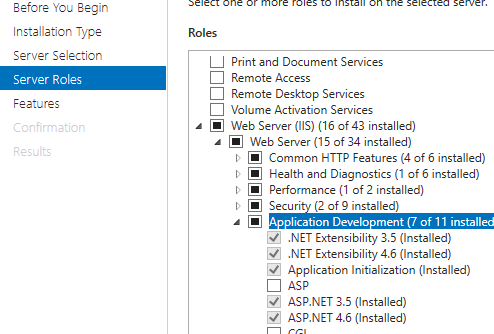
The issue happened to me on new Windows 2016 server where ASP.NET 4.6 was not installed. After installation everything got fixed.
Steps
- Run Server Manager
- Manage > Add Roles and Features
- Server Roles
- Web Server (IIS) > Web Server > Application Development > ASP.NET 4.6
All methods was sourced from stackoverflow.com or stackexchange.com, is licensed under cc by-sa 2.5, cc by-sa 3.0 and cc by-sa 4.0