I keep getting this error when I try to run a web app that I have inherited. It was written in 2010 for C# 3.5 and uses Mvc 2. I have installed the necessary libraries however I get this error.
Error 1 Could not load type
‘AdminConsole.MvcApplication’. C:pathtomyappGlobal.asax 1
Global.asax.cs looks like this:
using System.Web.Mvc;
using System.Web.Routing;

namespace AdminConsole
{
    // Note: For instructions on enabling IIS6 or IIS7 classic mode,
    // visit http://go.microsoft.com/?LinkId=9394801

    public class MvcApplication : System.Web.HttpApplication
    {
        public static void RegisterRoutes(RouteCollection routes)
        {
            routes.IgnoreRoute("{resource}.axd/{*pathInfo}");

            routes.MapRoute(
                "Default", // Route name
                "{controller}.aspx/{action}/{id}", // URL with parameters
                new { controller = "Entitlement", action = "Index", id = UrlParameter.Optional } // Parameter defaults
            );

        }

        protected void Application_Start()
        {
            AreaRegistration.RegisterAllAreas();

            RegisterRoutes(RouteTable.Routes);
        }
    }
}
And Global.asax looks like this: <%@ Application Inherits="AdminConsole.MvcApplication" Language="C#" %>
Answers:
Thank you for visiting the Q&A section on Magenaut. Please note that all the answers may not help you solve the issue immediately. So please treat them as advisements. If you found the post helpful (or not), leave a comment & I’ll get back to you as soon as possible.
Method 1
Add Codebehind="Global.asax.cs" to the Markup file (Global.asax):
From:
<%@ Application Inherits="AdminConsole.MvcApplication" Language="C#" %>
To:
<%@ Application Codebehind="Global.asax.cs"
                Inherits="AdminConsole.MvcApplication" Language="C#" %>
Method 2
Verify that the project is configured to place your DLLs into the /bin folder and not in /bin/x86/Debug/ (or similar).
Method 3
My problem was that I had accidentally created a web site instead of a web application. Once I recreated the project it worked fine.
Method 4
As written by @FMM
Verify that the project is configured to place your DLLs into the /bin
folder and not in /bin/x86/Debug/ (or similar).
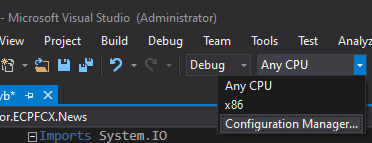
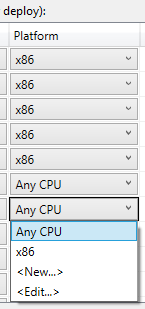
I could check, and resolve my issue, changing the configuration manager. Then, changing the platform, from “x86” to “Any CPU”.
1 – configuration manager:
2 – x86 to Any CPU:
All methods was sourced from stackoverflow.com or stackexchange.com, is licensed under cc by-sa 2.5, cc by-sa 3.0 and cc by-sa 4.0