How can I get my global.asax file to publish to our ftp site?
I have added a global.asax file to my project (using asp.net with c# from vs2010) which works great on my local machine. Then when I publish to our ftp site. Then copy from the ftp folder into the site folder overwriting old files. It doesn’t work. I am using Windows Server 2008 R2 Enterprise.
Answers:
Thank you for visiting the Q&A section on Magenaut. Please note that all the answers may not help you solve the issue immediately. So please treat them as advisements. If you found the post helpful (or not), leave a comment & I’ll get back to you as soon as possible.
Method 1
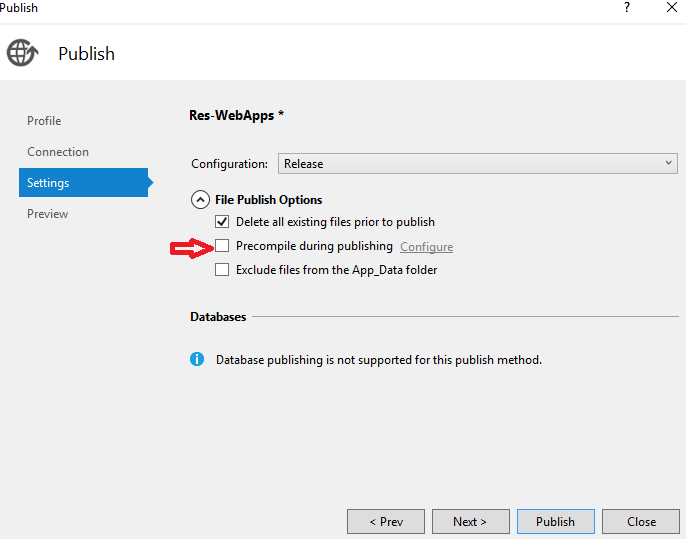
We had to uncheck the Precompile during publishing feature in our publishing profile and that did the trick.
Method 2
Check that the “Build action” of the Global.asax file is set to “Content” in the file properties. All files set to content will be deployed.
Method 3
I had the same problem and found that I also had to set Copy to Output Directory property to Copy always
Method 4
We tried a lot of things.
- Global.asax is not publishing and event are not firing in Global.asax
- Why are the Global.asax events not firing in my ASP .NET website?
- Global.asax not firing for Release build
- Mystery of Global.asax in ASP.NET MVC application
We also tried putting the below files in root and bin directories.
- App_global.asax.dll and App_global.asax.compiled files
- PrecompiledApp.config
None of it worked!
We had to put raw Global.asax instead of pre-compiled dll, in order to fire the global events, for our asp .net 2.0 website.
Hope this helps someone! Cheers! Happy coding! 😀
Method 5
try the following:
<system.webServer>
    <validation validateIntegratedModeConfiguration="false" />
    <handlers>
        <add name="ExtensionlessUrlHandler-ISAPI-4.0_64bit" path="*." verb="GET,HEAD,POST,DEBUG" modules="IsapiModule" scriptProcessor="C:WindowsMicrosoft.NETFramework64v4.0.30319aspnet_isapi.dll" resourceType="Unspecified" preCondition="classicMode,runtimeVersionv4.0,bitness64" />
    </handlers>

    <validation validateIntegratedModeConfiguration="false" />
</system.webServer>
Method 6
I had same issue while publishing from vs 2013 and following worked for me
yourproject–>properties–>Web-> Click on Create Virtual Directory.
(Even though you created virtual directory before try it again)
hope this helps.
Method 7
Try to publish the following files this works for me
App_global.asax.dll
App_global.asax.compiled
PrecompiledApp.config
yoursite.dll
and as @GabrielG said you have to uncheck precompile during publishing
I hope this help somebody else.
All methods was sourced from stackoverflow.com or stackexchange.com, is licensed under cc by-sa 2.5, cc by-sa 3.0 and cc by-sa 4.0