I decided to pull information from Google’s Weather API – The code I’m using below works fine.
            XmlDocument widge = new XmlDocument();
            widge.Load("https://www.google.com/ig/api?weather=Brisbane/dET7zIp38kGFSFJeOpWUZS3-");
            var weathlist = widge.GetElementsByTagName("current_conditions");
            foreach (XmlNode node in weathlist)
            {

                City.Text = ("Brisbane");
                CurCond.Text = (node.SelectSingleNode("condition").Attributes["data"].Value);
                Wimage.ImageUrl = ("http://www.google.com/" + node.SelectSingleNode("icon").Attributes["data"].Value);
                Temp.Text = (node.SelectSingleNode("temp_c").Attributes["data"].Value + "°C");
        }
     }
As I said, I am able to pull the required data from the XML file and display it, however if the page is refreshed or a current session is still active, I receive the following error:
WebException was unhandled by user code – The remote server returned
an error: 403 Forbidden Exception.
I’m wondering whether this could be to do with some kind of access limitation put on access to that particular XML file?
Further research and adaptation of suggestions
As stated below, this is by no means best practice, but I’ve included the catch I now use for the exception. I run this code on Page_Load so I just do a post-back to the page. I haven’t noticed any problems since. Performance wise I’m not overly concerned – I haven’t noticed any increase in load time and this solution is temporary due to the fact this is all for testing purposes. I’m still in the process of using Yahoo’s Weather API.
        try
        {
            XmlDocument widge = new XmlDocument();
            widge.Load("https://www.google.com/ig/api?weather=Brisbane/dET7zIp38kGFSFJeOpWUZS3-");
            var list2 = widge.GetElementsByTagName("current_conditions");
            foreach (XmlNode node in list2)
            {

                City.Text = ("Brisbane");
                CurCond.Text = (node.SelectSingleNode("condition").Attributes["data"].Value);
                Wimage.ImageUrl = ("http://www.google.com/" + node.SelectSingleNode("icon").Attributes["data"].Value);
                Temp.Text = (node.SelectSingleNode("temp_c").Attributes["data"].Value + "°C");

            }
        }
        catch (WebException exp)
        {
            if (exp.Status == WebExceptionStatus.ProtocolError &&
                exp.Response != null)
            {
                var webres = (HttpWebResponse)exp.Response;
                if (webres.StatusCode == HttpStatusCode.Forbidden)
                {
                    Response.Redirect(ithwidgedev.aspx);
                }

            }
        }
Google article illustrating API error handling
Thanks to:
https://stackoverflow.com/a/12011819/1302173 (Catch 403 and recall)
https://stackoverflow.com/a/11883388/1302173 (Error Handling and General Google API info)
https://stackoverflow.com/a/12000806/1302173 (Response Handling/json caching – Future plans)
Alternative
I found this great open source alternative recently
OpenWeatherMap – Free weather data and forecast API
Answers:
Thank you for visiting the Q&A section on Magenaut. Please note that all the answers may not help you solve the issue immediately. So please treat them as advisements. If you found the post helpful (or not), leave a comment & I’ll get back to you as soon as possible.
Method 1
This is related to a change / outage of the service. See: http://status-dashboard.com/32226/47728
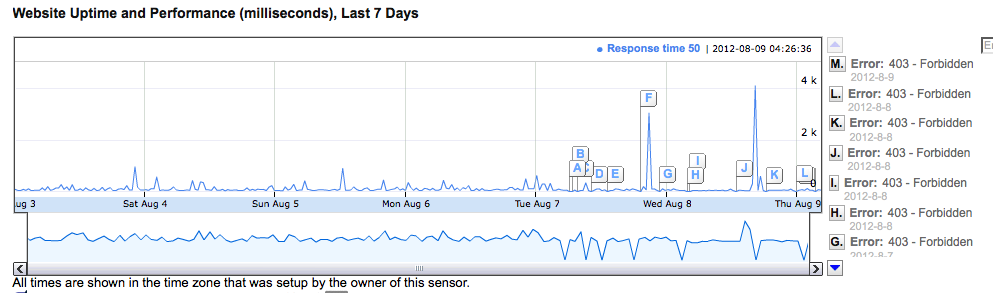
I have been using Google’s Weather API for over a year to feed a phone server so that the PolyCom phones receive a weather page. It has run error free for over a year. As of August 7th 2012 there have been frequent intermittent 403 errors.
I make a hit of the service once per hour (As has always been the case) so I don’t think frequency of request is the issue. More likely the intermittent nature of the 403 is related to the partial roll-out of a configuration change or a CDN change at Google.
The Google Weather API isn’t really a published API. It was an internal service apparently designed for use on iGoogle so the level of support is uncertain. I tweeted googleapis yesterday and received no response.
It may be better to switch to a promoted weather API such as:
WUnderground Weather or
Yahoo Weather.
I have added the following ‘unless defined’ error handling perl code myself yesterday to cope with this but if the problem persists I will switch to a more fully supported service:
my $url = "http://www.google.com/ig/api?weather=" . $ZipCode ;

my $tpp = XML::TreePP->new();
my $tree = $tpp->parsehttp( GET => $url );

my $city = $tree->{xml_api_reply}->{weather}->{forecast_information}->{city}->{"-data"};

unless (defined($city)) {
    print "The weather service is currently unavailable. n";
    open (MYFILE, '>/home/swarmp/public_html/status/polyweather.xhtml');
    print MYFILE qq(<?xml version="1.0" encoding="utf-8"?>n);
    print MYFILE qq(<!DOCTYPE html PUBLIC "-//W3C//DTD XHTML 1.1//EN" "xhtml11.dtd">n);
    print MYFILE qq(<html xmlns="http://www.w3.org/1999/xhtml">n);
    print MYFILE qq(<head><title>Weather is Unavailable!</title></head>n);
    print MYFILE qq(<body>n);
    print MYFILE qq(<p>n);
    print MYFILE qq(The weather service is currently unavailable from the data vendor.n);
    print MYFILE qq(</p>n);
    print MYFILE qq(</body>n);
    print MYFILE qq(</html>n);
    close MYFILE;
    exit(0);
}...
Method 2
This is by no means a best practice, but I use this API heavily in some WP7 and Metro apps. I handle this by catching the exception (most of the time a 403) and simply re-calling the service inside of the catch, if there is an error on the Google end it’s usually briefly and only results in 1 or 2 additional calls.
Method 3
That`s the same thing we found out.
Compare the request header in a bad request and a working request. The working request includes cookies. But where are they from?
Delete all your browser cookies from google. The weather api call will not work in your browser anymore. Browse to google.com and then to the weather api, it will work again.
Google checks the cookies to block multiple api calls. Getting the cookies one time before handling all weather api requests will fix the problem. The cookies will expire in one year. I assume you will restart your application more often then once a year. So that you will get a new one. Getting cookies for each request will end in the same problem: Too many different requests.
One tip: Weather does not often change, so cache the json information (for maybe a hour). That will reduce time-consuming operations as requests!
Method 4
I found that If you try the request in a clean browser (like new window incognito mode on chrome) the google weather service works. Possible problem of cookies?
All methods was sourced from stackoverflow.com or stackexchange.com, is licensed under cc by-sa 2.5, cc by-sa 3.0 and cc by-sa 4.0