I want to show a message box on the successful save of any item. I googled it and tried different solutions, but none of them worked. Here is the code I am using:
try
{
    con.Open();
    string pass="abc";
    cmd = new SqlCommand("insert into register values('" +
                                       txtName.Text + "','" +
                                       txtEmail.Text + "','" +
                                       txtPhoneNumber.Text + "','" +
                                       ddlUserType.SelectedText + "','" +
                                       pass + "')", con);

    cmd.ExecuteNonQuery();
    con.Close();
    Response.Write("<script LANGUAGE='JavaScript' >alert('Login Successful')</script>");
}
catch (Exception ex)
{

}
finally
{
    con.Close();
}
(I am using Firefox, if that matters)
Answers:
Thank you for visiting the Q&A section on Magenaut. Please note that all the answers may not help you solve the issue immediately. So please treat them as advisements. If you found the post helpful (or not), leave a comment & I’ll get back to you as soon as possible.
Method 1
@freelancer If you are using ScriptManager then try this code for message..
string script = "alert("Hello!");";
ScriptManager.RegisterStartupScript(this, GetType(),
                      "ServerControlScript", script, true);
Method 2
Make a method of MsgBox in your page.
public void MsgBox(String ex, Page pg,Object obj)
{
    string s = "<SCRIPT language='javascript'>alert('" + ex.Replace("rn", "\n").Replace("'", "") + "'); </SCRIPT>";
    Type cstype = obj.GetType();
    ClientScriptManager cs = pg.ClientScript;
    cs.RegisterClientScriptBlock(cstype, s, s.ToString());
}
and when you want to use msgbox just put this line
MsgBox("! your message !", this.Page, this);
Method 3
just try this, it works fine in my browser:
your response writing code should be
Response.Write("<script>alert('login successful');</script>");
Hope this works
Method 4
you can use clientscript. MSDN : Clientscript
String scriptText =
        "alert('sdsd');";
    ClientScript.RegisterOnSubmitStatement(this.GetType(),
        "ConfirmSubmit", scriptText);
try this
ClientScript.RegisterStartupScript(this.GetType(), "JSScript", scriptText);


ClientScript.RegisterClientScriptBlock(this.GetType(), "alert", scriptText); //use this
Method 5
This code will help you add a MsgBox in your asp.net file. You can change the function definition to your requirements. Hope this helps!
protected void Addstaff_Click(object sender, EventArgs e)
    {
 if (intClassCapcity < intCurrentstaffNumber)
                {
            MsgBox("Record cannot be added because max seats available for the " + (string)Session["course_name"] + " training has been reached");
        }
else
    {
            sqlClassList.Insert();
    }
}

private void MsgBox(string sMessage)
    {
        string msg = "<script language="javascript">";
        msg += "alert('" + sMessage + "');";
        msg += "</script>";
        Response.Write(msg);
    }
Method 6
I use this and it works
public void Messagebox(string xMessage)
{
    Response.Write("<script>alert('" + xMessage + "')</script>");
}
And I call like this
Messagebox("je suis la!");
Method 7
Using AJAX Modal Popup and creating a Message Box Class:
Messsage Box Class:
public class MessageBox
{
    ModalPopupExtender _modalPop;
    Page _page;
    object _sender;
    Panel _pnl;

    public enum Buttons
    {
        AbortRetryIgnore,
        OK,
        OKCancel,
        RetryCancel,
        YesNo,
        YesNoCancel
    }
    public enum DefaultButton
    {
        Button1,
        Button2,
        Button3
    }
    public enum MessageBoxIcon
    {
        Asterisk,
        Exclamation,
        Hand,
        Information,
        None,
        Question,
        Warning

    }

    public MessageBox(Page page, object sender, Panel pnl)
    {
        _page = page;
        _sender = sender;
        _pnl = pnl;
        _modalPop = new ModalPopupExtender();

        _modalPop.ID = "popUp";
        _modalPop.PopupControlID = "ModalPanel";

    }


    public void Show(String strTitle, string strMessage, Buttons buttons, DefaultButton defaultbutton, MessageBoxIcon msbi)
    {
        MasterPage mPage = _page.Master;
        Label lblTitle = null;
        Label lblError = null;
        Button btn1 = null;
        Button btn2 = null;
        Button btn3 = null;
        Image imgIcon = null;


        lblTitle = ((Default)_page.Master).messageBoxTitle;
        lblError = ((Default)_page.Master).messageBoxMsg;
        btn1 = ((Default)_page.Master).button1;
        btn2 = ((Default)_page.Master).button2;
        btn3 = ((Default)_page.Master).button3;
        imgIcon = ((Default)_page.Master).messageBoxIcon;

        lblTitle.Text = strTitle;
        lblError.Text = strMessage;

        btn1.CssClass = "btn btn-default";
        btn2.CssClass = "btn btn-default";
        btn3.CssClass = "btn btn-default";

        switch (msbi)
        {
            case MessageBoxIcon.Asterisk:
                //imgIcon.ImageUrl = "~/img/asterisk.jpg";
                break;
            case MessageBoxIcon.Exclamation:
                //imgIcon.ImageUrl = "~/img/exclamation.jpg";
                break;
            case MessageBoxIcon.Hand:
                break;
            case MessageBoxIcon.Information:
                break;
            case MessageBoxIcon.None:
                break;
            case MessageBoxIcon.Question:
                break;
            case MessageBoxIcon.Warning:
                break;
        }
        switch (buttons)
        {
            case Buttons.AbortRetryIgnore:
                btn1.Text = "Abort";
                btn2.Text = "Retry";
                btn3.Text = "Ignore";
                btn1.Visible = true;
                btn2.Visible = true;
                btn3.Visible = true;

                break;

            case Buttons.OK:
                btn1.Text = "OK";
                btn1.Visible = true;
                btn2.Visible = false;
                btn3.Visible = false;
                break;

            case Buttons.OKCancel:
                btn1.Text = "OK";
                btn2.Text = "Cancel";
                btn1.Visible = true;
                btn2.Visible = true;
                btn3.Visible = false;
                break;

            case Buttons.RetryCancel:
                btn1.Text = "Retry";
                btn2.Text = "Cancel";
                btn1.Visible = true;
                btn2.Visible = true;
                btn3.Visible = false;
                break;

            case Buttons.YesNo:
                btn1.Text = "No";
                btn2.Text = "Yes";
                btn1.Visible = true;
                btn2.Visible = true;
                btn3.Visible = false;
                break;

            case Buttons.YesNoCancel:
                btn1.Text = "Yes";
                btn2.Text = "No";
                btn3.Text = "Cancel";
                btn1.Visible = true;
                btn2.Visible = true;
                btn3.Visible = true;
                break;
        }

        if (defaultbutton == DefaultButton.Button1)
        {
            btn1.CssClass = "btn btn-primary";
            btn2.CssClass = "btn btn-default";
            btn3.CssClass = "btn btn-default";
        }

        else if (defaultbutton == DefaultButton.Button2)
        {
            btn1.CssClass = "btn btn-default";
            btn2.CssClass = "btn btn-primary";
            btn3.CssClass = "btn btn-default";
        }

        else if (defaultbutton == DefaultButton.Button3)
        {
            btn1.CssClass = "btn btn-default";
            btn2.CssClass = "btn btn-default";
            btn3.CssClass = "btn btn-primary";
        }

        FirePopUp();
    }

    private void FirePopUp()
    {
        _modalPop.TargetControlID = ((Button)_sender).ID;
        _modalPop.DropShadow = true;
        _modalPop.OkControlID = //btn 1 / 2 / 3;
        _modalPop.CancelControlID = //btn 1 / 2 / 3;
        _modalPop.BackgroundCssClass = "modalBackground";
        _pnl.Controls.Add(_modalPop);
        _modalPop.Show();

    }
In my MasterPage code:
  #region AlertBox
    public Button button1
    {
        get
        { return this.btn1; }
    }
    public Button button2
    {
        get
        { return this.btn2; }
    }
    public Button button3
    {
        get
        { return this.btn1; }
    }

    public Label messageBoxTitle
    {
        get
        { return this.lblMessageBoxTitle; }
    }

    public Label messageBoxMsg
    {
        get
        { return this.lblMessage; }
    }

    public Image messageBoxIcon
    {
        get
        { return this.img; }
    }

    public DialogResult res
    {
        get { return res; }
        set { res = value; }
    }

    #endregion
In my MasterPage aspx:
On the header add reference (just for some style)
<link href="https://maxcdn.bootstrapcdn.com/bootstrap/3.3.0/css/bootstrap.min.css" rel="nofollow noreferrer noopener" rel="stylesheet">
On the Content:
<asp:Panel ID="ModalPanel" runat="server" style="display: none; position: absolute; top:0;">
        <asp:Panel ID="pnlAlertBox" runat="server" >
        <div class="modal-dialog" >
            <div ID="modalContent" runat="server" class="modal-content">
                <div class="modal-header">
                    <h4 class="modal-title" id="myModalLabel">
                         <asp:Label ID="lblMessageBoxTitle" runat="server" Text="This is the MessageBox Caption"></asp:Label>
                    </h4>
                </div>
                <div ID="modalbody" class="modal-body" style="width:800px; height:600px">
                    <asp:Image ID="img" runat="server" Height="20px" Width="20px"/>
                    <asp:Label ID="lblMessage" runat="server" Text="Here Goes My Message"></asp:Label>
                </div>
                <div class="modal-footer">
                    <asp:Button ID="btn1" runat="server" OnClick="btn_Click" CssClass="btn btn-default" Text="Another Button" />
                    <asp:Button ID="btn2" runat="server" OnClick="btn_Click" CssClass="btn btn-default" Text="Cancel" />
                    <asp:Button ID="btn3" runat="server" OnClick="btn_Click" CssClass="btn btn-primary" Text="Ok" />
                </div>
            </div>
        </div>
    </asp:Panel>
   </asp:Panel>
And to call it from a button, button code:
protected void btnTest_Click(object sender, EventArgs e)
        {
            MessageBox msgBox = new MessageBox(this, sender, aPanel);
            msgBox.Show("This is my Caption", "this is my message", MessageBox.Buttons.AbortRetryIgnore, MessageBox.DefaultButton.Button1, MessageBox.MessageBoxIcon.Asterisk);

        }
Method 8
This method works fine for me:
private void alert(string message)
{
    Response.Write("<script>alert('" + message + "')</script>");
}
Example:
protected void Page_Load(object sender, EventArgs e)
{
    alert("Hello world!");
}
And when your page load yo will see something like this:
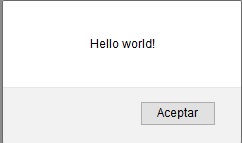
I’m using .NET Framework 4.5 in Firefox.
Method 9
create a simple JavaScript function having one line of code-“alert(“Hello this is an Alert”)”
and instead on OnClick() ,use OnClientClick() method.
`<html xmlns="http://www.w3.org/1999/xhtml">
 <head runat="server">
 <title></title>
 <script type="text/javascript" language="javascript">
    function showAlert() {
        alert("Hello this is an Alert")
    }
 </script>
 </head>
 <body>
 <form id="form1" runat="server">
 <div>
 <asp:Button ID="Button1" runat="server" Text="Button" OnClientClick="showAlert()" />
 </div>
 </form>
 </body>
 </html>`
Method 10
Try This Code:Successfully
Written on click Button.
ScriptManager.RegisterStartupScript(this, GetType(),"alertMessage", "alert('Record Inserted Successfully');", true);
Method 11
The best solution is a minimal use of java directly in the visualstudio GUI
here it is:
On a button go to the “OnClientClick” property (its not into events*)
overthere type:
return confirm('are you sure?')
it will put a dialog with cancel ok buttons transparent over current page
if cancel is pressed no postback will ocure. However if you want only ok button type:
alert ('i told you so')
The events like onclick work server side they execute your code, while OnClientClick runs in the browser side. the come most close to a basic dialog
Method 12
Response.Write is used to display the text not for executing JavaScript, If you want to execute the JavaScript from your code than try as below:
try
{
    con.Open();
    string pass="abc";
    cmd = new SqlCommand("insert into register values('" + txtName.Text + "','" + txtEmail.Text + "','" + txtPhoneNumber.Text + "','" + ddlUserType.SelectedText + "','" + pass + "')", con);
    cmd.ExecuteNonQuery();
    con.Close();
    Page.ClientScript.RegisterStartupScript(this.GetType(), "click","alert('Login Successful');");
}
catch (Exception ex)
{
}
finally
{
    con.Close();
}
Method 13
Alert message with redirect
Response.Write("<script language='javascript'>window.alert('Popup message ');window.location='webform.aspx';</script>");
Only alert message
Response.Write("<script language='javascript'>window.alert('Popup message ')</script>");
All methods was sourced from stackoverflow.com or stackexchange.com, is licensed under cc by-sa 2.5, cc by-sa 3.0 and cc by-sa 4.0