For the purpose of transferring a very large number of user responses from non-WordPress to WordPress comments, I’ve been given a Google Sheet. Regardless of the method by which I turn the Sheet into a CSV file (direct download as CSV, download as xlsx then save as csv, copy-paste into Excel and save), I get some version of the same problem, though with marginally varying results.
-
If processed as saved, comments with slanted apostrophes/curled single quotes –
’– are simply not inserted – they do not appear either in backend comments.php or in the post output. - If I use esc_html() on the comment content, the comments will be processed – are will be listed in the backend and in post output – but the comment content will be emptied.
-
I’ve tried some other means to change the comment content programmatically, like str_replace-ing
’with', but I haven’t had any luck with that: The affected comments are still rejected. - Other shots in the dark investigated so for, like disabling wp_texturize() via filter function, have no effect.
The one method that has worked so far has been to run a straight character replace – ’ with ' – in the data files before saving as CSV and uploading. That’s sub-optimal for large files that will in the future need to be updated continually, and I can’t shake the feeling that there should be a possibly very simple programmatic solution.
First, here’s the relevant portion of the code I’m using for the function, which I’m running via shortcode, up to the point where comment_data is initially set. FYI the post_id is added later. (Per request, I’ll add more of the code – which also inserts posts and categories, at the end.)
    $new_array = array() ;

    if ( ( $handle = fopen( __DIR__ . "/sample_data.csv", "r" ) ) !== FALSE ) {

        while ( ( $data = fgetcsv( $handle ) ) !== FALSE ) {

            $new_array[] = $data ;

        }

        fclose( $handle ) ;

    }

    foreach( $new_array as $insert_array ) {

        $comment_data = array(

            'comment_author'    =>  $insert_array[0] ,
            'comment_content'   =>  $insert_array[4] , //a string, see notes
            'comment_date'      =>  date( 'Y-m-d H:i:s', strtotime( $insert_array[5] ) ),
            'comment_date_gmt'  =>  date( 'Y-m-d H:i:s', strtotime( $insert_array[5] ) ),

        ) ;

    }
To re-state the issue: If I don’t make any other changes, then the implicated entries simply do not get added at all, while the rest of the file/rows are completed, and entries that use straight quotes are included in the output, as expected.
FOR CLARIFICATION, RE QUESTIONS/REQUESTS
Each row is extracted from the csv file as an array, with each cell as a value. The highlighted cells below are two typical comment content cells – extracted as successive $insert_array[4]‘s. The first one transfers/outputs just fine. The second one, with a slanty single quote in the second sentence produces the issues I’ve described. Cells with straight quotes transfer fine.

Full code:
add_shortcode( 'insert_from_db_file', 'insert_from_db_file_handler' ) ;

function insert_from_db_file_handler( $atts ) {

    require_once( ABSPATH . '/wp-admin/includes/taxonomy.php');

    $a  = shortcode_atts( array(

        'test'=> 'on',

        ), $atts ) ;

    $new_array = array() ;

    if ( ( $handle = fopen( __DIR__ . "/sample_data.csv", "r" ) ) !== FALSE ) {

        while ( ( $data = fgetcsv( $handle ) ) !== FALSE ) {

            $new_array[] = $data ;

        }

        fclose( $handle ) ;

    }

    $i = 0 ;


    foreach( $new_array as $insert_array ) {

        $cats = array() ;
        $state_id = $country_id = $state = $country = $post_id = '' ;

        $i++ ;

        if ( 'on' == $a['test'] && $i > 300 ) {

            break ;

        }

        $comment_data = array(

            'comment_author'    =>  $insert_array[0] ,
            'comment_content'   =>  $insert_array[4] ,
            'comment_date'      =>  date( 'Y-m-d H:i:s', strtotime( $insert_array[5] ) ),
            'comment_date_gmt'  =>  date( 'Y-m-d H:i:s', strtotime( $insert_array[5] ) ),
            'comment_post_id'   =>  '',
            'comment_meta'      => array(

                'db_row'    => $insert_array[6],
                'standardized_location' =>  $insert_array[7],

            ),

        ) ;

        if ( ! get_page_by_title( $insert_array[1], OBJECT, 'city' ) ) {  // don't create new post if already exists

            //create city categories
            $country    =   'NONE' == $insert_array[3] ? '' : ucfirst( $insert_array[3] ) ;
            $state      =   'NONE' == $insert_array[2] ? '' : ucfirst( $insert_array[2] ) ; //some lowercase in db

            $country_id =   wp_create_category( $country ) ;
            $cats[]     =   $country_id ;

            if ( $state ) {

                $state_id   = wp_create_category( $state, $country_id ) ;
                $cats[]     = $state_id ;

            }

            //create post
            $post_arr = array(

                'post_title'        => ucfirst( $insert_array[1] ), //lowercase in some data
                'post_content'      => $insert_array[1],
                'post_status'       => 'publish',
                'post_author'       => 3,
                'comment_status'    => 'closed',
                'post_category'     =>  $cats,
                'post_type'         =>  'city'

            ) ;

            $post_id = wp_insert_post( $post_arr ) ;
            $args = array(

                'post_id' => $post_id,
                'count' => true,

            ) ;
            $previous_comment = get_comments( $args ) ;

            $comment_data['comment_post_ID'] = $post_id ;
            //add unique comments only

            if ( ! $previous_comment ) {

                $comment = wp_insert_comment( $comment_data ) ;
                if ( ! $comment ) {

                    custom_logs( 'FALSE FOR ' . $i ) ;
                    custom_logs( print_r( $insert_array, true ) ) ;

                }

            }

            $cities[] = $insert_array[1] ;


        } else { //find city for comments

            $db_rows = array() ; // don't accumulate gigantic db_rows?

            $id = get_page_by_title( $insert_array[1], OBJECT, 'city' )->ID ;

            $args = array(

                'post_id' => $id,

            ) ;

            $previous_comments = get_comments( $args ) ;

            foreach ( $previous_comments as $previous_comment ) {

                $db_rows[] = get_comment_meta( $previous_comment->comment_ID, 'db_row', true ) ;

            }

            if ( $previous_comments && ! in_array( $insert_array[6], $db_rows ) ) {

                $comment_data['comment_post_ID'] = $id ;

                $comment = wp_insert_comment( $comment_data ) ;

                if ( ! $comment ) {

                    custom_logs( 'FALSE FOR ' . $i ) ; //"custom_logs( $message )" is a utility function for debugging
                    custom_logs( print_r( $insert_array, true ) ) ;

                }

            }
        }

    }

    return $i . 'COMMENTS INSERTED' ;

}
Answers:
Thank you for visiting the Q&A section on Magenaut. Please note that all the answers may not help you solve the issue immediately. So please treat them as advisements. If you found the post helpful (or not), leave a comment & I’ll get back to you as soon as possible.
Method 1
If processed as saved, comments with slanted apostrophes/curled single
quotes –’– are simply not inserted – they do not appear either in
backend comments.php or in the post output.
That’s because the wpdb class checks if the comment content contains any invalid (UTF-8) text, and if yes, then wpdb rejects the content and therefore does not run the insert query (which originates from wp_insert_comment()).
If I use esc_html() on the comment content, the comments will be
processed – are will be listed in the backend and in post output – but
the comment content will be emptied.
Similar to the first case above, where esc_html() uses wp_check_invalid_utf8() to check if the comment content contains any invalid UTF-8 text, and if so, then an empty string is returned (by default).
I’ve tried some other means to change the comment content
programmatically, like str_replace-ing’with', but I haven’t had
any luck with that: The affected comments are still rejected.
Yes, because the slanted quote you passed to str_replace() isn’t the same slanted quote in the comment content, i.e. their encoding does not match, only their appearance that looks alike.
Therefore… You may simply need to convert the file encoding to UTF-8.
And I mean, convert it before uploading the file. 🙂 Have you already tried doing so?
Or if you’re using Windows, then you should know that MS Excel by default saves the CSV file using the ANSI ( i.e. Windows-1252 or Western European (Windows) ) encoding, so you should instead save it as UTF-8 — in the “Save As” window, click the “Tools” next to the “Save” button, select “Web Options”, then go to the “Encoding” tab and choose “Unicode (UTF-8)”.
Regardless of the method by which I turn the Sheet into a CSV file
(direct download as CSV, download as xlsx then save as csv, copy-paste
into Excel and save), I get some version of the same problem
- If by the “direct download as CSV”, you mean the File → Download → “Comma-separated values (.csv, current sheet)” option in the Google Sheets (web) app, then perhaps after you downloaded the file, you edited it and saved it using MS Excel (with the encoding set to the default)?
- Because Google Sheets actually encodes the sheet in UTF-8 (when exporting the sheet for download), so if you uploaded the file as-is (without editing it) to your website, then you wouldn’t have the encoding issues.
And if you want to be sure the encoding is Windows-1252, then try one of these (with the already-uploaded data), where if the encoding is indeed Windows-1252, then the 2nd and 3rd below would give you the slanted quote as-is (i.e. just as how it appears on-screen — ’), whereas the first one would give you ’ ( and not the �.. ).
-
$comment_content = mb_convert_encoding( $insert_array[4], 'HTML-ENTITIES', 'Windows-1252' ); -
$comment_content = mb_convert_encoding( $insert_array[4], 'UTF-8', 'Windows-1252' ); -
$comment_content = iconv( 'Windows-1252', 'UTF-8', $insert_array[4] );
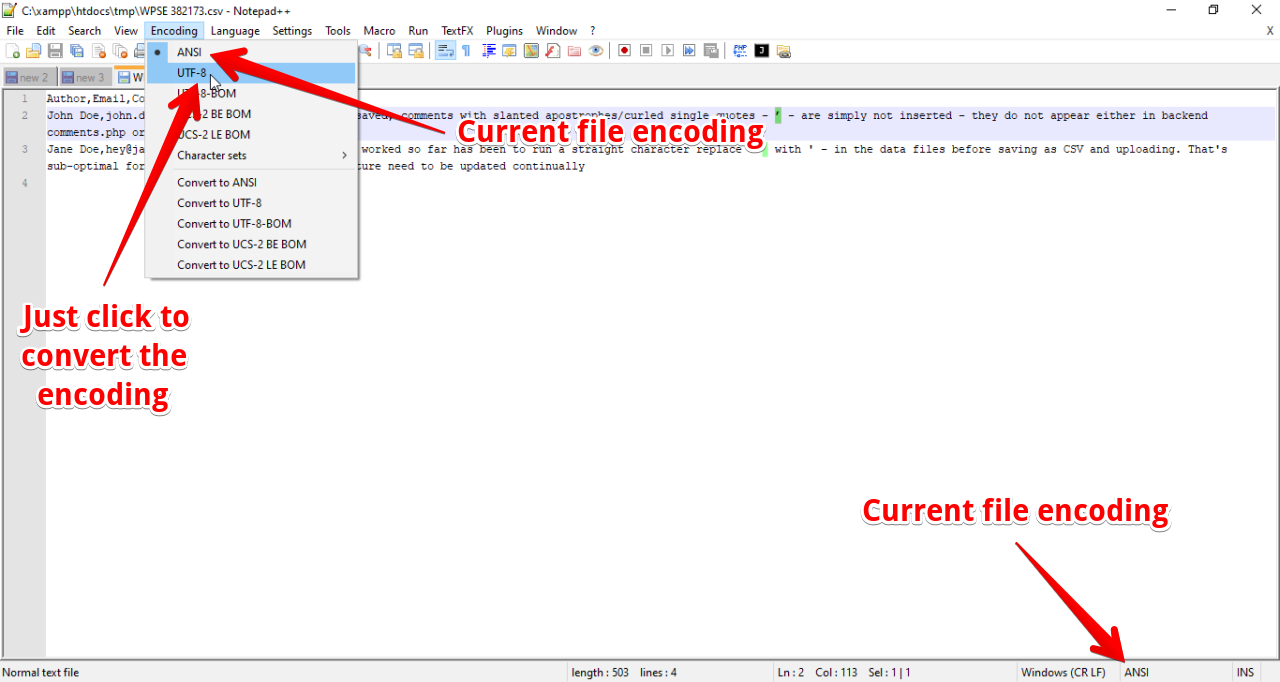
Or actually, if you use Notepad++, then you could easily check the encoding by looking at the bottom-right corner of the editor. 🙂
UPDATE
- Actually, when I said save it as UTF-8, I mean, in Google Sheets, export the file as an Excel file (.xlsx) and then in Excel, export it as CSV with the UTF-8 encoding. Have you tried doing so or is that what you actually did?
-
And if
wp_insert_category()works, but notwp_create_category(), then it’s likely thatcategory_exists()fails and it could be due to many reasons…
But anyway, now that you know what the file encoding is (which is Windows-1252), then if you just can’t get the CSV data to work without giving you the encoding (or invalid characters) issues, then you can try to manually encode the data (i.e. each item in $insert_array) to UTF-8 like so:
function my_fix_invalid_utf8( $text ) {
    if ( function_exists( 'iconv' ) ) {
        return iconv( 'Windows-1252', 'UTF-8', $text );
    } elseif ( function_exists( 'mb_convert_encoding' ) ) {
        return mb_convert_encoding( $text, 'UTF-8', 'Windows-1252' );
    } elseif ( function_exists( 'utf8_encode' ) ) {
        // This would not fix the APPEARANCE of the text (i.e. you'd see something like '??' on
        // the page), but this would at least let you insert the comment or text to the database..
        return utf8_encode( $text );
    }

    return $text; // if all else fails, return the text as-is
}

$insert_array = array_map( 'my_fix_invalid_utf8', $insert_array );
And I have no affiliations with the author/devs of Notepad++, but you could actually easily convert the encoding using Notepad++.. so give it a try? 🙂 (the below file was BTW, exported from an Excel file)
Method 2
I’m posting this as a temporary answer, but won’t accept it until I’ve solved some new issues that arose, or were emphasized, when I expanded from 300 test rows to 20000, on the way to 100,000s, and some new characters turned up that had to be handled. If someone can provide the rest of the answer, or a superior alternative, then great, and I’ll accept it instead of my own. If not, then I’ll return after I’ve had a chance to work it out by myself.
Anyway, for particular site and initial data, what worked was to use mb_convert_encoding() in a way that remained agnostic about the source encoding, then string-replacing the bad characters I got back. So:
    $comment_content = mb_convert_encoding( $insert_array[4], 'HTML-ENTITIES' ) ;
    $comment_modified = str_replace( "�", "’", $comment_content ) ;

    $comment_data = array(

        'comment_author'    =>  ucfirst( $insert_array[0] ) ,
        'comment_content'   =>  $comment_modified,
        'comment_date'      =>  date( 'Y-m-d H:i:s', strtotime( $insert_array[5] ) ),
        'comment_date_gmt'  =>  date( 'Y-m-d H:i:s', strtotime( $insert_array[5] ) ),
        'comment_post_id'   =>  '',
        'comment_meta'      => array(

            'db_row'    => $insert_array[6],
            'standardized_location' =>  $insert_array[7],

        ),

    ) ;
Background: Using a function from a PHP Manual commenter 12 years ago – https://www.php.net/manual/en/function.mb-convert-encoding.php#86878 -, I was able to process the comments all into UTF-8 encoding, but got an invalid character (which renders in the output as the Unicode “replacement character” https://www.fileformat.info/info/unicode/char/fffd/index.htm).
However, when I processed $comment_content into HTML-ENTITIES, I got � back. I then ran a str_replace() on �, with ’, and everything processed as desired – at least for 300 rows. Unfortunately, as noted at the top, the a much larger data file turned up additional invalid characters.
Without going into the peculiar history of character sets worldwide, I’ll just say that it appears that in mainly English-language character sets single and double quotes are rendered with the simple entity, but in other character sets widely in use are rendered with the other, and there are other characters common to some character sets that cause similar problems for attempts to convert them into standard English-language character sets. I still haven’t had a chance to apply and compare different, possibly more efficient methods – for example, on installation configuration levels or through content filter functions – for handling the underlying issues.
All methods was sourced from stackoverflow.com or stackexchange.com, is licensed under cc by-sa 2.5, cc by-sa 3.0 and cc by-sa 4.0