How can I overlay two graphs in Seaborn? I have two columns in my data I would like to have them in the same graph. How can I do it preserving the labeling for both graphs.
Answers:
Thank you for visiting the Q&A section on Magenaut. Please note that all the answers may not help you solve the issue immediately. So please treat them as advisements. If you found the post helpful (or not), leave a comment & I’ll get back to you as soon as possible.
Method 1
seaborn function that operate on a single Axes can take one as an argument.
For instance, the docs to seaborn.kdeplot include:
ax : matplotlib axis, optional
    Axis to plot on, otherwise uses current axis
So if you did:
df = function_to_load_my_data()
fig, ax = plt.subplots()
You could then do:
seaborn.kdeplot(df['col1'], ax=ax)
seaborn.kdeplot(df['col2'], ax=ax)
Method 2
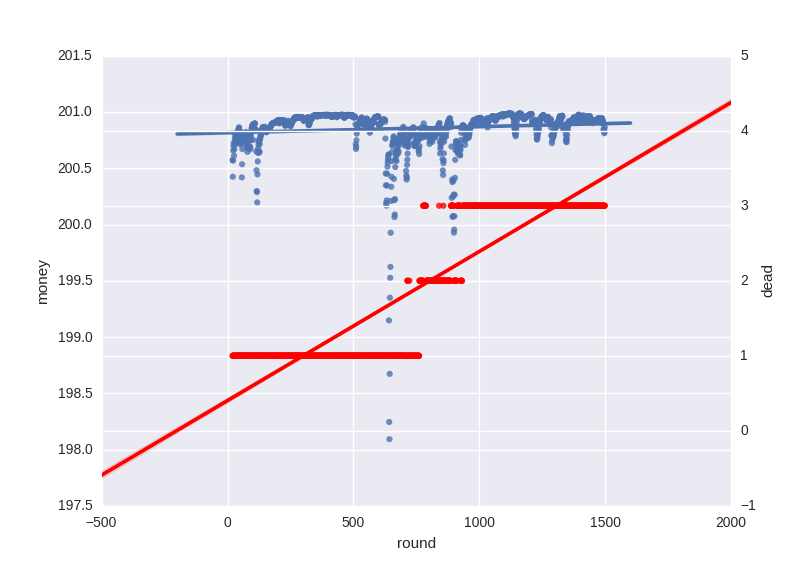
One solution is to introduce a secondary axis:
    fig, ax = plt.subplots()
    sb.regplot(x='round', y='money', data=firm, ax=ax)
    ax2 = ax.twinx()
    sb.regplot(x='round', y='dead', data=firm, ax=ax2, color='r')
    sb.plt.show()
Method 3
The data is about Private vs Public collage data but works, as we can see we load all the global parameters to a seaborn object and later we map the charts to the same pane.
import seaborn as sns

import matplotlib.pyplot as plt

import pandas as pd


df = pd.read_csv('College_Data',index_col=0)

g = sns.FacetGrid(df,hue='Private',palette='coolwarm',size=6,aspect=2)

g.map(plt.hist,'Outstate',bins=20,alpha=0.7)
All methods was sourced from stackoverflow.com or stackexchange.com, is licensed under cc by-sa 2.5, cc by-sa 3.0 and cc by-sa 4.0