I am trying to use imshow in matplotlib to plot data as a heatmap, but some of the values are NaNs. I’d like the NaNs to be rendered as a special color not found in the colormap.
example:
import numpy as np
import matplotlib.pyplot as plt
f = plt.figure()
ax = f.add_subplot(111)
a = np.arange(25).reshape((5,5)).astype(float)
a[3,:] = np.nan
ax.imshow(a, interpolation='nearest')
f.canvas.draw()
The resultant image is unexpectedly all blue (the lowest color in the jet colormap). However, if I do the plotting like this:
ax.imshow(a, interpolation='nearest', vmin=0, vmax=24)
–then I get something better, but the NaN values are drawn the same color as vmin… Is there a graceful way that I can set NaNs to be drawn with a special color (eg: gray or transparent)?
Answers:
Thank you for visiting the Q&A section on Magenaut. Please note that all the answers may not help you solve the issue immediately. So please treat them as advisements. If you found the post helpful (or not), leave a comment & I’ll get back to you as soon as possible.
Method 1
Hrm, it appears I can use a masked array to do this:
masked_array = np.ma.array (a, mask=np.isnan(a))
cmap = matplotlib.cm.jet
cmap.set_bad('white',1.)
ax.imshow(masked_array, interpolation='nearest', cmap=cmap)
This should suffice, though I’m still open to suggestions. :]
Method 2
With newer versions of Matplotlib, it is not necessary to use a masked array anymore.
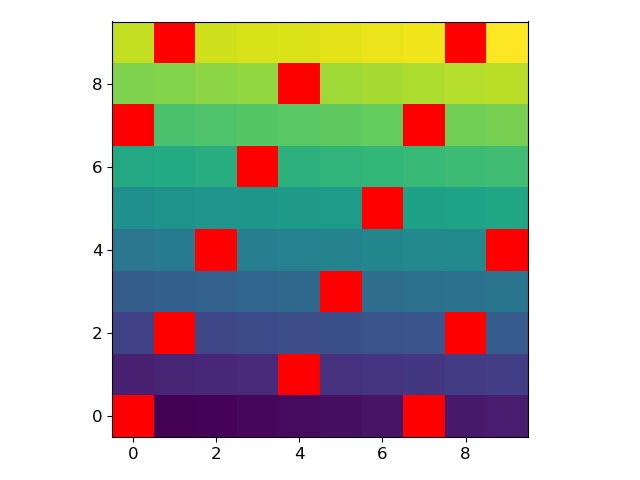
For example, let’s generate an array where every 7th value is a NaN:
arr = np.arange(100, dtype=float).reshape(10, 10)
arr[~(arr % 7).astype(bool)] = np.nan
We can modify the current colormap and plot the array with the following lines:
current_cmap = matplotlib.cm.get_cmap()
current_cmap.set_bad(color='red')
plt.imshow(arr)
All methods was sourced from stackoverflow.com or stackexchange.com, is licensed under cc by-sa 2.5, cc by-sa 3.0 and cc by-sa 4.0