i have read a lot of questions about this but i am stil confused..
I made a powerapps project where i uploaded a file into sharepoint, that upload would create a folder with a text field that would be fullfilled in that form.. And inside the fields would be uploaded, if the the name was already a folder, he would just upload into the library!
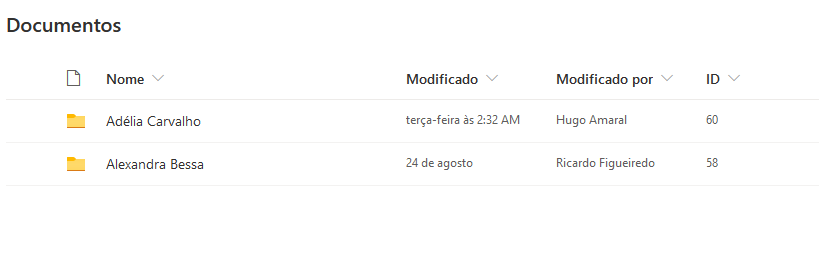
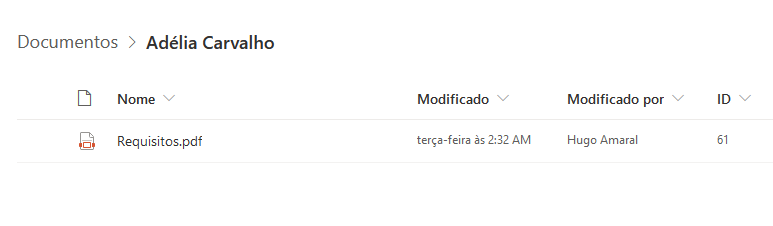
Now what i want, is to do the exact same thing, but with C# ASP.NET, i want to create a form where i send 2 values, a text to create the folder and the file to be uploaded into that folder! Can anyone please help? 🙂 thanks for any help ! 🙂
Answers:
Thank you for visiting the Q&A section on Magenaut. Please note that all the answers may not help you solve the issue immediately. So please treat them as advisements. If you found the post helpful (or not), leave a comment & I’ll get back to you as soon as possible.
Method 1
You can use SharePoint CSOM to create folder:
            string userName = "<a href="https://getridbug.com/cdn-cgi/l/email-protection" class="__cf_email__" data-cfemail="96e3e5f3e4d6c2f3f8f7f8e2b8f9f8fbfff5e4f9e5f9f0e2b8f5f9fb">[email protected]</a>";
            string Password = "*********";
            var securePassword = new SecureString();
            foreach (char c in Password)
            {
                securePassword.AppendChar(c);
            }
            using (var ctx = new ClientContext("https://tenant.sharepoint.com/sites/sitename"))
            {
                ctx.Credentials = new Microsoft.SharePoint.Client.SharePointOnlineCredentials(userName, securePassword);
                Web web = ctx.Web;
                ctx.Load(web);
                ctx.ExecuteQuery();
                List byTitle = ctx.Web.Lists.GetByTitle("LibraryName");

                // New object of "ListItemCreationInformation" class
                ListItemCreationInformation listItemCreationInformation = new ListItemCreationInformation();

                // Below are options.
                // (1) File - This will create a file in the list or document library
                // (2) Folder - This will create a foder in list(if folder creation is enabled) or documnt library
                listItemCreationInformation.UnderlyingObjectType = FileSystemObjectType.Folder;

                // This will et the internal name/path of the file/folder
                listItemCreationInformation.LeafName = "NewFolderFromCSOM";

                ListItem listItem = byTitle.AddItem(listItemCreationInformation);

                // Set folder Name
                listItem["Title"] = "NewFolderFromCSOM";

                listItem.Update();
                ctx.ExecuteQuery();
            }

Create Folder in SharePoint using CSOM
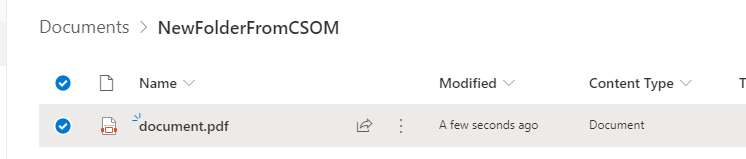
Then upload file to the new created folder:
            string userName = "<a href="https://getridbug.com/cdn-cgi/l/email-protection" class="__cf_email__" data-cfemail="2b5e584e596b7f4e454a455f054445464248594458444d5f05484446">[email protected]</a>";
            string Password = "*******";
            var securePassword = new SecureString();
            foreach (char c in Password)
            {
                securePassword.AppendChar(c);
            }
            using (var ctx = new ClientContext("https://tenant.sharepoint.com/"))
            {
                ctx.Credentials = new Microsoft.SharePoint.Client.SharePointOnlineCredentials(userName, securePassword);
                Web web = ctx.Web;
                ctx.Load(web);
                ctx.ExecuteQuery();
                FileCreationInformation newFile = new FileCreationInformation();
                newFile.Content = System.IO.File.ReadAllBytes("D:\document.pdf");
                newFile.Url = @"document.pdf";
                List byTitle = ctx.Web.Lists.GetByTitle("Documents");
                Folder folder = byTitle.RootFolder.Folders.GetByUrl("NewFolderFromCSOM");
                ctx.Load(folder);
                ctx.ExecuteQuery();
                Microsoft.SharePoint.Client.File uploadFile = folder.Files.Add(newFile);
                uploadFile.CheckIn("checkin", CheckinType.MajorCheckIn);
                ctx.Load(byTitle);
                ctx.Load(uploadFile);
                ctx.ExecuteQuery();
                Console.WriteLine("done");
            }
All methods was sourced from stackoverflow.com or stackexchange.com, is licensed under cc by-sa 2.5, cc by-sa 3.0 and cc by-sa 4.0