My code looks like this right now with two lines of code for each message. The code works but if I have for example 30 messages that I can each give values to then I will need to have 60 lines of code just to declare everything:
string _msg1;
string _msg2;
public string Msg1 { get => _msg1; set => SetProperty(ref _msg1, value); }
public string Msg2 { get => _msg2; set => SetProperty(ref _msg2, value); }
and in C# I assign to these:
vm.Msg1 = "A";
vm.Msg2 = "B";
and in the XAML I bind my Text to Msg1 and another Text to Msg2
Can someone tell me how / if I can do this with array so that I would assign like this and hopefully so the assignment of the array can just be done in two lines instead of 2 lines for every single message:
vm.Msg[0] = "A";
vm.Msg[1] = "B";
For reference:
public class ObservableObject : INotifyPropertyChanged
{

    protected virtual bool SetProperty<T>(
        ref T backingStore, T value,
        [CallerMemberName]string propertyName = "",
        Action onChanged = null)
    {
        if (EqualityComparer<T>.Default.Equals(backingStore, value))
            return false;

        backingStore = value;
        onChanged?.Invoke();
        OnPropertyChanged(propertyName);
        return true;
    }

    public event PropertyChangedEventHandler PropertyChanged;
    protected virtual void OnPropertyChanged([CallerMemberName]string propertyName = "") =>
        PropertyChanged?.Invoke(this, new PropertyChangedEventArgs(propertyName));

}
Answers:
Thank you for visiting the Q&A section on Magenaut. Please note that all the answers may not help you solve the issue immediately. So please treat them as advisements. If you found the post helpful (or not), leave a comment & I’ll get back to you as soon as possible.
Method 1
You can create a simple wrapper class with indexing that supports property change notification.
For example:
public class Messages : ObservableObject
{
    readonly IDictionary<int, string> _messages = new Dictionary<int, string>();

    [IndexerName("Item")] //not exactly needed as this is the default
    public string this[int index]
    {
        get
        {
            if (_messages.ContainsKey(index))
                return _messages[index];

//Uncomment this if you want exceptions for bad indexes
//#if DEBUG
//          throw new IndexOutOfRangeException();
//#else
            return null; //RELEASE: don't throw exception
//#endif
        }

        set
        {
            _messages[index] = value;
            OnPropertyChanged("Item[" + index + "]");
        }
    }
}
And, create a property in view model as:
private Messages _msg;
public Messages Msg
{
    get { return _msg ?? (_msg = new Messages()); }
    set { SetProperty(ref _msg, value); }
}
Now you can set or update values as:
vm.Msg[0] = "A";
vm.Msg[1] = "B";
Bindings in XAML will be same as:
<Label Text="{Binding Msg[0]}" />
<Label Text="{Binding Msg[1]}" />
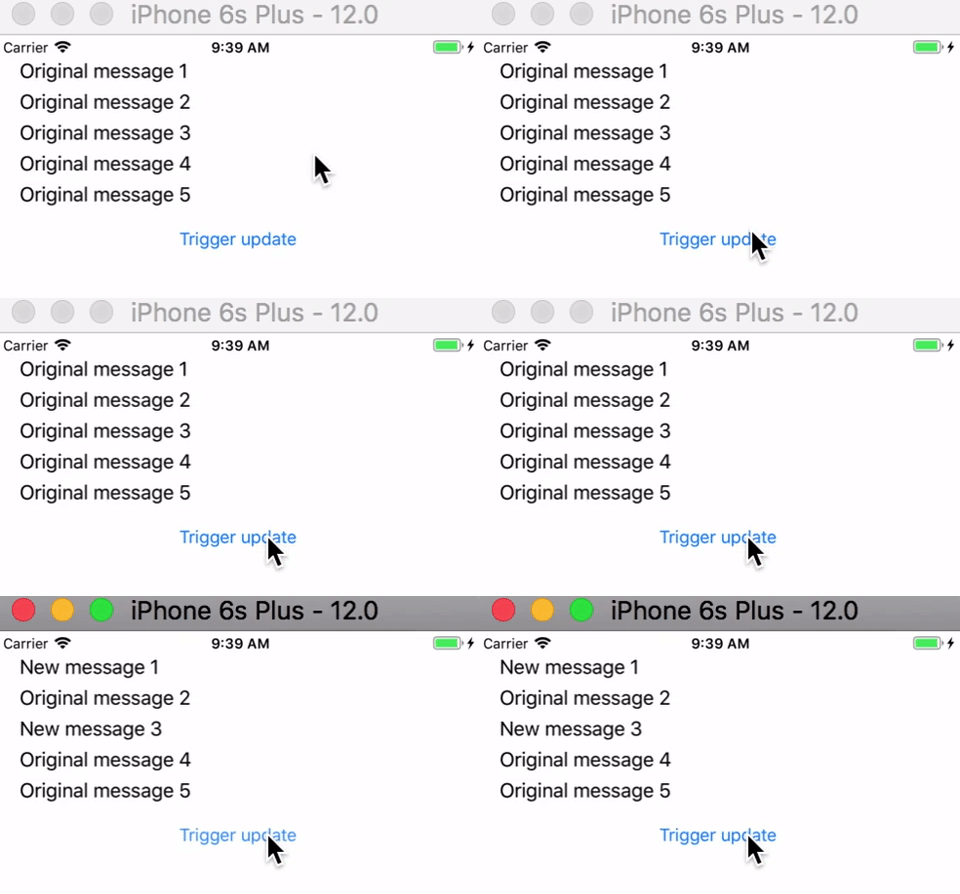
Sample usage code
XAML
<StackLayout Margin="20">
    <Label Text="{Binding Msg[0]}" />
    <Label Text="{Binding Msg[1]}" />
    <Label Text="{Binding Msg[2]}" />
    <Label Text="{Binding Msg[3]}" />
    <Label Text="{Binding Msg[4]}" />

    <Button Text="Trigger update" Command="{Binding UpdateMessage}" />
</StackLayout>
Code-behind, view-model
public partial class MainPage : ContentPage
{
    public MainPage()
    {
        InitializeComponent();

        var viewModel = new MainViewModel();

        viewModel.Msg[0] = "Original message 1";
        viewModel.Msg[1] = "Original message 2";
        viewModel.Msg[2] = "Original message 3";
        viewModel.Msg[3] = "Original message 4";
        viewModel.Msg[4] = "Original message 5";

        BindingContext = viewModel;
    }
}

public class MainViewModel : ObservableObject
{
    private Messages _msg;
    public Messages Msg
    {
        get { return _msg ?? (_msg = new Messages()); }
        set { SetProperty(ref _msg, value); }
    }

    public ICommand UpdateMessage => new Command(() =>
           {
               Msg[2] = "New message 3";
               Msg[0] = "New message 1";
           });
}
Method 2
Arrays will not raise property changed event. You’ll need to use an ObservableCollection that can raise an event when the collection has changed. However, this doesn’t raise an event when the object inside the collection has changed it’s value. You’ll need to wrap your object, in this case a string, into a type that can raise property changed events.
Something like the following would work:
    public class BindableValue<T> : INotifyPropertyChanged
    {
        private T _value;
        public T Value
        { get => _value; set => SetProperty(ref _value, value); }
        // INotifyPropertyChanged and SetProperty implementation goes here
    }

    private ObservableCollection<BindableValue<string>> _msg;
    public ObservableCollection<BindableValue<string>> Msg
    { get => _msg; set => SetProperty(ref _msg1, value); }
you would be binding to Msg[0].Value, Msg[1].Value etc.,
Method 3
Not entirely sure that I got the question, but as I understood the simplest way is this:
The Viewmodel:
Just bind to an ObservableCollection of strings, because it already implements INotifyCollectionChanged and INotifyPropertyChanged.
RelayCommand is just an implementation of ICommand and I’m assuming you have heard of them since you are doing WPF MVVM.
using System.Collections.ObjectModel;

namespace WpfApp1
{
    public class MainWindowViewmodel
    {
        public ObservableCollection<string> Messages { get; set; }
        public MainWindowViewmodel()
        {
            Messages = new ObservableCollection<string>();
            Messages.Add("My message!");
            ChangeMessageCommand = new RelayCommand(ChangeMessageExcecute);
        }
        public RelayCommand ChangeMessageCommand { get; set; }
        private void ChangeMessageExcecute() => Messages[0] = "NEW message!";
    }
}
The View:
In the view you can just bind your Textblocks to the Elements of the ObservableCollection. When you press the button, the Command gets called and changes the message in the window.
<Window x:Class="WpfApp1.MainWindow"
        xmlns="http://schemas.microsoft.com/winfx/2006/xaml/presentation"
        xmlns:x="http://schemas.microsoft.com/winfx/2006/xaml"
        xmlns:d="http://schemas.microsoft.com/expression/blend/2008"
        xmlns:mc="http://schemas.openxmlformats.org/markup-compatibility/2006"
        mc:Ignorable="d"
        Title="MainWindow" Height="450" Width="800">
    <Grid>
        <StackPanel>
            <TextBlock Text="{Binding Messages[0]}" HorizontalAlignment="Center"/>
            <Button Content="Change Message" Command="{Binding ChangeMessageCommand}" Width="200"/>
        </StackPanel>
    </Grid>
</Window>
Kind regards,
misdirection
Method 4
I Assume that your given example is running and working as expected (Atleast with 2 items)
View Code.
Assuming you want to show all the 30 messages as a list.
<ListView ItemsSource="{Binding MessagesArray}"/>
Also you should set the DataContext properly, Comment below if you need any help
View Model Code.
We are using an ObservableCollection instead of array. Since pure arrays doesn’t support proper binding features.
private ObservableCollection<string> _messagesArray;

public ObservableCollection<string> MessagesArray
{
    get { return _messagesArray; }
    set { SetProperty(ref _messagesArray, value); }
}
Assigning Values
MessagesArray = new ObservableCollection<string>();
vm.MessagesArray.Add("A");
vm.MessagesArray.Add("B");
In the assignment code MessagesArray = new ObservableCollection<string>(); assigns a new object of ObservableCollection of String
If you are new to
ObservableCollectionthink of this as an wrapper tostring[], but not actually true
SetProperty method will tell the XAML View that a new collection is arrived, so the UI will rerender the list.
When you call vm.MessagesArray.Add("B"); internal logics inside the method Add will tell the XAML View a new item is added to the ObservableCollection so the view can rerender the ListView with the new item.
Update 27 October 2018
You can create your own array using any of the below ways. (Not all)
string[] dataArray = new string[30];
1. this will create an array with 30 null values
string[] dataArray = { "A", "B", "C" }; //Go up to 30 items
2. this will create an array with predefined set of values, you can go up to 30
string[] dataArray = Enumerable.Repeat<string>(String.Empty, 30).ToArray();
3. this will create an array with string which holds empty values, Instead of String.Empty you can put any string value.
Choose any of the above method
I recommend the last method, then you can assign that into a Observable Collection like below.
MessagesArray = new ObservableCollection<string>(dataArray);
Now the trick is
vm.MessagesArray[0] = "A"
vm.MessagesArray[25] = "Z"
View might look like below
<TextBlock Text="{Binding MessagesArray[0]}"/>
<TextBlock Text="{Binding MessagesArray[1]}"/>
Method 5
What about using reflection?
You can ask for all the public properties of type string with name “Msg*”.
For example:
static class Program
{
    static void Main(string[] args)
    {
        var vm = new MessagesViewModel();

        PropertyInfo[] myProperties = vm.GetType()
            .GetProperties(BindingFlags.Public | BindingFlags.Instance)
            .Where(p => p.PropertyType == typeof(string) && p.Name.Contains("Msg"))
            .ToArray();

        foreach (var propertyInfo in myProperties)
        {
            //You can also access directly using the indexer --> myProperties[0]..
            propertyInfo.SetValue(vm, $"This is {propertyInfo.Name} property");
        }

        Console.WriteLine(vm.Msg1);
        Console.WriteLine(vm.Msg2);
    }
}

public class MessagesViewModel
{
    string _msg1;
    string _msg2;
    public string Msg1 { get => _msg1; set => _msg1 = value; }
    public string Msg2 { get => _msg2; set => _msg2 = value; }
}
If this type of solution fits, you can wrap it with an indexer, sort the array to match the index and the Msg[num].
All methods was sourced from stackoverflow.com or stackexchange.com, is licensed under cc by-sa 2.5, cc by-sa 3.0 and cc by-sa 4.0