The objective was to make some bullets come out of the current position of the player and then have them move in a straight line, defined by a vector that is defined by the points of the mouse position at the time of clicking the button and the position of the player, but when the button is pressed nothing happens. Can anyone tell me whats wrong with this code? Thank you
import pygame
import math
pygame.init()
win = pygame.display.set_mode((500,500))
pygame.display.set_caption("Space Shooter")
char = pygame.image.load("spaceship_sprite.png")

x = 500/2
y = 500/2
width = 50
height = 50
velocity = 6
list_of_bullets = []

def point_to_mouse(x,y,char):
    mouse_x, mouse_y = pygame.mouse.get_pos()
    vector_x, vector_y = mouse_x - x, mouse_y - y
    angle = (180 / math.pi) * -math.atan2(vector_y, vector_x) - 90
    updated_image = pygame.transform.rotate(char,int(angle))
    image_location = updated_image.get_rect(center= (x,y))
    win.blit(updated_image,image_location)

def update_game(x,y,width,height,char):
    win.fill((0,0,0))
    point_to_mouse(x,y,char)
    pygame.display.update()

def spawn_bullet(x,y):
    global list_of_bullets
    initial_x = x
    initial_y = y
    mouse_x, mouse_y = pygame.mouse.get_pos()
    vector_x, vector_y = mouse_x - x, mouse_y - y
    #normalize the vector
    distance = math.sqrt(vector_x ** 2 + vector_y **2)
    normalized_vec = (vector_x/ distance, vector_y/distance)
    list_of_bullets.append([initial_x,initial_y,normalized_vec])


run = True
while run:
    #check for an event
    pygame.time.delay(75)
    for event in pygame.event.get():
        if event.type == pygame.QUIT:
            run = False
        if event.type == pygame.MOUSEBUTTONDOWN:
            spawn_bullet(x,y)

    for bullet in list_of_bullets:
        bullet[0] = bullet[0] * bullet[2][0]
        bullet[1] = bullet[1] * bullet[2][1]

        pygame.draw.rect(win,(0,0,255),(int(bullet[0]),int(bullet[1]),20,20))

        if bullet[0] > 500 or bullet[0] < 0 or bullet[1] < 0 or bullet[1] > 500:
            del list_of_bullets[list_of_bullets.index(bullet)]
            continue


    keys = pygame.key.get_pressed()
    if keys[pygame.K_LEFT] and x > 0 + width:
        x = x - velocity
    elif keys[pygame.K_RIGHT] and x < 500 - width:
        x = x + velocity
    elif keys[pygame.K_UP] and y > 0 + width:
        y = y - velocity
    elif keys[pygame.K_DOWN] and y < 500 - width:
        y = y + velocity


    update_game(x,y,width,height,char)

pygame.quit()
Answers:
Thank you for visiting the Q&A section on Magenaut. Please note that all the answers may not help you solve the issue immediately. So please treat them as advisements. If you found the post helpful (or not), leave a comment & I’ll get back to you as soon as possible.
Method 1
There are 2 issues. The current position of the bullets is multiplied by its the normalized direction vector. That doesn’t make sense:
for bullet in list_of_bullets:
   bullet[0] = bullet[0] * bullet[2][0]
   bullet[1] = bullet[1] * bullet[2][1]
Add the direction vector to the position of the bullet:
for bullet in list_of_bullets:
    bullet[0] += bullet[2][0]
    bullet[1] += bullet[2][1]
If you want to increase the speed of the bullets, then you’ve to scale the vector by a certain speed. e.g.:
def spawn_bullet(x,y):
    global list_of_bullets
    initial_x = x
    initial_y = y
    mouse_x, mouse_y = pygame.mouse.get_pos()
    vector_x, vector_y = mouse_x - x, mouse_y - y

    distance = math.sqrt(vector_x ** 2 + vector_y **2)
    speed = 5
    move_vec = (speed*vector_x/distance, speed*vector_y/distance)

    list_of_bullets.append([initial_x, initial_y, move_vec])
The 2nd issue is, that the display is cleared, after the bullets are draw, so you’ll never “see” the bullets.
Draw the bullets in update_game after the display is cleared:
def update_game(x,y,width,height,char):
    win.fill((0,0,0))
    for bullet in list_of_bullets:
        pygame.draw.rect(win,(0,0,255),(int(bullet[0]),int(bullet[1]),20,20))
    point_to_mouse(x,y,char)
    pygame.display.update()
(Delete the drawing for the main application loop)
Minimal example:
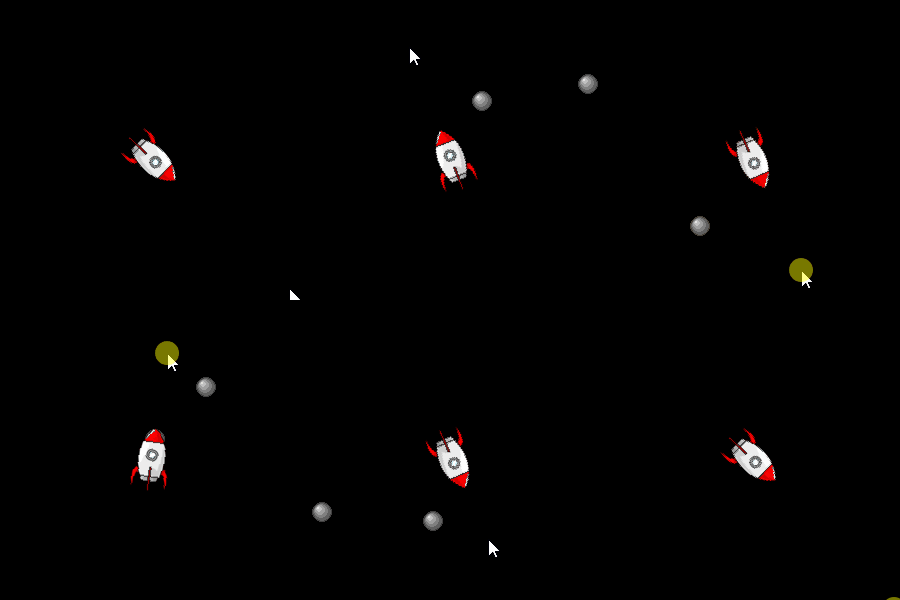
import math
import pygame

def blit_point_to_mouse(target_surf, char_surf, x, y):
    mouse_x, mouse_y = pygame.mouse.get_pos()
    vector_x, vector_y = mouse_x - x, mouse_y - y
    angle = (180 / math.pi) * -math.atan2(vector_y, vector_x) - 90
    rotated_surface = pygame.transform.rotate(char_surf, round(angle))
    rotated_surface_location = rotated_surface.get_rect(center = (x, y))
    target_surf.blit(rotated_surface, rotated_surface_location)

def spawn_bullet(list_of_bullets, x, y):
    mouse_x, mouse_y = pygame.mouse.get_pos()
    vector_x, vector_y = mouse_x - x, mouse_y - y
    distance = math.hypot(vector_x, vector_y)
    if distance == 0:
        return
    speed = 5
    move_vec = (speed * vector_x / distance, speed * vector_y / distance)
    list_of_bullets.append([x, y, move_vec])

pygame.init()
window = pygame.display.set_mode((500,500))
clock = pygame.time.Clock()

rocket = pygame.image.load('Rocket64.png')
rocket_rect = rocket.get_rect(center = window.get_rect().center)
velocity = 6
list_of_bullets = []
bullet = pygame.Surface((20, 20), pygame.SRCALPHA)
pygame.draw.circle(bullet, (64, 64, 64), (10, 10), 10)
pygame.draw.circle(bullet, (96, 96, 96), (10, 10), 9)
pygame.draw.circle(bullet, (128, 128, 128), (9, 9), 7)
pygame.draw.circle(bullet, (160, 160, 160), (8, 8), 5)
pygame.draw.circle(bullet, (192, 192, 192), (7, 7), 3)
pygame.draw.circle(bullet, (224, 224, 224), (6, 6), 1)

run = True
while run:
    clock.tick(60)
    for event in pygame.event.get():
        if event.type == pygame.QUIT:
            run = False
        if event.type == pygame.MOUSEBUTTONDOWN:
            spawn_bullet(list_of_bullets, *rocket_rect.center)

    for bullet_pos in list_of_bullets:
        bullet_pos[0] += bullet_pos[2][0]
        bullet_pos[1] += bullet_pos[2][1]
        if not (0 <= bullet_pos[0] < window.get_width() and 0 < bullet_pos[1] < window.get_height()):
            del list_of_bullets[list_of_bullets.index(bullet_pos)]
            continue

    keys = pygame.key.get_pressed()
    rocket_rect.x += (keys[pygame.K_RIGHT] - keys[pygame.K_LEFT]) * velocity
    rocket_rect.y += (keys[pygame.K_UP] - keys[pygame.K_DOWN]) * velocity
    rocket_rect.clamp_ip(window.get_rect())

    window.fill(0)
    for bullet_pos in list_of_bullets:
        window.blit(bullet, bullet.get_rect(center = (round(bullet_pos[0]),round(bullet_pos[1]))))
    blit_point_to_mouse(window, rocket, *rocket_rect.center)
    pygame.display.flip()

pygame.quit()
exit()
All methods was sourced from stackoverflow.com or stackexchange.com, is licensed under cc by-sa 2.5, cc by-sa 3.0 and cc by-sa 4.0