I’ve been reading some async articles here: http://www.asp.net/web-forms/tutorials/aspnet-45/using-asynchronous-methods-in-aspnet-45 and the author says :
When you’re doing asynchronous work, you’re not always using a thread.
For example, when you make an asynchronous web service request,
ASP.NET will not be using any threads between the async method call
and the await.
So what I am trying to understand is, how does it become async if we don’t use any Threads for concurrent execution? What does it mean “you’re not always using a thread.”?
Let me first explain what I know regarding working with threads (A quick example, of course Threads can be used in different situations other than UI and Worker methodology here)
- You have UI Thread to take input, give output.
- You can handle things in UI Thread but it makes the UI unresponsive.
- So lets say we have a stream-related operation and we need to download some sort of data.
- And we also allow users to do other things while it is being downloaded.
- We create a new worker thread which downloads the file and changes the progress bar.
- Once it is done, there is nothing to do so thread is killed.
- We continue from UI thread.
We can either wait for the worker thread in UI thread depending on the situation but before that while the file is being downloaded, we can do other things with UI thread and then wait for the worker thread.
Isn’t the same for async programming? If not, what’s the difference? I read that async programming uses ThreadPool to pull threads from though.
Answers:
Thank you for visiting the Q&A section on Magenaut. Please note that all the answers may not help you solve the issue immediately. So please treat them as advisements. If you found the post helpful (or not), leave a comment & I’ll get back to you as soon as possible.
Method 1
Threads are not necessary for asynchronous programming.
“Asynchronous” means that the API doesn’t block the calling thread. It does not mean that there is another thread that is blocking.
First, consider your UI example, this time using actual asynchronous APIs:
- You have UI Thread to take input, give output.
- You can handle things in UI Thread but it makes the UI unresponsive.
- So lets say we have a stream-related operation and we need to download some sort of data.
- And we also allow users to do other things while it is being downloaded.
- We use asynchronous APIs to download the file. No worker thread is necessary.
- The asynchronous operation reports its progress back to the UI thread (which updates the progress bar), and it also reports its completion to the UI thread (which can respond to it like any other event).
This shows how there can be only one thread involved (the UI thread), yet also have asynchronous operations going on. You can start up multiple asynchronous operations and yet only have one thread involved in those operations – no threads are blocked on them.
async/await provides a very nice syntax for starting an asynchronous operation and then returning, and having the rest of the method continue when that operation completes.
ASP.NET is similar, except it doesn’t have a main/UI thread. Instead, it has a “request context” for every incomplete request. ASP.NET threads come from a thread pool, and they enter the “request context” when they work on a request; when they’re done, they exit their “request context” and return to the thread pool.
ASP.NET keeps track of incomplete asynchronous operations for each request, so when a thread returns to the thread pool, it checks to see if there are any asynchronous operations in progress for that request; if there are none, then the request is complete.
So, when you await an incomplete asynchronous operation in ASP.NET, the thread will increment that counter and return. ASP.NET knows the request isn’t complete because the counter is non-zero, so it doesn’t finish the response. The thread returns to the thread pool, and at that point: there are no threads working on that request.
When the asynchronous operation completes, it schedules the remainder of the async method to the request context. ASP.NET grabs one of its handler threads (which may or may not be the same thread that executed the earlier part of the async method), the counter is decremented, and the thread executes the async method.
ASP.NET vNext is slightly different; there’s more support for asynchronous handlers throughout the framework. But the general concept is the same.
For more information:
- My async/await intro post tries to be both an intro yet also reasonably complete picture of how
asyncandawaitwork. - The official async/await FAQ has lots of great links that go into a lot of detail.
- The MSDN magazine article It’s All About the SynchronizationContext exposes some of the plumbing underneath.
Method 2
First time when I saw async and await, I thougth they were C# Syntactic sugar for Asynchronous Programming Model. I was wrong, async and await are more than that. It is a brand new asynchronous pattern Task-based Asynchronous Pattern, http://www.microsoft.com/en-us/download/details.aspx?id=19957 is a good article to get start. Most of the FCL classes which inplement TAP are call APM methods (BegingXXX() and EndXXX()). Here are two code snaps for TAP and AMP:
TAP sample:
    static void Main(string[] args)
    {
        GetResponse();
        Console.ReadLine();
    }

    private static async Task<WebResponse> GetResponse()
    {
        var webRequest = WebRequest.Create("http://www.google.com");
        Task<WebResponse> response = webRequest.GetResponseAsync();
        Console.WriteLine(new StreamReader(response.Result.GetResponseStream()).ReadToEnd());
        return response.Result;
    }
APM sample:
    static void Main(string[] args)
    {
        var webRequest = WebRequest.Create("http://www.google.com");
        webRequest.BeginGetResponse(EndResponse, webRequest);
        Console.ReadLine();
    }

    static void EndResponse(IAsyncResult result)
    {
        var webRequest = (WebRequest) result.AsyncState;
        var response = webRequest.EndGetResponse(result);
        Console.WriteLine(new StreamReader(response.GetResponseStream()).ReadToEnd());
    }
Finally these two will be the same, because GetResponseAsync() call BeginGetResponse() and EndGetResponse() inside. When we reflector the source code of GetResponseAsync(), we will get code like this:
task = Task<WebResponse>.Factory.FromAsync(
       new Func<AsyncCallback, object, IAsyncResult>(this.BeginGetResponse),
       new Func<IAsyncResult, WebResponse>(this.EndGetResponse), null);
For APM, in the BeginXXX(), there is an argument for a callback method which will invoked when the task (typically is an IO heavy operation) was completed. Creating a new thread and asynchronous, both of them will immediately return in main thread, both of them are unblocked. On performance side, creating new thread will cost more resource when process I/O-bound operations such us read file, database operation and network read. There are two disadvantages in creating new thread,
- like in your mentioned article, there are memory cost and CLR are
limitation on thread pool. - Context switch will happen. On the other hander, asynchronous will
not create any thread manually and it will not have context switch
when the the IO-bound operations return.
Here is an picture which can help to understand the differences:
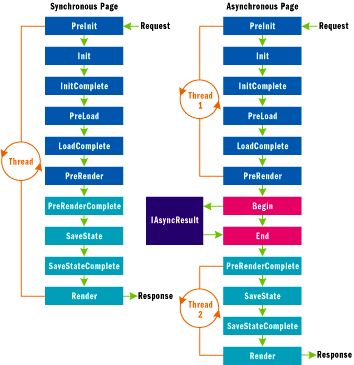
This diagram is from a MSDN article “Asynchronous Pages in ASP.NET 2.0“, which explain very detail about how the old asynchronous working in ASP.NET 2.0.
About Asynchronous Programming Model, please get more detail from Jeffrey Richter’s article “Implementing the CLR Asynchronous Programming Model“, also there are more detail on his book “CLR via Csharp 3rd Edition” in chapter 27.
Method 3
Let’s imagine that you are implementing a web application and as each client request comes in to
your server, you need to make a database request. When a client request comes in, a thread pool
thread will call into your code. If you now issue a database request synchronously, the thread will block
for an indefinite amount of time waiting for the database to respond with the result. If during this time
another client request comes in, the thread pool will have to create another thread and again this
thread will block when it makes another database request. As more and more client requests come in,
more and more threads are created, and all these threads block waiting for the database to respond.
The result is that your web server is allocating lots of system resources (threads and their memory) that
are barely even used!
And to make matters worse, when the database does reply with the various results, threads become
unblocked and they all start executing. But since you might have lots of threads running and relatively
few CPU cores, Windows has to perform frequent context switches, which hurts performance even
more. This is no way to implement a scalable application.
To read data from the file, I now call ReadAsync instead of Read. ReadAsync internally allocates a
Task object to represent the pending completion of the read operation. Then, ReadAsync
calls Win32’s ReadFile function (#1). ReadFile allocates its IRP, initializes it just like it did in the
synchronous scenario (#2), and then passes it down to the Windows kernel (#3). Windows adds the IRP
to the hard disk driver’s IRP queue (#4), but now, instead of blocking your thread, your thread is
allowed to return to your code; your thread immediately returns from its call to ReadAsync (#5, #6,
and #7). Now, of course, the IRP has not necessarily been processed yet, so you cannot have code after
ReadAsync that attempts to access the bytes in the passed-in Byte[].
All methods was sourced from stackoverflow.com or stackexchange.com, is licensed under cc by-sa 2.5, cc by-sa 3.0 and cc by-sa 4.0