I’m in a situation where I want to assert the identity of a PyQt5 signal. Specifically, I want to check whether the clicked signal from a given QPushButton object is identical to a signal that is stored in a variable named signal. The following snippet illustrates the situation:
from PyQt5.QtWidgets import QApplication, QPushButton

app = QApplication([])
widget = QPushButton()
signal = widget.clicked

widget.clicked == signal
Out[1]: False

widget.clicked is signal
Out[2]: False

id(widget.clicked) == id(signal)
Out[3]: False
As shown, the three comparisons involving ==, is, and id() respectively all produce False, i.e. they fail to assert the identity of the left-hand and the right-hand argument.
Is there any way to assert that widget.clicked and signal are referencing the same signal?
Answers:
Thank you for visiting the Q&A section on Magenaut. Please note that all the answers may not help you solve the issue immediately. So please treat them as advisements. If you found the post helpful (or not), leave a comment & I’ll get back to you as soon as possible.
Method 1
Signals as entities are created each time you invoke it as they represent a different connection:
In [1]: import sys

In [2]: from PyQt5 import QtWidgets

In [3]: app = QtWidgets.QApplication(sys.argv)

In [4]: button = QtWidgets.QPushButton()

In [5]: id(button.clicked)
Out[5]: 140150155639464

In [6]: id(button.clicked)
Out[6]: 140150154507528

In [7]: id(button.clicked)
Out[7]: 140150155640184

In [8]: id(button.clicked)
Out[8]: 140150155640504

In [9]: id(button.clicked)
Out[9]: 140150154510128

In [10]: id(button.clicked)
Out[10]: 140149427454320
Therefore if you connect 100 times between the same signal and slot, and when the signal is emitted, the slot will be called 100 times:
import sys
from PyQt5 import QtCore, QtWidgets

def foo():
    print("clicked")

if __name__ == '__main__':

    app = QtWidgets.QApplication(sys.argv)
    button = QtWidgets.QPushButton("Press me")
    button.show()
    for _ in range(10):
        button.clicked.connect(foo)
    # the click is emulated
    QtCore.QTimer.singleShot(1000, lambda: button.animateClick(500))
    QtCore.QTimer.singleShot(2000, app.quit)
    sys.exit(app.exec_())
Output:
clicked
clicked
clicked
clicked
clicked
clicked
clicked
clicked
clicked
clicked
So it will be impossible to solve your problem directly but I think that your goal is to discriminate which object that emitted the signal that calls the slot since you probably have several objects connected to the same slot, and for that if there is a solution:
1. Using sender() method
If the slot belongs to a QObject (or classes derived from QObject as the widgets) then you can use the sender method to obtain the object that emitted the signal.
import sys
from PyQt5 import QtCore, QtWidgets

class Widget(QtWidgets.QWidget):
    def __init__(self, parent=None):
        super(Widget, self).__init__(parent)

        self.button_1 = QtWidgets.QPushButton("button 1")
        self.button_1.clicked.connect(self.foo)
        self.button_2 = QtWidgets.QPushButton("button 2")
        self.button_2.clicked.connect(self.foo)
        self.button_3 = QtWidgets.QPushButton("button 3")
        self.button_3.clicked.connect(self.foo)

        lay = QtWidgets.QVBoxLayout(self)
        lay.addWidget(self.button_1)
        lay.addWidget(self.button_2)
        lay.addWidget(self.button_3)

    @QtCore.pyqtSlot()
    def foo(self):
        button = self.sender()
        if button is self.button_1:
            print("button_1")
        elif button is self.button_2:
            print("button_2")
        elif button is self.button_3:
            print("button_3")

if __name__ == '__main__':

    app = QtWidgets.QApplication(sys.argv)
    w = Widget()
    w.show()
    sys.exit(app.exec_())
2. Pass the object as an additional parameter
2.1 lambda function
import sys
from PyQt5 import QtCore, QtWidgets

class Widget(QtWidgets.QWidget):
    def __init__(self, parent=None):
        super(Widget, self).__init__(parent)

        self.button_1 = QtWidgets.QPushButton("button 1")
        self.button_1.clicked.connect(lambda *args, b=self.button_1 : self.foo(b))
        self.button_2 = QtWidgets.QPushButton("button 2")
        self.button_2.clicked.connect(lambda *args, b=self.button_2 : self.foo(b))
        self.button_3 = QtWidgets.QPushButton("button 3")
        self.button_3.clicked.connect(lambda *args, b=self.button_3 : self.foo(b))

        lay = QtWidgets.QVBoxLayout(self)
        lay.addWidget(self.button_1)
        lay.addWidget(self.button_2)
        lay.addWidget(self.button_3)

    def foo(self, button):
        if button is self.button_1:
            print("button_1")
        elif button is self.button_2:
            print("button_2")
        elif button is self.button_3:
            print("button_3")

if __name__ == '__main__':

    app = QtWidgets.QApplication(sys.argv)
    w = Widget()
    w.show()
    sys.exit(app.exec_())
2.1 functools.partial function
import sys
from PyQt5 import QtCore, QtWidgets
from functools import partial

class Widget(QtWidgets.QWidget):
    def __init__(self, parent=None):
        super(Widget, self).__init__(parent)

        self.button_1 = QtWidgets.QPushButton("button 1")
        self.button_1.clicked.connect(partial(self.foo, self.button_1))
        self.button_2 = QtWidgets.QPushButton("button 2")
        self.button_2.clicked.connect(partial(self.foo, self.button_2))
        self.button_3 = QtWidgets.QPushButton("button 3")
        self.button_3.clicked.connect(partial(self.foo, self.button_3))

        lay = QtWidgets.QVBoxLayout(self)
        lay.addWidget(self.button_1)
        lay.addWidget(self.button_2)
        lay.addWidget(self.button_3)

    def foo(self, button):
        if button is self.button_1:
            print("button_1")
        elif button is self.button_2:
            print("button_2")
        elif button is self.button_3:
            print("button_3")

if __name__ == '__main__':

    app = QtWidgets.QApplication(sys.argv)
    w = Widget()
    w.show()
    sys.exit(app.exec_())
In my case I prefer to use sender if I can use it, then functools.partial and finally lambda methods
Method 2
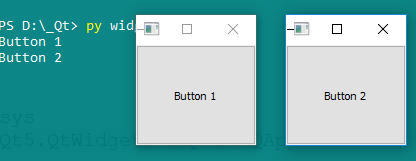
Try it:
import sys
from PyQt5.QtWidgets import QApplication, QPushButton

app = QApplication([])

def clickButton(w):
    # Check what you clicked here.                        # <-----
    return print(w.text())

widget  = QPushButton('Button 1')
widget.clicked.connect(lambda : clickButton(widget))

widget2 = QPushButton('Button 2')
widget2.clicked.connect(lambda : clickButton(widget2))

widget.setGeometry(300, 150, 100, 100)
widget.show()

widget2.setGeometry(450, 150, 100, 100)
widget2.show()

sys.exit(app.exec_())
All methods was sourced from stackoverflow.com or stackexchange.com, is licensed under cc by-sa 2.5, cc by-sa 3.0 and cc by-sa 4.0