I’m working on a simple website using django and bootstrap.
I’ve used the UserCreationForm class to make a standards registration page.
But I’d like to make the texts a little darker so it’s more legible and has a good contrast from the background image and mask. What’d be the best solution?
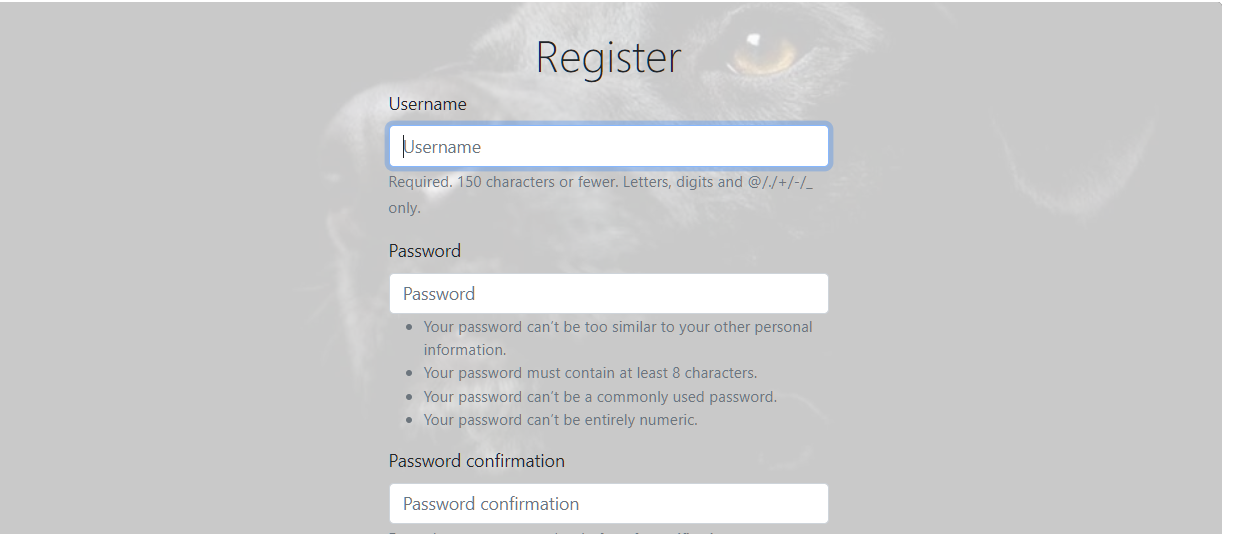
View module
def register(request):
    #if the request method is a  'get'
    #Yes initial data
    if request.method != 'POST':
        form = UserCreationForm()
    #no initial data
    #f the request method is a 'post'
    else:
        form = UserCreationForm(data=request.POST)
        if form.is_valid():
            new_user=form.save()
            authenticated_user = authenticate(username=new_user.username,
                                          password=request.POST['password1'])
            login(request, aunthenticated_user)
            return HttpResponseRedirect(reverse('my_websites:home'))
    context = {'form': form}
    return render(request, 'users/register.html', context)
bootstrap
{% extends "pages/base.html" %}
{% load bootstrap5 %}

{% block header %}
<div="container my-5">
  <div class="bg-image position-relative rounded" style="background:url('https://wallpaperaccess.com/full/1708426.jpg') no-repeat center center fixed; -webkit-background-size: cover; -moz-background-size: cover; -o-background-size: cover; background-size: cover;  height: 100vh;">
    <div class="mask position-absolute rounded p-4 top-0 end-0 bottom-0 start-0" style="background-color: rgba(251, 251, 251, 0.8);">
      <h2 class="text-center display-6"> Register </h2>
      <form method="post" action="{% url 'users:register' %}" class="form text-dark" style="max-width: 400px; margin:0 auto;">
        {% csrf_token %}
        {% bootstrap_form form %}
        {% buttons %}
           <button name="submit" class="btn btn-dark">Register
</button>
        {% endbuttons %}
        <input type="hidden" name="next" value="{% url 'my_websites:home' %}" />
      </form>
    </div>
  </div>
</div>
thank you for your time.
Answers:
Thank you for visiting the Q&A section on Magenaut. Please note that all the answers may not help you solve the issue immediately. So please treat them as advisements. If you found the post helpful (or not), leave a comment & I’ll get back to you as soon as possible.
Method 1
It looks like you’re using Bootstrap, which pre-defined a set of CSS classes you can use for colors.
Try changing your <h2 class="text-center display-6"> Register </h2> tag to <h2 class="text-center display-6 text-danger"> Register </h2> – it will likely turn red.
The bootstrap_form tag allows you to pass parameters to control the CSS class attributes applied.
For example, try:
{% bootstrap_form form field_class="text-danger" %}
For available parameters you can pass, see the documentation: https://django-bootstrap-v5.readthedocs.io/en/latest/templatetags.html#bootstrap-field
For more information on how to use colors with Bootstrap, including defining your own color theme to use, see here: https://getbootstrap.com/docs/5.0/utilities/colors/ Good luck!
All methods was sourced from stackoverflow.com or stackexchange.com, is licensed under cc by-sa 2.5, cc by-sa 3.0 and cc by-sa 4.0