Is there a way in Python to convert characters as they are being entered by the user to asterisks, like it can be seen on many websites?
For example, if an email user was asked to sign in to their account, while typing in their password, it wouldn’t appear as characters but rather as * after each individual stroke without any time lag.
If the actual password was KermitTheFrog, it would appear as ************* when typed in.
Answers:
Thank you for visiting the Q&A section on Magenaut. Please note that all the answers may not help you solve the issue immediately. So please treat them as advisements. If you found the post helpful (or not), leave a comment & I’ll get back to you as soon as possible.
Method 1
There is getpass(), a function which hides the user input.
import getpass

password = getpass.getpass()
print(password)
Method 2
If you want a solution that works on Windows/macOS/Linux and on Python 2 & 3, you can install the pwinput module (formerly called stdiomask):
pip install pwinput
Unlike getpass.getpass() (which is in the Python Standard Library), the pwinput module can display *** mask characters as you type. It is also cross-platform, while getpass is Linux and macOS only.
Example usage:
>>> pwinput.pwinput()
Password: *********
'swordfish'
>>> pwinput.pwinput(mask='X') # Change the mask character.
Password: XXXXXXXXX
'swordfish'
>>> pwinput.pwinput(prompt='PW: ', mask='*') # Change the prompt.
PW: *********
'swordfish'
>>> pwinput.pwinput(mask='') # Don't display anything.
Password:
'swordfish'
Unfortunately this module, like Python’s built-in getpass module, doesn’t work in IDLE or Jupyter Notebook.
More details at https://pypi.org/project/pwinput/
Method 3
If you’re using Tkinter:
# For Python 2:
from Tkinter import Entry, Tk
# For Python 3
from tkinter import Entry, Tk

master = Tk()

Password = Entry(master, bd=5, width=20, show="*")
Password.pack()

master.mainloop()
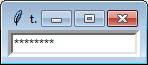
In the shell, this is not possible. You can however write a function to store the entered text and report only a string of *’s when called.
Kinda like this, which I did not write. I just Googled it.
Method 4
You can do this:
# if getch module is available, then we implement our own getpass() with asterisks,
# otherwise we just use the plain boring getpass.getpass()
try:
    import getch
    def getpass(prompt):
        """Replacement for getpass.getpass() which prints asterisks for each character typed"""
        print(prompt, end='', flush=True)
        buf = ''
        while True:
            ch = getch.getch()
            if ch == 'n':
                print('')
                break
            else:
                buf += ch
                print('*', end='', flush=True)
        return buf
except ImportError:
    from getpass import getpass
Method 5
first install the library:
pip install stdiomask
note that you install std io mask not studiomask…
And then the code is:
password = stdiomask.getpass() # It will ask to enter password and display * on the screen

print(password)
This is the output:
Password: *****
google
Method 6
For anyone who would actually want to have asterisks appear, here’s an improvement on Tigran Aivazian’s answer. This version imports the built-in msvcrt.getch, adds cases for different line endings when hitting ‘Enter/Return’, and includes logic to support Backspace, as well as Ctrl+C (KeyboardInterrupt):
try:
    from msvcrt import getch
    def getpass(prompt):
        """Replacement for getpass.getpass() which prints asterisks for each character typed"""
        print(prompt, end='', flush=True)
        buf = b''
        while True:
            ch = getch()
            if ch in {b'n', b'r', b'rn'}:
                print('')
                break
            elif ch == b'x08': # Backspace
                buf = buf[:-1]
                print(f'r{(len(prompt)+len(buf)+1)*" "}r{prompt}{"*" * len(buf)}', end='', flush=True)
            elif ch == b'x03': # Ctrl+C
                raise KeyboardInterrupt
            else:
                buf += ch
                print('*', end='', flush=True)
        return buf.decode(encoding='utf-8')
except ImportError:
    from getpass import getpass
Please feel free to suggest any other changes, or ways to improve this; I hacked the changes together pretty quickly, especially with the Backspace logic.
Method 7
while using getpass in python, nothing is indicated to show a password input.
this can be resolved by this simple solution:
just copy the ‘getpass_ak.py’ module provided in the link to python’s Lib folder.
https://starrernet.wixsite.com/analytix/python-coder
use the following code:
import getpass_ak

a = (getpass_ak.getpass('password: '))
this will add * to your password inputs.
Method 8
I have combined the answers of @Tigran Aivazian and @Ahndwoo into fully working solution:
- ! additional code for the backspace
{b'x08', b'x7f'}: # Backspaceis added - for the
Ctrl+Ccombination the silent return is used. Theraise KeyboardInterruptis commented now, but can be uncommented for raise the error.
# if getch module is available, then we implement our own getpass() with asterisks,
# otherwise we just use the plain boring getpass.getpass()
try:
    from getch import getch
    def getpass(prompt):
        """Replacement for getpass.getpass() which prints asterisks for each character typed"""
        print(prompt, end='', flush=True)
        buf = b''
        while True:
            ch = getch().encode()
            if ch in {b'n', b'r', b'rn'}:
                print('')
                break
            elif ch == b'x03': # Ctrl+C
                # raise KeyboardInterrupt
                return ''
            elif ch in {b'x08', b'x7f'}: # Backspace
                buf = buf[:-1]
                print(f'r{(len(prompt)+len(buf)+1)*" "}r{prompt}{"*" * len(buf)}', end='', flush=True)
            else:
                buf += ch
                print('*', end='', flush=True)

        return buf.decode(encoding='utf-8')
except ImportError:
    from getpass import getpass

password = getpass('Enter password: ')
print(password)
Method 9
You may want to check getpass function.
Prompt the user for a password without echoing. The user is prompted
using the string prompt, which defaults to ‘Password: ‘. On Unix, the
prompt is written to the file-like object stream. stream defaults to
the controlling terminal (/dev/tty) or if that is unavailable to
sys.stderr (this argument is ignored on Windows).
Note: This module mimics unix password prompts and does not show asterisks.
Usage:
import getpass
getpass.getpass()
Method 10
My own suggestion is — DO NOT DO IT!
Don’t reinvent the wheel, use a password helper if you want ‘stars’
Instead do something like the following pseudo-code… If the TTY_ASSPASS environment variable is set — call that password helper. There are a number available, including “systemd-ask-password” If there is a TTY – fall back to read no echo (getpass.getpass()) If there is no TTY, – fall back just read STDIN with rstrip()
This not only lets the user select a password input program (via an environment variable (or some other confuguration), but also lets them substitute for other sources of passwords, like GUI input, or collecting password from a pre-opened keyring password daemon, or elsewhere
Don’t restrict or otherwise limit where passwords come from!
For notes on password helpers see.. https://antofthy.gitlab.io/info/crypto/passwd_input.txt
For a shell script password helper https://antofthy.gitlab.io/software/#askpass_stars
Looks like Andrei Krivoshei answer has already made a start on that, resulting in something very similar, but still in its infancy.
All methods was sourced from stackoverflow.com or stackexchange.com, is licensed under cc by-sa 2.5, cc by-sa 3.0 and cc by-sa 4.0