I only want to fill the middle crosswalk, not all the edges of the image. How can I do it?
import numpy as np
import cv2 as cv2

%matplotlib inline
import matplotlib as mpl
import matplotlib.pyplot as plt
mpl.rc('axes', labelsize=14)
mpl.rc('xtick', labelsize=12)
mpl.rc('ytick', labelsize=12)

#Routine to fix
def fixColor(img):
return(cv2.cvtColor(img, cv2.COLOR_BGR2RGB))
img = cv2.imread("walk.jpg")
gray = cv2.cvtColor(img, cv2.COLOR_BGR2GRAY)
blurred = cv2.GaussianBlur(gray, (5, 5), 0)
plt.imshow(fixColor(blurred))
canny = cv2.Canny(blurred, 30, 300)
plt.imshow(fixColor(canny))

(cnts, _) = cv2.findContours(canny.copy(), cv2.RETR_EXTERNAL, cv2.CHAIN_APPROX_SIMPLE)
coins = image.copy()
cv2.drawContours(coins, cnts, -1, (255, 0, 0), 2)
plt.imshow(fixColor(coins))
Result: enter image description here
What I want: enter image description here
Original image:enter image description here
Answers:
Thank you for visiting the Q&A section on Magenaut. Please note that all the answers may not help you solve the issue immediately. So please treat them as advisements. If you found the post helpful (or not), leave a comment & I’ll get back to you as soon as possible.
Method 1
I used the code you shared and performed an additional dilation operation to thicken the Canny edge output
Additional Code:
kernel_ellipse = cv2.getStructuringElement(cv2.MORPH_ELLIPSE, (3,3))
dilate = cv2.dilate(canny, kernel_ellipse, iterations=1)

(cnts, _) = cv2.findContours(dilate.copy(), cv2.RETR_EXTERNAL, cv2.CHAIN_APPROX_SIMPLE)

coins = image.copy()
for c in cnts:
    area = cv2.contourArea(c)
    if area > 1000:
         cv2.drawContours(coins , [c], -1, (0, 0, 255), -1)
Result:
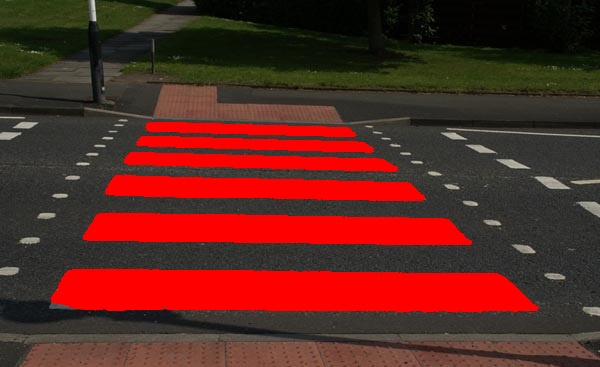
Note: In order to fill the contour with a color of your choice, the thickness parameter within cv2.drawContours() must be -1.
All methods was sourced from stackoverflow.com or stackexchange.com, is licensed under cc by-sa 2.5, cc by-sa 3.0 and cc by-sa 4.0