How do I learn where the source file for a given Python module is installed? Is the method different on Windows than on Linux?
I’m trying to look for the source of the datetime module in particular, but I’m interested in a more general answer as well.
Answers:
Thank you for visiting the Q&A section on Magenaut. Please note that all the answers may not help you solve the issue immediately. So please treat them as advisements. If you found the post helpful (or not), leave a comment & I’ll get back to you as soon as possible.
Method 1
For a pure python module you can find the source by looking at themodule.__file__.
The datetime module, however, is written in C, and therefore datetime.__file__ points to a .so file (there is no datetime.__file__ on Windows), and therefore, you can’t see the source.
If you download a python source tarball and extract it, the modules’ code can be found in the Modules subdirectory.
For example, if you want to find the datetime code for python 2.6, you can look at
Python-2.6/Modules/datetimemodule.c
You can also find the latest version of this file on github on the web at
https://github.com/python/cpython/blob/main/Modules/_datetimemodule.c
Method 2
Running python -v from the command line should tell you what is being imported and from where. This works for me on Windows and Mac OS X.
C:>python -v
# installing zipimport hook
import zipimport # builtin
# installed zipimport hook
# C:Python24libsite.pyc has bad mtime
import site # from C:Python24libsite.py
# wrote C:Python24libsite.pyc
# C:Python24libos.pyc has bad mtime
import os # from C:Python24libos.py
# wrote C:Python24libos.pyc
import nt # builtin
# C:Python24libntpath.pyc has bad mtime
...
I’m not sure what those bad mtime’s are on my install!
Method 3
I realize this answer is 4 years late, but the existing answers are misleading people.
The right way to do this is never __file__, or trying to walk through sys.path and search for yourself, etc. (unless you need to be backward compatible beyond 2.1).
It’s the inspect module—in particular, getfile or getsourcefile.
Unless you want to learn and implement the rules (which are documented, but painful, for CPython 2.x, and not documented at all for other implementations, or 3.x) for mapping .pyc to .py files; dealing with .zip archives, eggs, and module packages; trying different ways to get the path to .so/.pyd files that don’t support __file__; figuring out what Jython/IronPython/PyPy do; etc. In which case, go for it.
Meanwhile, every Python version’s source from 2.0+ is available online at http://hg.python.org/cpython/file/X.Y/ (e.g., 2.7 or 3.3). So, once you discover that inspect.getfile(datetime) is a .so or .pyd file like /usr/local/lib/python2.7/lib-dynload/datetime.so, you can look it up inside the Modules directory. Strictly speaking, there’s no way to be sure of which file defines which module, but nearly all of them are either foo.c or foomodule.c, so it shouldn’t be hard to guess that datetimemodule.c is what you want.
Method 4
If you’re using pip to install your modules, just pip show $module the location is returned.
Method 5
The sys.path list contains the list of directories which will be searched for modules at runtime:
python -v
>>> import sys
>>> sys.path
['', '/usr/local/lib/python25.zip', '/usr/local/lib/python2.5', ... ]
Method 6
from the standard library try imp.find_module
>>> import imp
>>> imp.find_module('fontTools')
(None, 'C:\Python27\lib\site-packages\FontTools\fontTools', ('', '', 5))
>>> imp.find_module('datetime')
(None, 'datetime', ('', '', 6))
Method 7
datetime is a builtin module, so there is no (Python) source file.
For modules coming from .py (or .pyc) files, you can use mymodule.__file__, e.g.
> import random
> random.__file__
'C:\Python25\lib\random.pyc'
Method 8
Here’s a one-liner to get the filename for a module, suitable for shell aliasing:
echo 'import sys; t=__import__(sys.argv[1],fromlist=["."]); print(t.__file__)' | python -
Set up as an alias:
alias getpmpath="echo 'import sys; t=__import__(sys.argv[1],fromlist=["."]); print(t.__file__)' | python - "
To use:
$ getpmpath twisted
/usr/lib64/python2.6/site-packages/twisted/__init__.pyc
$ getpmpath twisted.web
/usr/lib64/python2.6/site-packages/twisted/web/__init__.pyc
Method 9
In the python interpreter you could import the particular module and then type help(module). This gives details such as Name, File, Module Docs, Description et al.
Ex:
import os

help(os)


Help on module os:

NAME

os - OS routines for Mac, NT, or Posix depending on what system we're on.

FILE

/usr/lib/python2.6/os.py

MODULE DOCS

http://docs.python.org/library/os

DESCRIPTION

This exports:

- all functions from posix, nt, os2, or ce, e.g. unlink, stat, etc.

- os.path is one of the modules posixpath, or ntpath

- os.name is 'posix', 'nt', 'os2', 'ce' or 'riscos'
et al
Method 10
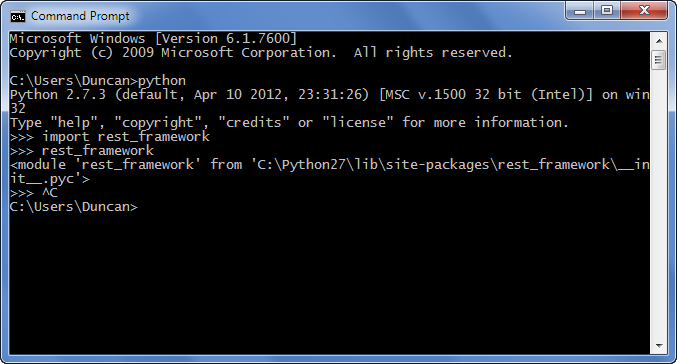
On windows you can find the location of the python module as shown below:i.e find rest_framework module
Method 11
New in Python 3.2, you can now use e.g. code_info() from the dis module:
http://docs.python.org/dev/whatsnew/3.2.html#dis
Method 12
Check out this nifty “cdp” command to cd to the directory containing the source for the indicated Python module:
cdp () {
  cd "$(python -c "import os.path as _, ${1};
    print _.dirname(_.realpath(${1}.__file__[:-1]))"
  )"
}
Method 13
On Ubuntu 12.04, for example numpy package for python2, can be found at:
/usr/lib/python2.7/dist-packages/numpy
Of course, this is not generic answer
Method 14
Just updating the answer in case anyone needs it now, I’m at Python 3.9 and using Pip to manage packages. Just use pip show, e.g.:
pip show numpy
It will give you all the details with the location of where pip is storing all your other packages.
Method 15
Another way to check if you have multiple python versions installed, from the terminal.
$ python3 -m pip show pyperclip
Location: /Library/Frameworks/Python.framework/Versions/3.7/lib/python3.7/site-
$ python -m pip show pyperclip
Location: /Users/umeshvuyyuru/Library/Python/2.7/lib/python/site-packages
Method 16
Not all python modules are written in python. Datetime happens to be one of them that is not, and (on linux) is datetime.so.
You would have to download the source code to the python standard library to get at it.
Method 17
For those who prefer a GUI solution: if you’re using a gui such as Spyder (part of the Anaconda installation) you can just right-click the module name (such as “csv” in “import csv”) and select “go to definition” – this will open the file, but also on the top you can see the exact file location (“C:….csv.py”)
Method 18
If you are not using interpreter then you can run the code below:
import site
print (site.getsitepackages())
Output:
['C:\Users\<your username>\AppData\Local\Programs\Python\Python37', 'C:\Users\<your username>\AppData\Local\Programs\Python\Python37\lib\site-packages']
The second element in Array will be your package location. In this case:
C:Users<your username>AppDataLocalProgramsPythonPython37libsite-packages
Method 19
In an IDE like Spyder, import the module and then run the module individually.
enter image description here
Method 20
as written above
in python just use help(module)
ie
import fractions
help(fractions)
if your module, in the example fractions, is installed then it will tell you location and info about it, if its not installed it says module not available
if its not available it doesn’t come by default with python in which case you can check where you found it for download info
All methods was sourced from stackoverflow.com or stackexchange.com, is licensed under cc by-sa 2.5, cc by-sa 3.0 and cc by-sa 4.0