I want to find out the following:
given a date (datetime object), what is the corresponding day of the week?
For instance, Sunday is the first day, Monday: second day.. and so on
And then if the input is something like today’s date.
Example
>>> today = datetime.datetime(2017, 10, 20)
>>> today.get_weekday()  # what I look for
The output is maybe 6 (since it’s Friday)
Answers:
Thank you for visiting the Q&A section on Magenaut. Please note that all the answers may not help you solve the issue immediately. So please treat them as advisements. If you found the post helpful (or not), leave a comment & I’ll get back to you as soon as possible.
Method 1
Use weekday():
>>> import datetime
>>> datetime.datetime.today()
datetime.datetime(2012, 3, 23, 23, 24, 55, 173504)
>>> datetime.datetime.today().weekday()
4
From the documentation:
Return the day of the week as an integer, where Monday is 0 and Sunday is 6.
Method 2
If you’d like to have the date in English:
from datetime import date
import calendar
my_date = date.today()
calendar.day_name[my_date.weekday()]  #'Wednesday'
Method 3
If you’d like to have the date in English:
from datetime import datetime
datetime.today().strftime('%A')
'Wednesday'
Read more:
https://docs.python.org/3/library/datetime.html#strftime-strptime-behavior
Method 4
Use date.weekday() when Monday is 0 and Sunday is 6
or
date.isoweekday() when Monday is 1 and Sunday is 7
Method 5
I solved this for a CodeChef question.
import datetime
dt = '21/03/2012'
day, month, year = (int(x) for x in dt.split('/'))
ans = datetime.date(year, month, day)
print (ans.strftime("%A"))
Method 6
A solution whithout imports for dates after 1700/1/1
def weekDay(year, month, day):
    offset = [0, 31, 59, 90, 120, 151, 181, 212, 243, 273, 304, 334]
    week   = ['Sunday',
              'Monday',
              'Tuesday',
              'Wednesday',
              'Thursday',
              'Friday',
              'Saturday']
    afterFeb = 1
    if month > 2: afterFeb = 0
    aux = year - 1700 - afterFeb
    # dayOfWeek for 1700/1/1 = 5, Friday
    dayOfWeek  = 5
    # partial sum of days betweem current date and 1700/1/1
    dayOfWeek += (aux + afterFeb) * 365
    # leap year correction
    dayOfWeek += aux / 4 - aux / 100 + (aux + 100) / 400
    # sum monthly and day offsets
    dayOfWeek += offset[month - 1] + (day - 1)
    dayOfWeek %= 7
    return dayOfWeek, week[dayOfWeek]

print weekDay(2013, 6, 15) == (6, 'Saturday')
print weekDay(1969, 7, 20) == (0, 'Sunday')
print weekDay(1945, 4, 30) == (1, 'Monday')
print weekDay(1900, 1, 1)  == (1, 'Monday')
print weekDay(1789, 7, 14) == (2, 'Tuesday')
Method 7
If you have dates as a string, it might be easier to do it using pandas’ Timestamp
import pandas as pd
df = pd.Timestamp("2019-04-12")
print(df.dayofweek, df.weekday_name)
Output:
4 Friday
Method 8
Here’s a simple code snippet to solve this problem
import datetime

intDay = datetime.date(year=2000, month=12, day=1).weekday()
days = ["Monday", "Tuesday", "Wednesday", "Thursday", "Friday", "Saturday", "Sunday"]
print(days[intDay])
The output should be:
Friday
Method 9
This is a solution if the date is a datetime object.
import datetime
def dow(date):
    days=["Monday","Tuesday","Wednesday","Thursday","Friday","Saturday","Sunday"]
    dayNumber=date.weekday()
    print days[dayNumber]
Method 10
datetime library sometimes gives errors with strptime() so I switched to dateutil library. Here’s an example of how you can use it :
from dateutil import parser
parser.parse('January 11, 2010').strftime("%a")
The output that you get from this is 'Mon'. If you want the output as ‘Monday’, use the following :
parser.parse('January 11, 2010').strftime("%A")
This worked for me pretty quickly. I was having problems while using the datetime library because I wanted to store the weekday name instead of weekday number and the format from using the datetime library was causing problems. If you’re not having problems with this, great! If you are, you cand efinitely go for this as it has a simpler syntax as well. Hope this helps.
Method 11
Say you have timeStamp: String variable, YYYY-MM-DD HH:MM:SS
step 1: convert it to dateTime function with blow code…
df['timeStamp'] = pd.to_datetime(df['timeStamp'])
Step 2 : Now you can extract all the required feature as below which will create new Column for each of the fild- hour,month,day of week,year, date
df['Hour'] = df['timeStamp'].apply(lambda time: time.hour)
df['Month'] = df['timeStamp'].apply(lambda time: time.month)
df['Day of Week'] = df['timeStamp'].apply(lambda time: time.dayofweek)
df['Year'] = df['timeStamp'].apply(lambda t: t.year)
df['Date'] = df['timeStamp'].apply(lambda t: t.day)
Method 12
Assuming you are given the day, month, and year, you could do:
import datetime
DayL = ['Mon','Tues','Wednes','Thurs','Fri','Satur','Sun']
date = DayL[datetime.date(year,month,day).weekday()] + 'day'
#Set day, month, year to your value
#Now, date is set as an actual day, not a number from 0 to 6.

print(date)
Method 13
If you have reason to avoid the use of the datetime module, then this function will work.
Note: The change from the Julian to the Gregorian calendar is assumed to have occurred in 1582. If this is not true for your calendar of interest then change the line if year > 1582: accordingly.
def dow(year,month,day):
    """ day of week, Sunday = 1, Saturday = 7
     http://en.wikipedia.org/wiki/Zeller%27s_congruence """
    m, q = month, day
    if m == 1:
        m = 13
        year -= 1
    elif m == 2:
        m = 14
        year -= 1
    K = year % 100
    J = year // 100
    f = (q + int(13*(m + 1)/5.0) + K + int(K/4.0))
    fg = f + int(J/4.0) - 2 * J
    fj = f + 5 - J
    if year > 1582:
        h = fg % 7
    else:
        h = fj % 7
    if h == 0:
        h = 7
    return h
Method 14
If you’re not solely reliant on the datetime module, calendar might be a better alternative. This, for example, will provide you with the day codes:
calendar.weekday(2017,12,22);
And this will give you the day itself:
days = ["Monday","Tuesday","Wednesday","Thursday","Friday","Saturday","Sunday"]
days[calendar.weekday(2017,12,22)]
Or in the style of python, as a one liner:
["Monday","Tuesday","Wednesday","Thursday","Friday","Saturday","Sunday"][calendar.weekday(2017,12,22)]
Method 15
This don’t need to day of week comments.
I recommend this code~!
import datetime


DAY_OF_WEEK = {
    "MONDAY": 0,
    "TUESDAY": 1,
    "WEDNESDAY": 2,
    "THURSDAY": 3,
    "FRIDAY": 4,
    "SATURDAY": 5,
    "SUNDAY": 6
}

def string_to_date(dt, format='%Y%m%d'):
    return datetime.datetime.strptime(dt, format)

def date_to_string(date, format='%Y%m%d'):
    return datetime.datetime.strftime(date, format)

def day_of_week(dt):
    return string_to_date(dt).weekday()


dt = '20210101'
if day_of_week(dt) == DAY_OF_WEEK['SUNDAY']:
    None
Method 16
import datetime
int(datetime.datetime.today().strftime('%w'))+1
this should give you your real day number – 1 = sunday, 2 = monday, etc…
Method 17
To get Sunday as 1 through Saturday as 7, this is the simplest solution to your question:
datetime.date.today().toordinal()%7 + 1
All of them:
import datetime

today = datetime.date.today()
sunday = today - datetime.timedelta(today.weekday()+1)

for i in range(7):
    tmp_date = sunday + datetime.timedelta(i)
    print tmp_date.toordinal()%7 + 1, '==', tmp_date.strftime('%A')
Output:
1 == Sunday
2 == Monday
3 == Tuesday
4 == Wednesday
5 == Thursday
6 == Friday
7 == Saturday
Method 18
We can take help of Pandas:
import pandas as pd
As mentioned above in the problem We have:
datetime(2017, 10, 20)
If execute this line in the jupyter notebook we have an output like this:
datetime.datetime(2017, 10, 20, 0, 0)
Using weekday() and weekday_name:
If you want weekdays in integer number format then use:
pd.to_datetime(datetime(2017, 10, 20)).weekday()
The output will be:
4
And if you want it as name of the day like Sunday, Monday, Friday, etc you can use:
pd.to_datetime(datetime(2017, 10, 20)).weekday_name
The output will be:
'Friday'
If having a dates column in Pandas dataframe then:
Now suppose if you have a pandas dataframe having a date column like this:
pdExampleDataFrame[‘Dates’].head(5)
0   2010-04-01
1   2010-04-02
2   2010-04-03
3   2010-04-04
4   2010-04-05
Name: Dates, dtype: datetime64[ns]
Now If we want to know the name of the weekday like Monday, Tuesday, ..etc we can use .weekday_name as follows:
pdExampleDataFrame.head(5)['Dates'].dt.weekday_name
the output will be:
0    Thursday
1      Friday
2    Saturday
3      Sunday
4      Monday
Name: Dates, dtype: object
And if we want the integer number of weekday from this Dates column then we can use:
pdExampleDataFrame.head(5)['Dates'].apply(lambda x: x.weekday())
The output will look like this:
0    3
1    4
2    5
3    6
4    0
Name: Dates, dtype: int64
Method 19
import datetime
import calendar

day, month, year = map(int, input().split())
my_date = datetime.date(year, month, day)
print(calendar.day_name[my_date.weekday()])
Output Sample
08 05 2015
Friday
Method 20
If you want to generate a column with a range of dates (Date) and generate a column that goes to the first one and assigns the Week Day (Week Day), do the following (I will used the dates ranging from 2008-01-01 to 2020-02-01):
import pandas as pd
dr = pd.date_range(start='2008-01-01', end='2020-02-1')
df = pd.DataFrame()
df['Date'] = dr
df['Week Day'] = pd.to_datetime(dr).weekday
The output is the following:
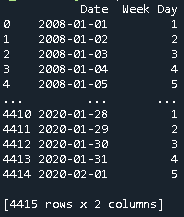
The Week Day varies from 0 to 6, where 0 corresponds to Monday and 6 to Sunday.
Method 21
Here is how to convert a list of little endian string dates to datetime:
import datetime, time
ls = ['31/1/2007', '14/2/2017']
for d in ls:
    dt = datetime.datetime.strptime(d, "%d/%m/%Y")
    print(dt)
    print(dt.strftime("%A"))
Method 22
A simple, straightforward and still not mentioned option:
import datetime
...
givenDateObj = datetime.date(2017, 10, 20)
weekday      = givenDateObj.isocalendar()[2] # 5
weeknumber   = givenDateObj.isocalendar()[1] # 42
Method 23
Using Canlendar Module
import calendar
a=calendar.weekday(year,month,day)
days=["MONDAY","TUESDAY","WEDNESDAY","THURSDAY","FRIDAY","SATURDAY","SUNDAY"]
print(days[a])
Method 24
Here is my python3 implementation.
months = {'jan' : 1, 'feb' : 4, 'mar' : 4, 'apr':0, 'may':2, 'jun':5, 'jul':6, 'aug':3, 'sep':6, 'oct':1, 'nov':4, 'dec':6}
dates = {'Sunday':1, 'Monday':2, 'Tuesday':3, 'Wednesday':4, 'Thursday':5, 'Friday':6, 'Saterday':0}
ranges = {'1800-1899':2, '1900-1999':0, '2000-2099':6, '2100-2199':4, '2200-2299':2}

def getValue(val, dic):
    if(len(val)==4):
        for k,v in dic.items():
            x,y=int(k.split('-')[0]),int(k.split('-')[1])
            val = int(val)
            if(val>=x and val<=y):
                return v
    else:
        return dic[val]

def getDate(val):
    return (list(dates.keys())[list(dates.values()).index(val)])


def main(myDate):
    dateArray = myDate.split('-')
    # print(dateArray)
    date,month,year = dateArray[2],dateArray[1],dateArray[0]
    # print(date,month,year)

    date = int(date)
    month_v = getValue(month, months)
    year_2 = int(year[2:])
    div = year_2//4
    year_v = getValue(year, ranges)
    sumAll = date+month_v+year_2+div+year_v
    val = (sumAll)%7
    str_date = getDate(val)

    print('{} is a {}.'.format(myDate, str_date))

if __name__ == "__main__":
    testDate = '2018-mar-4'
    main(testDate)
Method 25
import numpy as np

def date(df):
    df['weekday'] = df['date'].dt.day_name()

    conditions = [(df['weekday'] == 'Sunday'),
              (df['weekday'] == 'Monday'),
              (df['weekday'] == 'Tuesday'),
              (df['weekday'] == 'Wednesday'),
              (df['weekday'] == 'Thursday'),
              (df['weekday'] == 'Friday'),
              (df['weekday'] == 'Saturday')]

    choices = [0, 1, 2, 3, 4, 5, 6]

    df['week'] = np.select(conditions, choices)

    return df
Method 26
If u are Chinese user, u can use this package:
https://github.com/LKI/chinese-calendar
import datetime

# 判断 2018年4月30号 是不是节假日
from chinese_calendar import is_holiday, is_workday
april_last = datetime.date(2018, 4, 30)
assert is_workday(april_last) is False
assert is_holiday(april_last) is True

# 或者在判断的同时,获取节日名
import chinese_calendar as calendar  # 也可以这样 import
on_holiday, holiday_name = calendar.get_holiday_detail(april_last)
assert on_holiday is True
assert holiday_name == calendar.Holiday.labour_day.value

# 还能判断法定节假日是不是调休
import chinese_calendar
assert chinese_calendar.is_in_lieu(datetime.date(2006, 2, 1)) is False
assert chinese_calendar.is_in_lieu(datetime.date(2006, 2, 2)) is True
Method 27
Below is the code to enter date in the format of DD-MM-YYYY you can change the input format by changing the order of ‘%d-%m-%Y’ and also by changing the delimiter.
import datetime
try:
    date = input()
    date_time_obj = datetime.datetime.strptime(date, '%d-%m-%Y')
    print(date_time_obj.strftime('%A'))
except ValueError:
    print("Invalid date.")
Method 28
use this code:
import pandas as pd
from datetime import datetime
print(pd.DatetimeIndex(df['give_date']).day)
All methods was sourced from stackoverflow.com or stackexchange.com, is licensed under cc by-sa 2.5, cc by-sa 3.0 and cc by-sa 4.0